
Website Indexing: How to Speed It Up and Check Pages Are in Search
Website indexing is the process by which Google adds your pages to its searchable database, and a page that isn’t indexed simply cannot appear in search results, no matter how good it is. To get indexed faster, submit an accurate XML sitemap in Google Search Console, request indexing through the URL Inspection tool, strengthen internal links to new pages, and remove any accidental noindex or robots.txt blocks. To confirm a page is in Google, use the URL Inspection tool or a site: search. This guide walks through how indexing works and every practical lever you can pull to speed it up.
Key takeaways
- Indexing is separate from crawling: Google must first crawl a URL, render it, evaluate its quality, and only then store it in the index.
- The fastest way to check if a page is indexed is the URL Inspection tool in Google Search Console, backed up by a
site:yourdomain.com/pagequery. - An accurate XML sitemap plus strong internal linking are the two highest-leverage ways to help Google discover and prioritize new pages.
- Accidental
noindextags andDisallowrules in robots.txt are the most common reasons pages never get indexed, especially after a site migration. - Thin, duplicate, or low-value content is frequently crawled but deliberately left out of the index, so quality is a prerequisite, not an afterthought.
What website indexing is and why it matters
Website indexing is the process of adding information about your pages to a search engine’s database, known as the index. In simple terms, Google’s crawlers (also called bots or spiders) visit your site around the clock, read the content, and if a page meets its quality criteria, store a processed version of it in the index. When someone searches, Google looks up relevant results from that index, not from the live web.
This matters for three concrete reasons:
- Visibility in search. If a page isn’t in the index, Google doesn’t know it exists. It will never rank for any query, so the traffic it could earn is lost entirely.
- Free, sustained traffic. Every indexed page is a potential entry point for people searching for your product, service, or expertise, without paying for each click.
- Fresh data. Regular crawling lets Google pick up your changes quickly, whether that’s new articles, updated prices, or revised product information.
For a personal blog, slow indexing is an annoyance. For a commercial site with real budget behind it, waiting weeks or months for pages to surface is a direct hit to revenue, and usually a sign that something technical needs fixing. Getting indexing right is a foundational part of any SEO program.
Crawling vs. indexing: two different steps
These terms are often used interchangeably, but they describe distinct stages, and a page can complete one without the other.
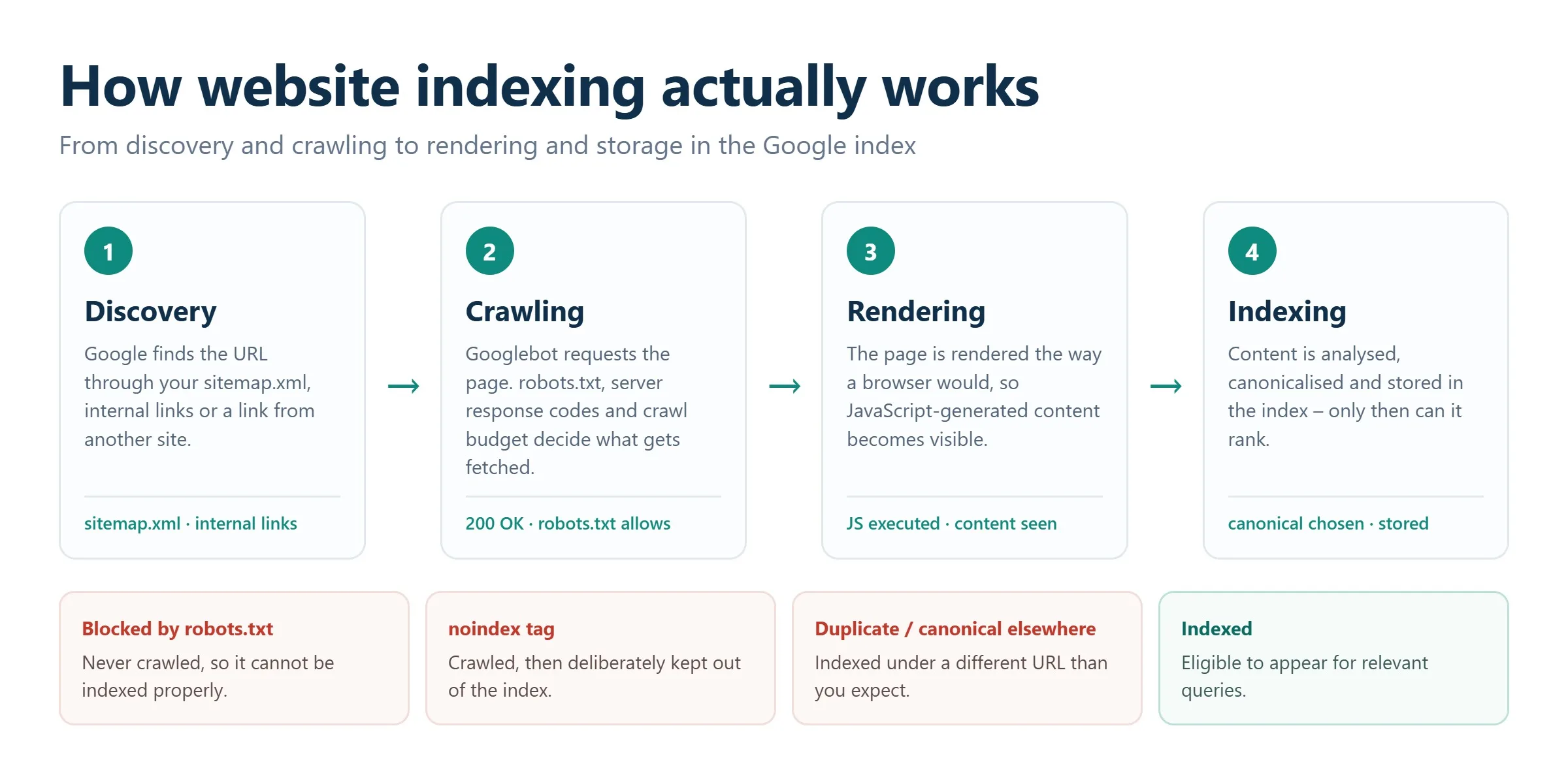
1. Crawling (discovery)
Googlebot follows links and reads sitemaps to find URLs. It fetches the raw HTML and decides whether the page is worth processing further. A page can be crawled and still never make it into the index.
2. Rendering
Google doesn’t just read the source HTML. It loads the full page, executing JavaScript and applying CSS, so it can see the content the way a real visitor does. This is also where it assesses mobile-friendliness and layout. Sites that rely heavily on client-side JavaScript sometimes render incompletely, which can stall indexing.
3. Content analysis
Google’s algorithms break the page down: the topic, headings, the uniqueness and usefulness of the text, and the quality of the links. If a page is a duplicate, thin, or spammy, it is often crawled but deliberately excluded.
4. Indexing (storage)
If the page passes those checks, it is stored in the index and becomes eligible to rank. Only at this point can users find it through search.
How to check whether a page is indexed
You don’t need any coding to verify indexing status. Here are the most reliable methods, focused on Google.
URL Inspection in Google Search Console
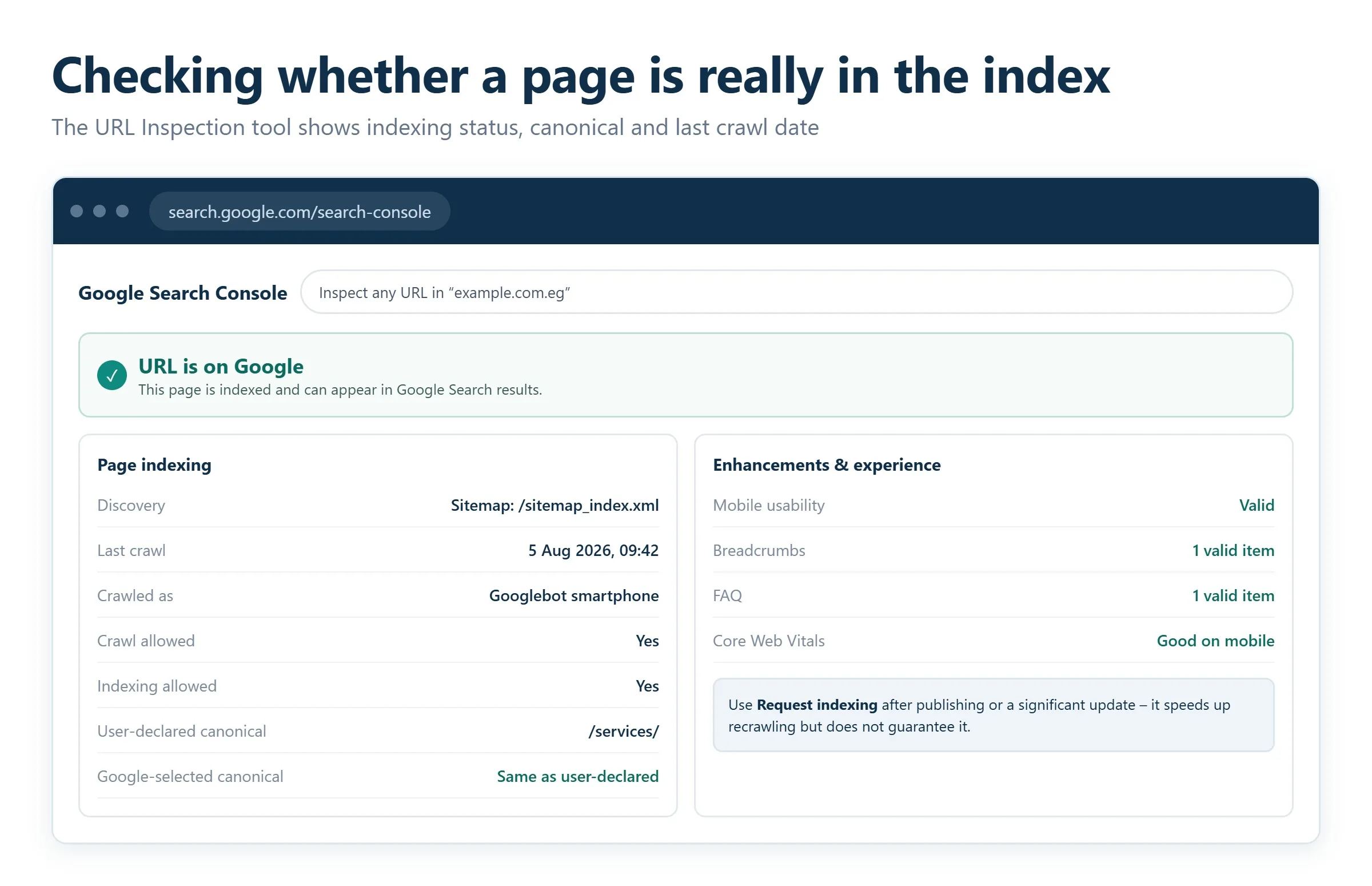
This is the definitive tool for site owners. Open your Search Console property, paste the URL into the inspection bar at the top, and Google reports the exact status: “URL is on Google” or a specific reason it isn’t. You can also see when the page was last crawled and request indexing directly from the same screen. Because the data comes straight from Google, it is more trustworthy than any third-party check.
The site: search operator
Type site:yourdomain.com/page-url into Google. If the page appears, it’s indexed. If nothing shows up, it isn’t in the index yet. You can also run site:yourdomain.com to get a rough sense of how many of your pages Google has stored. Treat this as a quick directional check rather than a precise count.
Bulk checks with SEO tools
When you need to verify many URLs at once, manual methods don’t scale. Dedicated SEO platforms let you upload a list of URLs and return an indexing report in minutes. Search Console’s own Pages report (under Indexing) is the best free option: it groups your URLs into “Indexed” and “Not indexed,” with the specific reason for every exclusion.
Browser extensions
SEO browser extensions can show indexing signals for whatever page you’re viewing in a single click. These are handy for spot checks while browsing, though for anything decision-critical you should confirm in Search Console.
How to speed up indexing
To get pages into search faster, your job is to make Google’s work easier: help it discover URLs, prove they’re worth indexing, and remove anything blocking the path.
Submit an accurate XML sitemap
The first thing to do is generate a current sitemap.xml and submit it in Google Search Console under Sitemaps. Reference it in your robots.txt too. A sitemap is a direct map of every important URL you want indexed, and it’s especially valuable for large sites, new pages, and content that isn’t yet well linked. Keep it clean: it should list only canonical, indexable URLs, and exclude anything set to noindex or blocked in robots.txt, since mixed signals waste crawl budget and create confusion.
Request indexing via URL Inspection
Don’t sit and wait for Google to come to you. After publishing or significantly updating a page, use URL Inspection and click “Request indexing.” This puts the URL into a priority crawl queue. It’s not an instant guarantee, but for individual important pages it’s the fastest signal you can send.
Strengthen internal linking
Crawlers travel along links. When you publish something new, link to it from older, already-indexed, and authoritative pages on your site. The closer a page sits to your homepage, ideally within three clicks, the sooner Google reaches it. A logical internal structure also passes ranking signals to the new page. If your site’s architecture is tangled or you have orphaned pages with no internal links pointing to them, that’s a common cause of slow or missing indexing, and a good reason to invest in content and internal-linking planning.
Use the Indexing API where it applies
Google’s Indexing API lets you notify Google directly when pages are added or removed. Officially it’s intended for sites with job-posting or livestream (video) structured data, where content changes fast and freshness is critical. If your site falls into those categories, it can dramatically cut the lag between publishing and indexing. For everything else, sitemaps plus URL Inspection remain the supported route.
Earn external links and social signals
Links from reputable external sites give Google another path to your content and a reason to treat it as worth indexing. A single mention from a trusted, relevant source often helps a new page get discovered and indexed faster than it would on its own. Focus on genuine, editorially earned links rather than bought ones, which carry real risk under Google’s spam policies.
What blocks indexing, and how to fix it
Indexing can stall entirely because of a handful of errors, many of them accidental. These are the usual suspects.
noindex tags and robots.txt blocks
A stray <meta name="robots" content="noindex"> in the page’s code, or a Disallow: / rule in robots.txt, will keep Google out. This happens most often after a site is moved from a staging environment to production and the development-time blocks are never removed. Always audit these first. Note the two do different things: robots.txt controls crawling, while the noindex tag controls indexing, and a page blocked in robots.txt can’t even be crawled to see its noindex tag. Sorting out these directives is core technical work and a standard part of an SEO audit.
Server errors and slow responses
Cheap or overloaded hosting can be unstable. When Googlebot hits 500 Internal Server Error responses or painfully slow load times, it backs off and crawling stops. Reliable hosting and fast server responses keep the crawl flowing.
Broken links and wasted crawl budget
Long chains of redirects, and links pointing to non-existent pages that return 404 errors, confuse crawlers and drain your crawl budget, the finite attention Google gives your site. Fix broken internal links and keep redirects short and direct.
Thin or duplicate content
Google won’t index empty pages, near-duplicate templates, or content copied from elsewhere on your own site or the wider web. If large sections of your site are duplicative, consolidate them, set canonical tags correctly, and make sure each indexable page offers something genuinely useful.
When to bring in help
If you’ve submitted sitemaps, requested indexing, cleaned up your directives, and pages still aren’t showing up, the problem is usually deeper in the technical stack, faceted-navigation traps, rendering issues, canonical conflicts, or crawl-budget waste at scale. A technical SEO audit isolates the exact cause, and as search shifts toward AI-driven answers, making sure your content is both indexable and citable also feeds into AI SEO (GEO). Getting indexing right is the entry ticket: everything else in SEO depends on it.
Arabic URLs, and why pages go missing from the index
Everything above applies regardless of language. There is one indexing problem specific to Arabic sites that accounts for a surprising number of pages that never appear in search, and it starts with how the URL is written.
What happens to an Arabic slug
A URL can only contain a limited set of ASCII characters. Arabic script is therefore percent-encoded, so a short readable Arabic slug becomes a long string of percent signs and hexadecimal codes. Modern browsers display the readable version, which is why the problem stays hidden until something breaks.
Encoded URLs work. Search engines handle them. The failures happen at the edges:
- Encoded URLs frequently exceed length limits in sitemaps, redirect rules and older server configurations, and get truncated.
- Copying and pasting an encoded URL into a message or email often mangles it, which quietly kills the links people would otherwise give you.
- Double encoding is common when a CMS and a plugin both encode. The result is a URL that resolves to a 404 while looking correct in the browser bar.
- Analytics and log files show the encoded form, so reports become unreadable and problems go unnoticed.
Choosing a slug policy
| Approach | Works well when | Watch out for |
|---|---|---|
| Arabic script in the slug | Your audience is entirely Arabic-speaking and shares links inside chat apps | Length limits, double encoding, unreadable logs |
| Transliterated Arabic in Latin characters | You want readable, shareable URLs that survive every context | Needs a consistent transliteration table, otherwise the same word maps two ways |
| English slug with Arabic content | The site is bilingual and the structure mirrors across languages | Loses the keyword signal in the URL, which is a minor cost |
Whichever you choose, choose once. The expensive mistake is switching policy later, which turns every existing URL into a redirect and puts your indexed pages through a migration they did not need.
Two checks to run today
- Open your sitemap and read the Arabic URLs. If any appear truncated or contain a doubled percent sequence, those pages are not being fetched correctly.
- Request indexing for one Arabic URL manually and watch what the tool reports back. If the URL it echoes differs from the one you submitted, you have an encoding mismatch somewhere in the chain.
For bilingual sites, add one more check. Each language version needs an annotation pointing to its counterpart, and those annotations must be reciprocal. A one-way reference is ignored, which leaves the Arabic and English versions competing with each other instead of supporting each other.
Frequently asked questions
How long does it take for Google to index a new page?
It ranges from a few hours to several weeks. Established sites with strong internal links and steady publishing tend to see new pages indexed within a day or two. Brand-new sites with few links can take much longer. Submitting a sitemap and using “Request indexing” in URL Inspection are the fastest ways to shorten the wait.
Why is my page crawled but not indexed?
Google has seen the page but chose not to store it, usually because it judged the content thin, duplicative, or low-value, or because a canonical tag points elsewhere. Check the exact status in the URL Inspection tool, improve the page’s uniqueness and depth, and confirm no conflicting canonical or noindex signals are present.
Does submitting a sitemap guarantee indexing?
No. A sitemap helps Google discover your URLs and understand which ones you consider important, but it doesn’t force indexing. Google still evaluates each page on quality and relevance. A sitemap improves discovery; it doesn’t override quality checks.
How do I remove a page from Google’s index?
Add a noindex meta tag (and make sure the page is not blocked in robots.txt, so Google can crawl it and see the tag), or use the Removals tool in Google Search Console for a faster, temporary removal. For permanent removal, keep the noindex tag in place until the page drops out of the index.
What’s the difference between robots.txt and a noindex tag?
Robots.txt controls crawling: it tells Google which URLs not to fetch. A noindex tag controls indexing: it tells Google not to store a page it has crawled. If you block a page in robots.txt, Google can’t crawl it to read a noindex tag, so the two directives should be used deliberately and not combined by accident.
Related guides
Want more people
to find your website?
Strategy call and
full site audit

Read also

Article Your Name in ChatGPT: AI Reputation for Individuals and Executives
Article How Much Does SEO Cost in Egypt, Saudi Arabia and the UAE in 2026?
Article Which Sites Do AI Engines Cite? What a 288-Answer Study Means for Gulf Brands
Article Google Algorithm Updates: Every Confirmed Update Since January 2025
Article ChatGPT Ads Context Hints: How to Write Them for Gulf and Arabic Campaigns
Article Google Ads Credit for New Advertisers: What a Google Premier Partner Can Apply for You
Article 25 Questions to Ask an SEO or GEO Agency Before You Hire One
Article GEO for E-commerce: How to Get Your Products Recommended by ChatGPT and Google AI






Real Results
More Wins
SEO & GEO for Delta Medical Labs
 GEO
GEO
1M+ monthly organic visits, 159,200 ranked keywords, 5,570 pages cited by AI engines, and 1,186 #1 rankings in KSA.

Arabic SEO, GEO & guest posting for VPNly
 SEO
SEO
65K peak monthly organic visits, 55 guest posts, and 149 pages cited by AI engines.

SEO & GEO for Ogaei Virtual Care
GEO
From 3 to 7,931 monthly organic clicks in 7 months, 2.9M+ impressions, and 40+ keywords in Google’s Top 10.

SEO for Eduverse
SEO
12× search traffic in 10 months, 45% of target keywords in the top 5, and 55% in the top 10.
Trusted by