

Schema Markup: A Complete Setup Guide for SEO
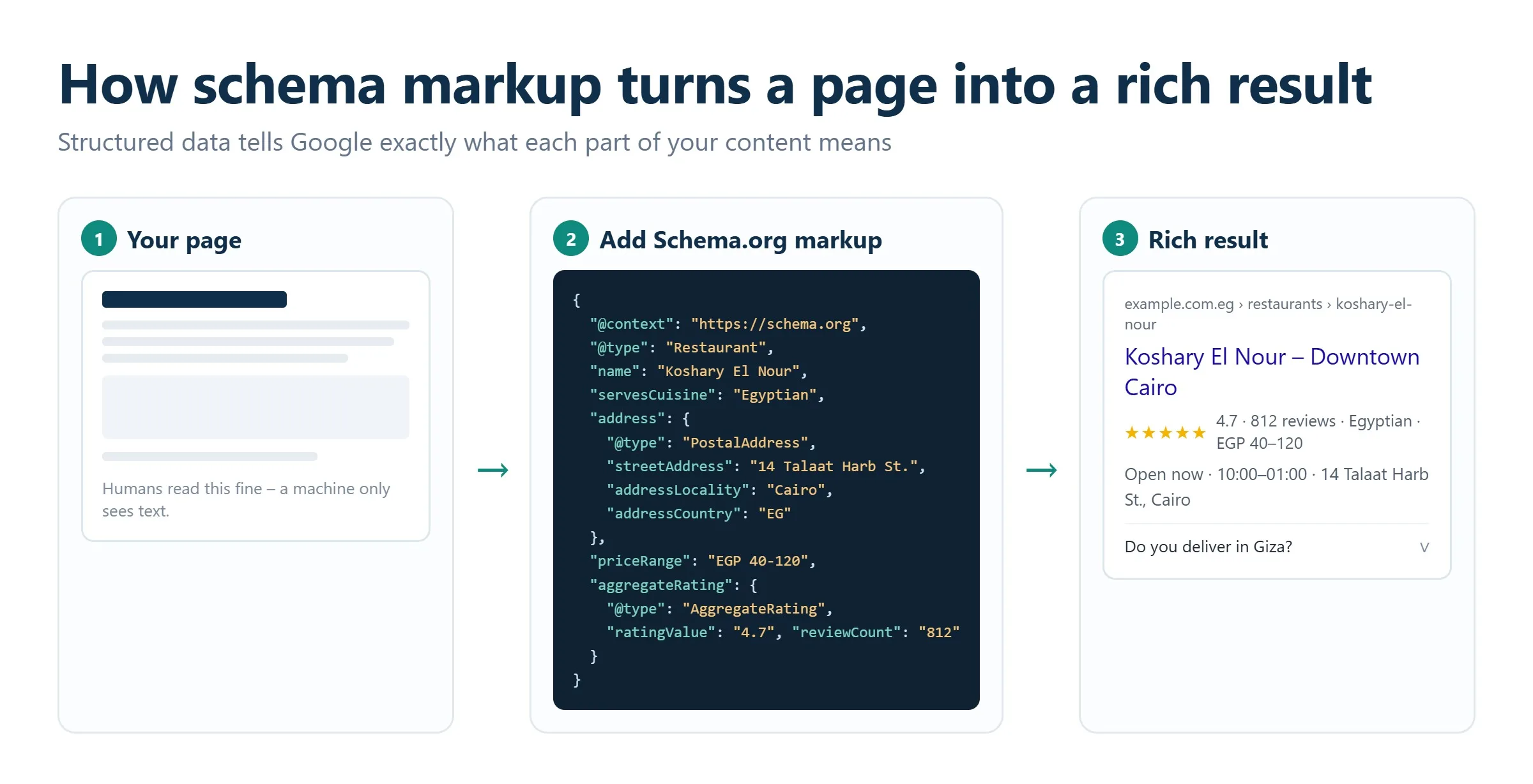
Schema markup is structured data you add to a page’s HTML to tell search engines exactly what your content means, not just what it says. Using the vocabulary from Schema.org (most commonly in JSON-LD format), you label a page as an article, a product, a recipe, a local business, or a review so Google can understand it precisely and render richer search results. Done correctly, schema markup can earn you rich snippets, star ratings, FAQ dropdowns, and prominent placement in AI-generated answers, all of which lift click-through rates and visibility without changing a single ranking factor on the page itself.
Key takeaways
- Schema markup (structured data) uses the shared Schema.org vocabulary to describe page content in a machine-readable way that search engines and AI systems can parse.
- Google recommends JSON-LD as the preferred format; it lives in a single script block and is far easier to maintain than inline Microdata or RDFa.
- Common, high-value types include Article, Product, FAQPage, HowTo, LocalBusiness, Review, BreadcrumbList, and Organization.
- Markup does not directly boost rankings, but the rich results it unlocks improve click-through rate, and structured data increasingly feeds AI answer engines.
- Always validate with Google’s Rich Results Test and the Schema.org validator, then monitor performance in Google Search Console.
- The most damaging mistakes are marking up content users cannot see, mismatched data, and incomplete required properties.
What schema markup (structured data) actually is
When a search engine crawls a page, it reads the visible text and does its best to infer meaning. A price, a publish date, an author name, and a phone number all look like plain characters unless you explicitly label them. Structured data closes that gap. It is a standardized set of tags, drawn from the collaborative Schema.org vocabulary, that annotates each element of your content: this string is a product name, this number is a rating, this block is a step in a recipe.
The Schema.org project is backed by Google, Microsoft (Bing), Yahoo, and other major search providers, which is why the same markup works across engines. Once a crawler can read those labels, it can present your result more attractively in the SERP and pass cleaner data to downstream systems, including the large language models behind AI Overviews and answer engines.
It helps to separate two related terms. “Structured data” is the general concept of organizing information in a predictable format. “Schema markup” is the specific implementation of that concept using the Schema.org vocabulary on a web page. In everyday SEO conversation the two are used interchangeably, and this guide follows that convention.
Why it matters for modern search
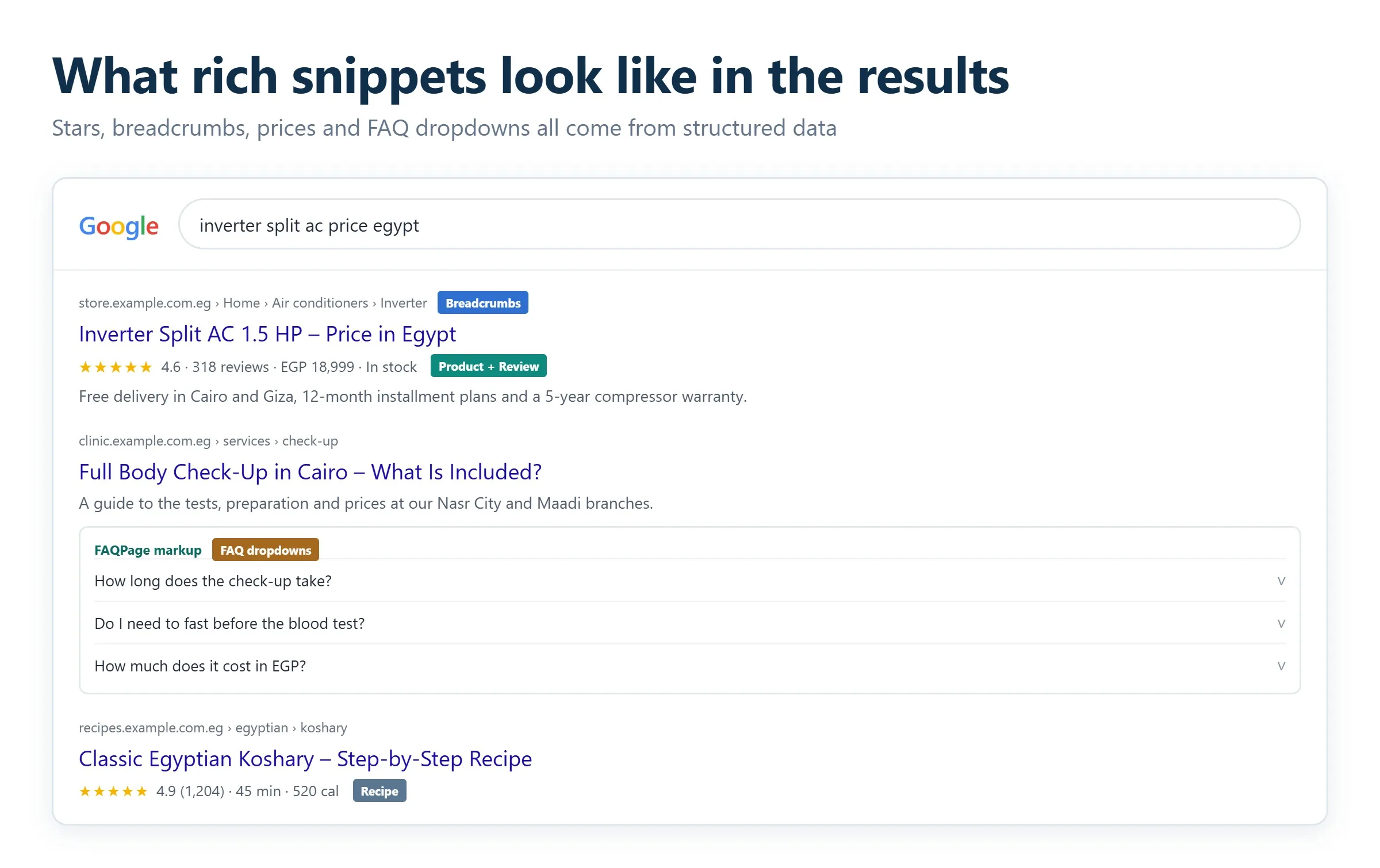
Structured data is one of the few technical investments that pays off on two fronts at once. On traditional search, it unlocks rich results: star ratings, FAQ accordions, breadcrumb trails, event dates, and product availability that make your listing physically larger and more clickable. On AI-driven search, it gives models a clean, unambiguous source to quote. With AI Overviews now appearing on a large and growing share of Google queries, feeding those systems well-labeled data is quickly becoming a baseline expectation rather than an edge. If you are thinking about how your pages surface inside generative results, our overview of Google AI Overviews explains where structured data fits into that picture.
JSON-LD vs Microdata vs RDFa
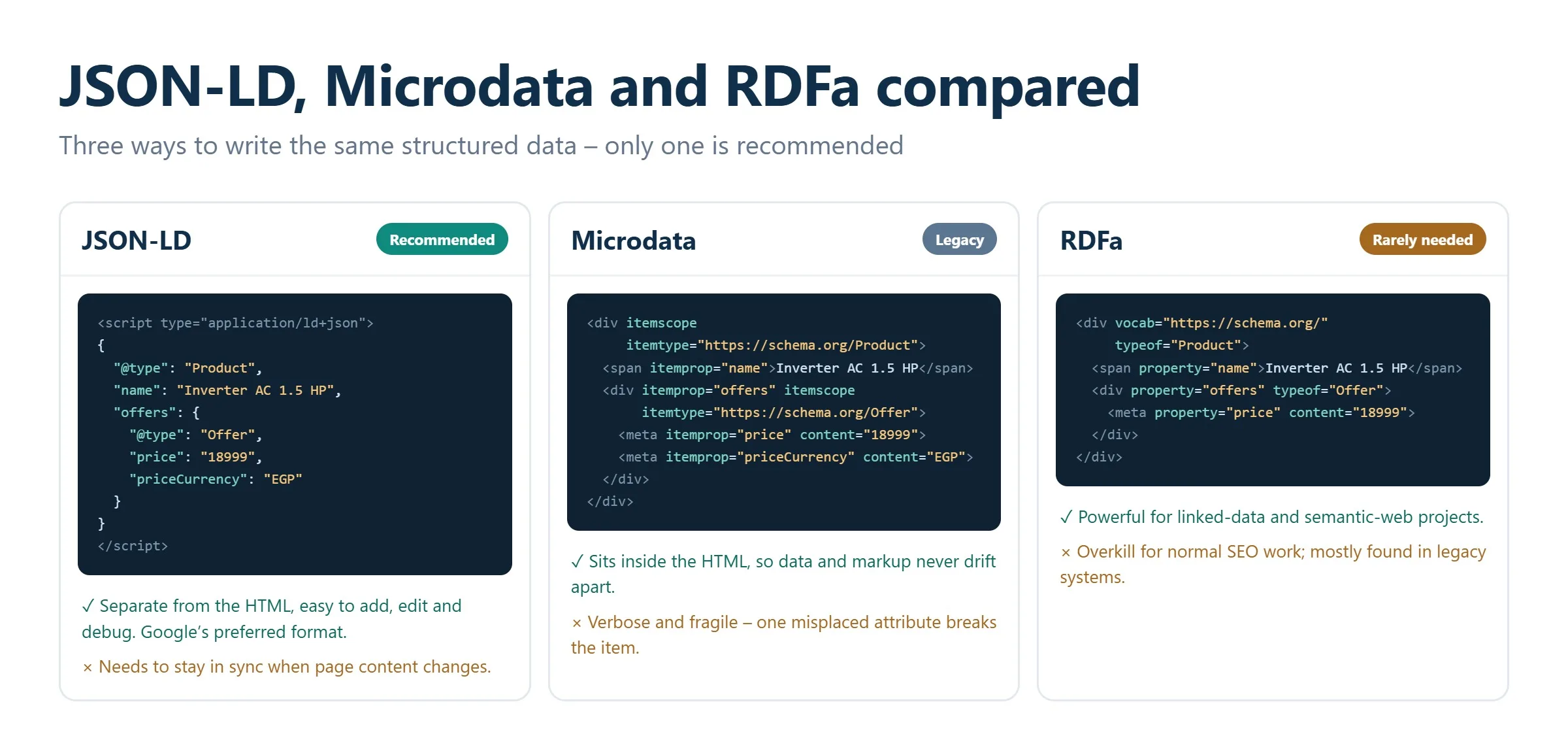
Schema.org markup can be written in three syntaxes. They express the same vocabulary but differ sharply in how easy they are to implement and maintain.
JSON-LD (recommended)
JSON-LD (JavaScript Object Notation for Linked Data) keeps all your structured data in a single <script type="application/ld+json"> block, usually placed in the page’s <head> or at the end of the body. It sits completely separate from your visible HTML, which means you can add, edit, or remove markup without touching your layout. Google explicitly recommends JSON-LD, tag managers can inject it dynamically, and it is the format used in every example below. For nearly every project, this is the format to choose.
Microdata
Microdata weaves the markup directly into your HTML elements using attributes such as itemscope, itemtype, and itemprop. It works, and it was the dominant approach for years, but because the annotations are entangled with your content markup, it is verbose, harder to read, and error-prone to maintain. On a template with many fields, a single misplaced tag can break the whole item.
RDFa
RDFa (Resource Description Framework in Attributes) is an HTML5 extension that, like Microdata, adds attributes to existing tags. It is powerful and flexible but rarely the right choice for typical SEO work; most teams only encounter it in legacy systems or specialized linked-data projects.
Key schema types every site should know
Schema.org defines hundreds of types, but a handful cover the vast majority of real-world SEO use cases. Choose types that genuinely match your content; applying a type that does not fit the page is a violation of Google’s guidelines.
Article
The Article type (and its variants NewsArticle and BlogPosting) describes editorial content: headline, author, publish and modified dates, publisher, and featured image. It helps Google understand blog posts and news stories and is a prerequisite for features like Top Stories. Every content-driven page on a blog or media site should carry it.
Product
The Product type is the backbone of e-commerce SEO. It describes name, image, description, brand, SKU, price, currency, and availability through the nested Offer property, and it can carry an aggregate rating. Valid Product markup can earn price and availability annotations directly in the SERP, which is often the difference between a click and a scroll-past.
FAQPage
The FAQPage type marks up a list of questions and their answers. When eligible, it can display expandable questions beneath your listing, letting you occupy more screen space and answer user queries before the click. It is one of the easiest wins for informational and support pages, and this very article ends with a working FAQPage example.
HowTo
The HowTo type structures step-by-step instructions, optionally with images, tools, materials, and time estimates. It suits tutorials, assembly guides, and any “how to do X” content, helping search engines present your process clearly.
LocalBusiness
The LocalBusiness type is essential for any company with a physical location or service area. It captures name, address, geo-coordinates, phone number, opening hours, and price range, reinforcing your presence in local search and Google Maps. Pairing accurate LocalBusiness markup with a well-maintained Business Profile is a cornerstone of local SEO.
Review and AggregateRating
The Review type describes a single review, while AggregateRating summarizes many. Correctly implemented, these unlock the star ratings that make listings stand out. Note that Google now restricts self-serving reviews (a business reviewing itself), so ratings should reflect genuine customer feedback attached to the appropriate entity.
BreadcrumbList
The BreadcrumbList type describes the navigational path to a page. Google uses it to replace the raw URL in the search result with a readable breadcrumb trail, clarifying where the page sits in your site hierarchy and improving perceived relevance.
Organization
The Organization type describes your company as an entity: legal name, logo, official URL, contact points, and social profiles. It underpins the knowledge panel and helps search engines and AI systems build a confident understanding of who you are, which matters more than ever for entity-based and generative search.
How to add schema markup to your site
There are three practical routes to implementation, and the right one depends on your platform and technical resources.
1. Hand-code JSON-LD
For full control, write the JSON-LD yourself and place it in a script block on the relevant page. Start from the appropriate type on Schema.org, populate only properties that reflect real, visible content, and keep the values in sync with what the user sees. A minimal Article example looks like this:
{ "@context": "https://schema.org", "@type": "Article", "headline": "Your headline", "author": { "@type": "Person", "name": "Author Name" }, "datePublished": "2026-07-31", "image": "https://example.com/image.jpg" }
Wrap that object in <script type="application/ld+json">...</script> and you are done. This approach scales well when your CMS or framework can template the values dynamically.
2. Use a CMS plugin or built-in feature
Most content platforms automate structured data. On WordPress, SEO suites such as Yoast SEO and Rank Math generate Article, Organization, BreadcrumbList, and other markup automatically, with dedicated blocks for FAQ and HowTo content. Shopify, Wix, and other hosted platforms ship product and business markup out of the box or through apps. This is the fastest path for non-developers and covers the essentials with little effort.
3. Inject via Google Tag Manager
If you cannot edit templates directly, Google Tag Manager can insert JSON-LD as a custom HTML tag on the pages you specify. It is flexible and requires no code deployment, though you must ensure the injected data matches the visible page and that Google can render it. Because tag-manager markup depends on JavaScript execution, always confirm it is detected using the testing tools below.
Whichever route you take, structured data works best as part of a healthy technical foundation. Broken templates, blocked resources, or rendering problems can prevent Google from reading your markup at all, which is where an SEO audit and ongoing technical support pay for themselves.
How to test and validate your markup
Never assume markup works because it is present in the source. Validation is a required step, and two free tools cover it.
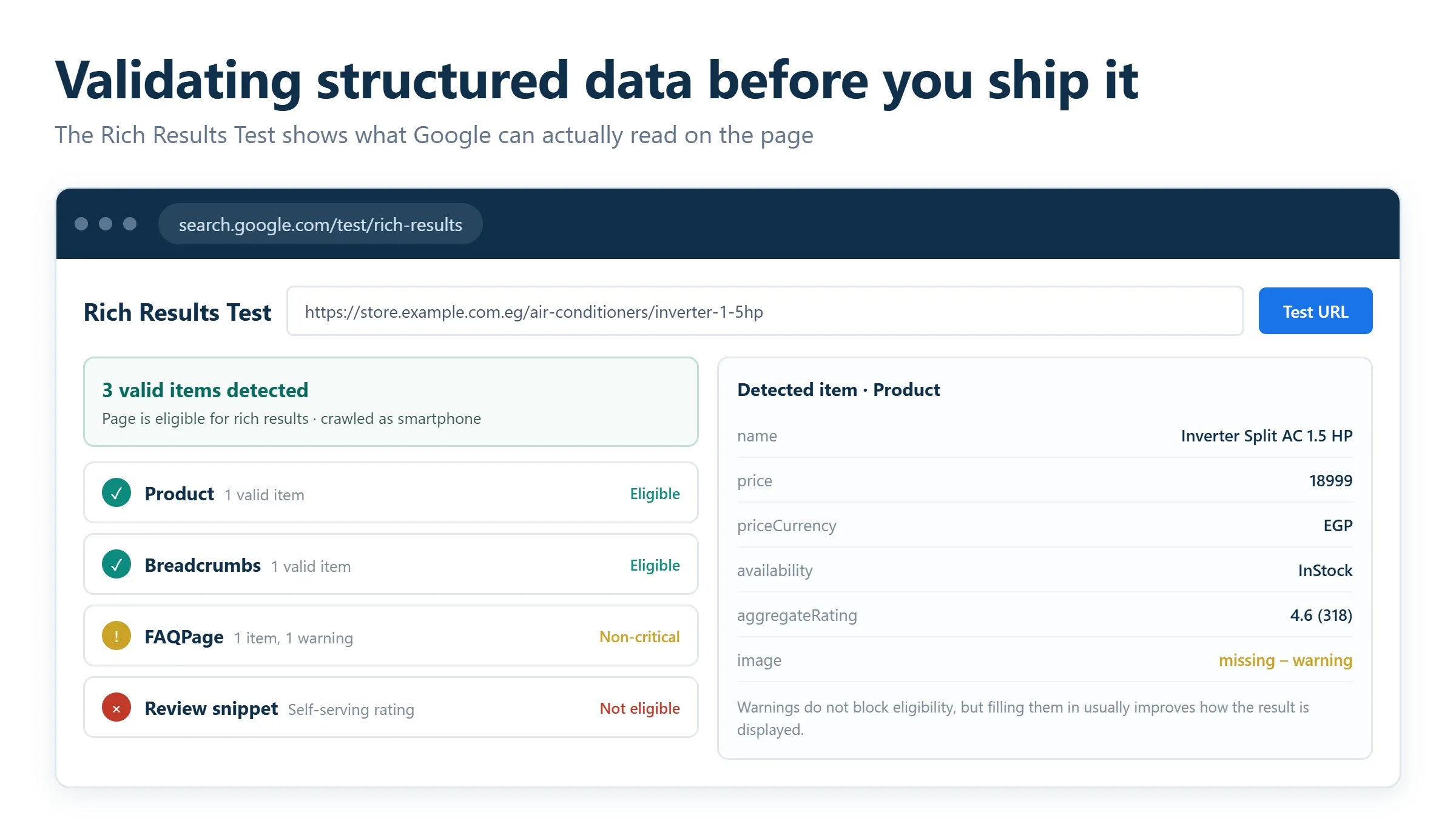
Google Rich Results Test
The Rich Results Test is Google’s official tool for checking whether a page is eligible for rich results. Enter a live URL or paste a code snippet, and it reports which rich-result types Google detected, any errors that block eligibility, and warnings for recommended-but-missing properties. This is your primary check because it reflects how Google specifically interprets the markup.
Schema.org validator
The Schema Markup Validator at validator.schema.org checks your markup against the full Schema.org vocabulary rather than Google’s rich-result requirements. Use it to confirm your syntax is well-formed and your types and properties are valid, even for markup that does not map to a specific Google feature.
Google Search Console
Once markup is live, Google Search Console becomes your monitoring dashboard. Its Enhancements reports track each structured-data type Google has detected across your site, flag errors and warnings at scale, and let you request revalidation after fixes. Search Console shows you real, indexed behavior over time rather than a single-page snapshot, so it is the tool for catching regressions after a site change. Structured data also supports the broader shift toward answer-engine and generative results; our work on answer engine optimization goes deeper into preparing content for that environment.
Common schema markup mistakes to avoid
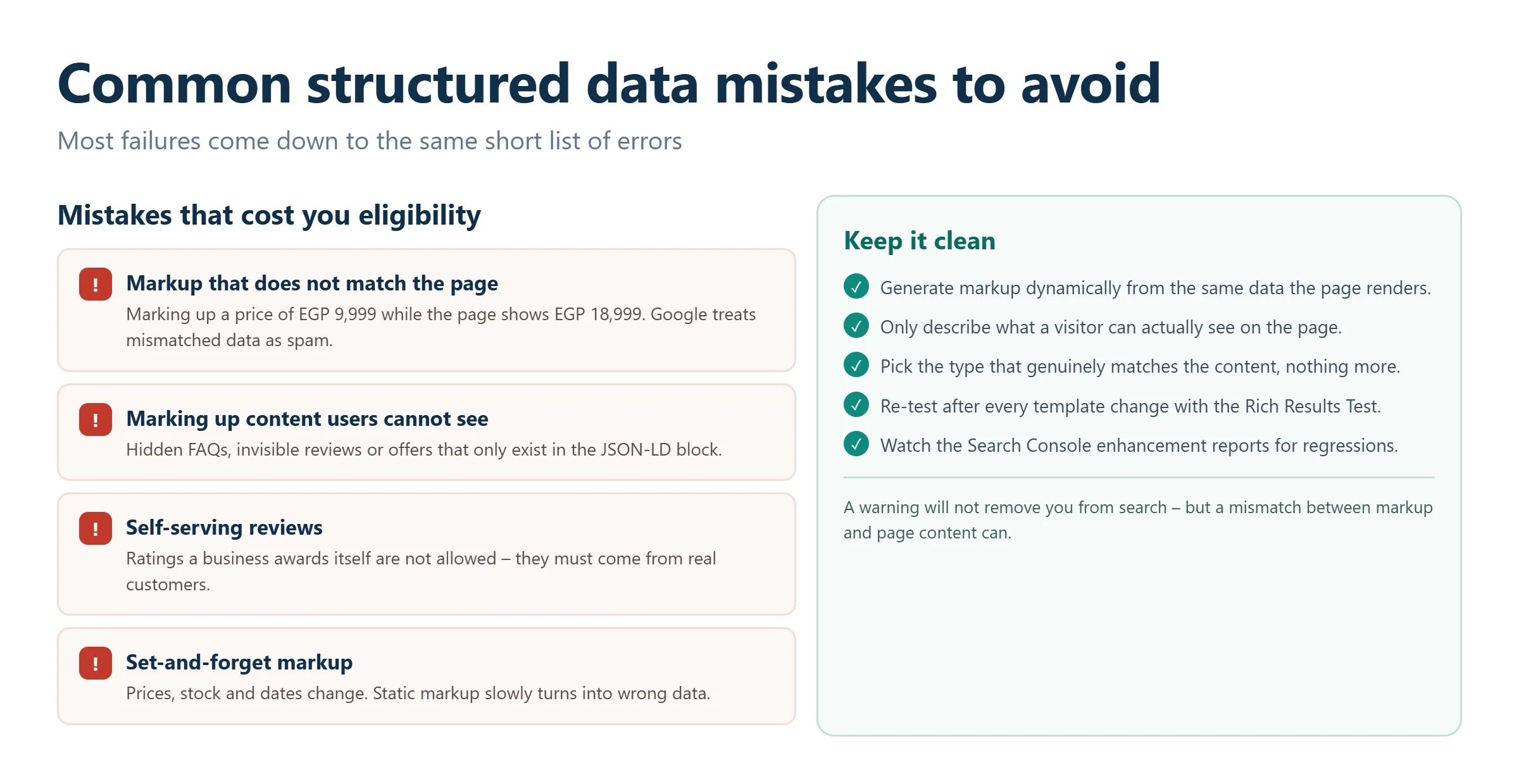
Most structured-data failures come down to a short list of recurring errors. Avoiding them keeps you eligible and out of trouble with Google’s spam policies.
- Marking up invisible content. Google requires that structured data describe content visible to users on the page. Adding FAQ or review markup for text that does not appear on screen is a guideline violation that can trigger a manual action.
- Mismatched data. If your markup says a product costs one price but the page shows another, or the author in JSON-LD differs from the byline, Google may ignore the markup or penalize the page. Keep every value identical to what users see.
- Missing required properties. Each rich-result type has required fields. Omit one and the whole item becomes ineligible, even if everything else is perfect. The Rich Results Test flags these explicitly.
- Wrong or irrelevant type. Applying Product markup to a category page, or Recipe markup to an article, misrepresents the content and will not qualify for the intended feature.
- Self-serving reviews. Review markup for ratings a business gives itself is not permitted; ratings must come from genuine customers.
- Set-and-forget markup. Prices, availability, and dates change. Static markup that no longer matches the page becomes mismatched data over time, so keep it dynamic or review it regularly.
Structured data in an AI-first search landscape
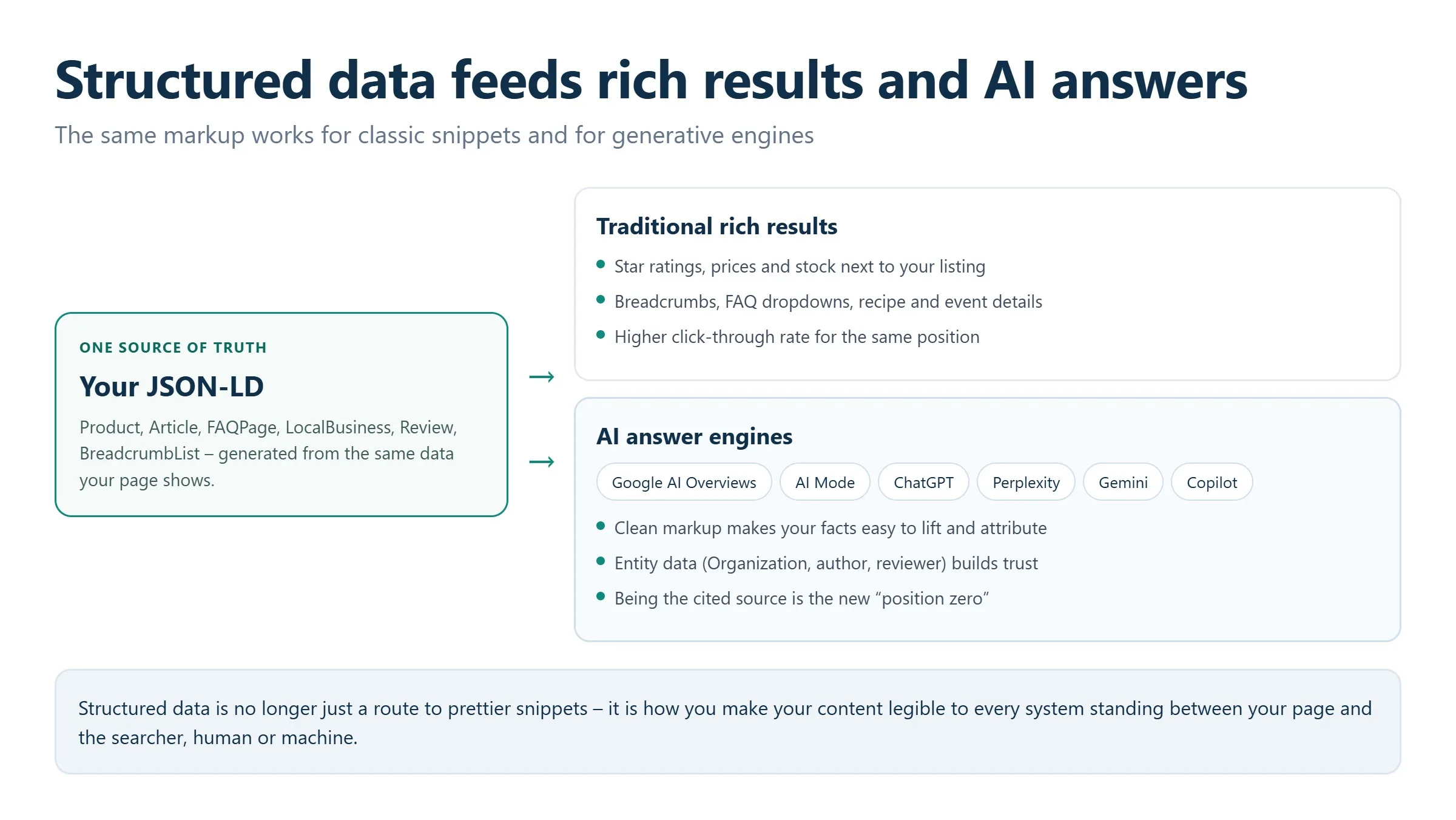
The value of clean markup has grown as search has shifted toward generated answers. AI Overviews now appear on a large share of Google searches, and generative engines rely on well-structured, unambiguous sources when they assemble responses. Schema markup gives those systems exactly what they need: labeled entities, explicit relationships, and verifiable facts they can attribute to your brand. In practice, the same Organization, Product, FAQPage, and Article markup that earns you rich results also makes your content easier for AI systems to cite correctly. For teams treating this as a distinct discipline, our approach to generative engine optimization (AI SEO) builds directly on a solid structured-data foundation, and it fits within a broader program of ongoing SEO services rather than a one-off task.
The takeaway is straightforward. Structured data is no longer just a route to prettier snippets; it is how you make your content legible to every system that now stands between your page and the searcher, human or machine.
Schema for Arabic and Gulf businesses
The schema types above behave the same in every language. Three details matter specifically for sites publishing in Arabic or trading in the Gulf, and all three are commonly left out.
1. Declare the language
Add the inLanguage property to your Article and WebPage markup. On a bilingual site it removes the ambiguity about which version a machine is reading, which matters more now that AI answer engines assemble responses from pages in several languages. If you serve different Arabic variants by market, use the regional code rather than the bare language code.
2. Get the local business fields right
| Property | Common mistake in the Gulf | What to do |
|---|---|---|
| postalCode | Left blank or filled with a placeholder | Omit it rather than inventing one, and rely on precise coordinates instead |
| streetAddress | Written as a Western-style street and number | Use the address format people actually give, including district and landmark |
| openingHours | Monday to Friday copied from a template | Reflect the local working week, which starts Sunday in most Gulf states |
| areaServed | Set to a single city | List the emirates, regions or governorates you genuinely serve |
| name | Only the English trading name | Add the Arabic name using alternateName so both resolve to one entity |
3. Connect the Arabic and English entities
The most damaging schema mistake on a bilingual site is treating each language as a separate organization. Two Organization nodes with different identifiers split your entity in half, and neither half accumulates the recognition that either would alone. Use one canonical identifier across both language versions, add the Arabic name as an alternate name, and keep the sameAs references identical on every page in every language.
Frequently asked questions
Does schema markup improve my Google rankings directly?
No. Structured data is not a direct ranking factor. What it does is make your page eligible for rich results and help search engines understand your content, which typically improves click-through rate and visibility. Those secondary effects can support better performance over time, but the markup itself does not move you up the results page on its own.
Which schema format should I use: JSON-LD or Microdata?
Use JSON-LD. Google explicitly recommends it, it keeps all your markup in a single script block separate from your HTML, and it is far easier to add, edit, and maintain. Microdata and RDFa remain valid but embed markup inside your content tags, making them more verbose and error-prone. For new implementations, choose JSON-LD.
How do I check whether my structured data is working?
Validate it with Google’s Rich Results Test to confirm rich-result eligibility, and the Schema.org validator to confirm your syntax and vocabulary are correct. After the markup is live, monitor the Enhancements reports in Google Search Console to track detected types, catch errors at scale, and request revalidation after making fixes.
Will rich results appear immediately after I add markup?
Not necessarily. Adding valid markup makes a page eligible for rich results, but Google decides when and whether to display them, and it must first recrawl and reprocess the page. This can take days or weeks. Eligibility is also not a guarantee: Google may choose not to show a rich result even when your markup is flawless.
Can schema markup help my content appear in AI Overviews?
It can help. Clean, accurate structured data gives AI systems clearly labeled entities and facts to draw on when generating answers, which makes your content easier to interpret and attribute. It is not a switch that guarantees inclusion, but it is a strong foundation for visibility in AI-driven and answer-engine results alongside traditional rich snippets.
Related guides
Want more people
to find your website?
Strategy call and
full site audit

Read also

Article Your Name in ChatGPT: AI Reputation for Individuals and Executives
Article How Much Does SEO Cost in Egypt, Saudi Arabia and the UAE in 2026?
Article Which Sites Do AI Engines Cite? What a 288-Answer Study Means for Gulf Brands
Article Google Algorithm Updates: Every Confirmed Update Since January 2025
Article ChatGPT Ads Context Hints: How to Write Them for Gulf and Arabic Campaigns
Article Google Ads Credit for New Advertisers: What a Google Premier Partner Can Apply for You
Article 25 Questions to Ask an SEO or GEO Agency Before You Hire One
Article GEO for E-commerce: How to Get Your Products Recommended by ChatGPT and Google AI








Real Results
More Wins
SEO & GEO for Delta Medical Labs
 GEO
GEO
1M+ monthly organic visits, 159,200 ranked keywords, 5,570 pages cited by AI engines, and 1,186 #1 rankings in KSA.

Arabic SEO, GEO & guest posting for VPNly
 SEO
SEO
65K peak monthly organic visits, 55 guest posts, and 149 pages cited by AI engines.

SEO & GEO for Ogaei Virtual Care
GEO
From 3 to 7,931 monthly organic clicks in 7 months, 2.9M+ impressions, and 40+ keywords in Google’s Top 10.

SEO for Eduverse
SEO
12× search traffic in 10 months, 45% of target keywords in the top 5, and 55% in the top 10.
Trusted by