

What Is Pagination and How to Implement It on Your Site

Pagination is the practice of splitting a large set of similar content, such as a product catalog or a blog archive, across numbered pages connected by navigation links. It exists because you cannot load a thousand products or five years of posts onto a single URL: the browser stalls, the visitor never reaches the bottom, and search engines struggle to crawl and index the page. Done well, pagination fixes all three problems at once. Done carelessly, it quietly damages your rankings through duplicate content, wasted crawl budget, and diluted link signals. This guide explains what pagination is, the SEO risks it creates, and how to implement it correctly for Google.
Key takeaways
- Pagination divides long content sets into separate, individually addressable pages linked by crawlable navigation.
- Google no longer uses
rel="next"andrel="prev", so do not rely on them; treat paginated URLs as standalone pages. - Use self-referencing canonicals on each paginated page rather than canonicalizing every page back to page one.
- Pagination links must be real crawlable
<a href>anchors, not JavaScript-only click handlers. - The biggest SEO risks are duplicate metadata, unindexed deep pages, and crawl budget wasted on filter and parameter combinations.
- Plan pagination during catalog or blog design; retrofitting it on a live site is always slower and more expensive.
What pagination is
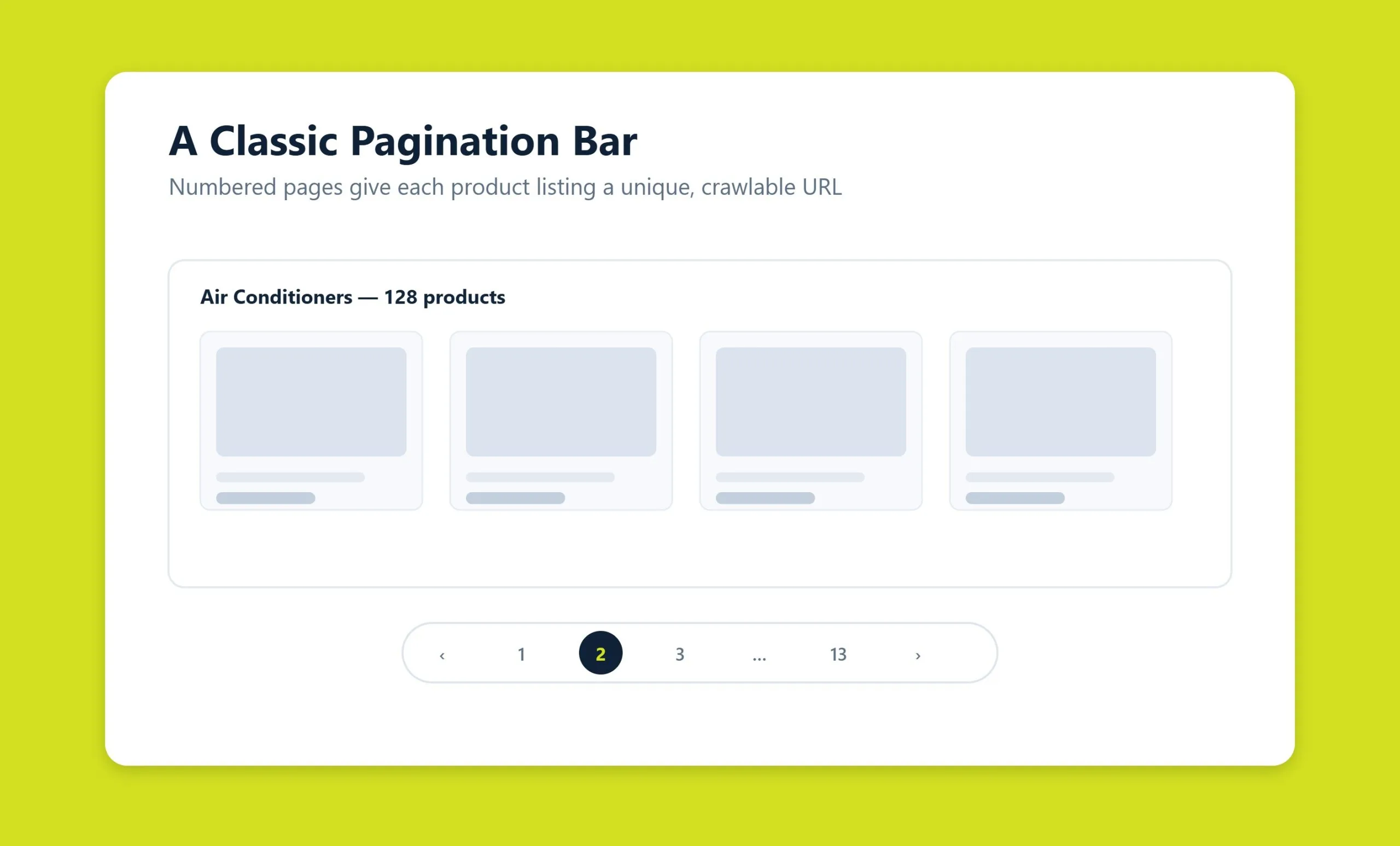
Pagination is a mechanism that breaks a large body of uniform content into separate pages joined by link-based navigation. If a catalog holds 500 product cards and you display 20 per page, you get 25 pages, and the connections between them are the pagination.
Technically, it is a block of links, usually at the bottom of the listing: page numbers, “Previous” and “Next” buttons, and sometimes “First” and “Last.” Each page has its own URL, typically with a query parameter such as ?page=2 or a path segment such as /page/2/. Search engine crawlers treat these as distinct documents, and users click through to the number they want.
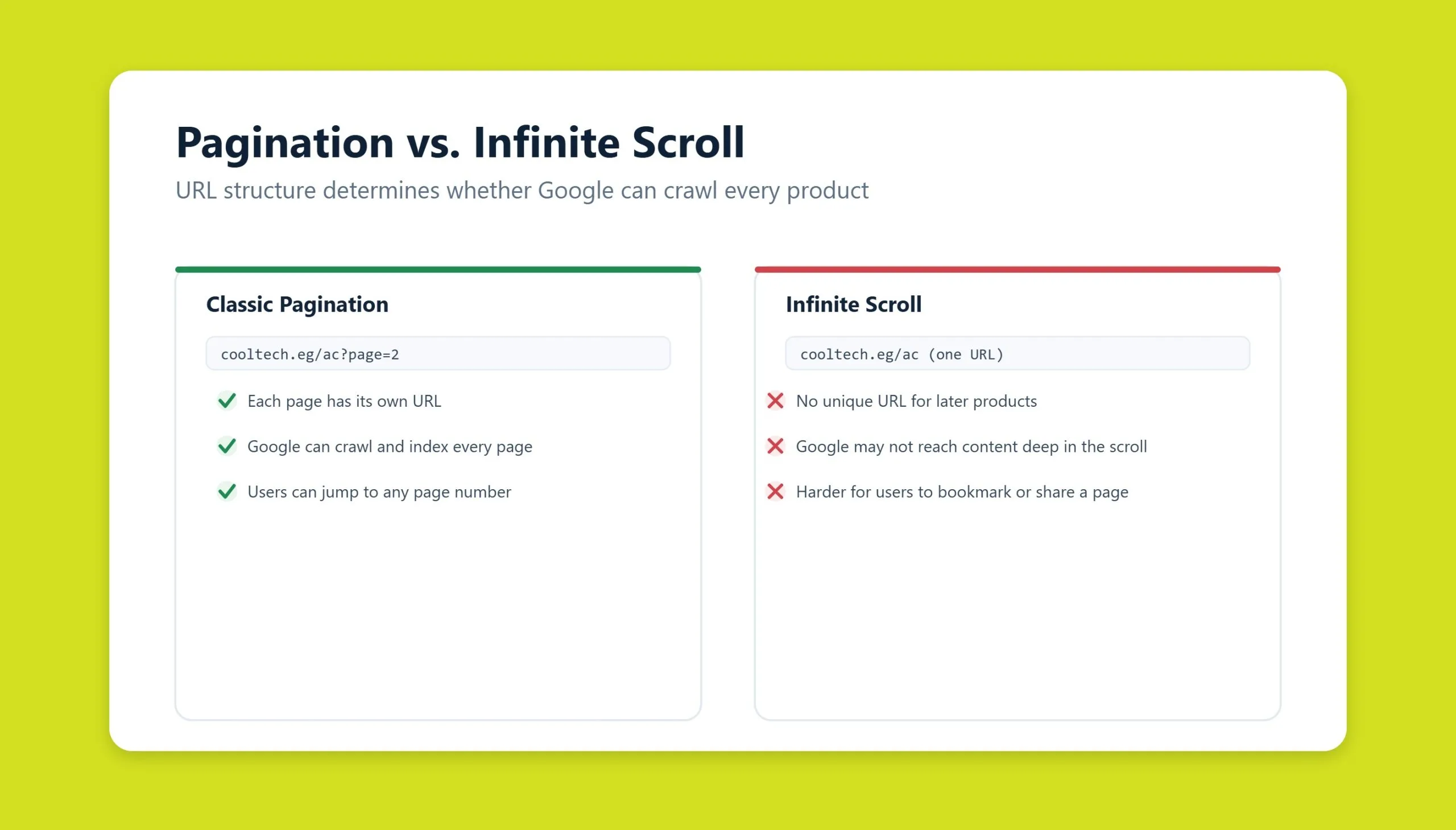
Pagination has two common alternatives: infinite scroll, where content loads automatically as the user scrolls, and a “Load more” button, where new items appear on click. Each has trade-offs, but classic numbered pagination remains the most universal option because both people and crawlers understand it without any special handling.
Why pagination matters
The obvious goal is to stop a visitor drowning in a thousand cards on one page. Several deeper reasons make it essential for any large project:
- Load speed: 20 to 30 items render in a second; 500 can take half a minute or more.
- Server load: fewer database queries and less HTML to generate and send.
- Orientation: the user sees where they are in the catalog and how big it is.
- State retention: returning after a click lands on the same page.
- Indexing: search engines crawl documents separately and understand structure better.
- Sharing and analytics: a specific page can be linked, and you can see how deep users go.
Without pagination, an online store with a serious catalog effectively stops working: the page will not open, the crawler will not index it, and conversions collapse.
SEO problems pagination can cause
Most difficulties stem from how a search engine perceives near-identical documents with running page numbers. Below are the issues that appear most often on catalogs and blogs, along with practical fixes. If you would rather diagnose these on your own site, a structured SEO audit will surface them quickly.
Duplicate metadata and content
If 25 catalog pages share the same title, meta description, H1, and boilerplate SEO copy, Google sees 25 near-duplicates. This dilutes relevance and predictably pushes positions down. Fix it by:
- Appending the page number to the title, for example “Lighting Catalog, Page 2 – Store X.”
- Showing category intro copy only on page one and hiding it on subsequent pages.
- Using a self-referencing canonical on each page.
- Optionally applying
noindex, followso the page is not indexed but its product links are still crawled.
Diluted link signals
External links almost always point to page one of a category. From there, authority flows through internal links, and paginated pages absorb equity that could otherwise reach product cards or subcategories. The remedy is deliberate internal linking: give products additional routes through “Related,” “Popular,” and “Best sellers” blocks rather than relying on pagination alone to distribute link value.
Wasted crawl budget and unindexed deep pages
If a category runs to 50 pages, Google’s crawler may never reach page 40 and never index the products listed there. The symptom is telling: the items exist in your catalog but are missing from search. Options include splitting oversized categories into subcategories, adding products to sitemap.xml directly, and strengthening the category page with internal links so crawlers reach deeper.
The problem compounds when filters run on paginated pages, producing URLs such as ?page=2&color=red&size=l&price_from=5000&sort=new. The number of combinations reaches into the tens of thousands, Google cannot crawl them all, and budget drains away. Block unnecessary parameters in robots.txt, use canonicals to collapse variants onto a clean URL, and manage parameter handling in Google Search Console.
Pagination best practices for SEO
Prefer self-referencing canonicals
The cleanest signal is a canonical on each paginated page that points to itself. Pointing every page’s canonical back to page one looks logical but is a mistake: Google’s documentation states plainly that later pages in a series are not considered duplicates and should not be consolidated with a canonical. On large catalogs, doing so can cause products near the end to drop out of the index entirely.
Do not rely on rel=”next” and rel=”prev”
For years Google recommended rel="prev" and rel="next" to bind a series together. In 2019 Google confirmed it had not used these attributes for indexing for some time, because its algorithms understand pagination without them. They do no harm if they remain in your markup, but they are not a strategy. Treat each paginated URL as a standalone, indexable page and manage it with titles, canonicals, and internal links instead.
Keep pagination links crawlable
Every page-number control should be a genuine <a href> anchor pointing to a real URL. Crawlers follow href attributes; they do not click JavaScript-only buttons that update the DOM without a navigable link. If your pagination is built purely on click handlers, the crawler sees only the first page and everything beyond it becomes invisible.
Handle “view all” carefully
A “view all” page can be useful for users who want everything on one screen, but only when the full list is small enough to load quickly. For large catalogs, a single monster page reintroduces the exact speed and rendering problems pagination solves. If you offer both, decide which URL you want indexed and keep signals consistent so you are not competing against yourself.
Avoid JavaScript pagination pitfalls
Infinite scroll and AJAX loading are the most common traps. If content loads via AJAX without changing the browser address, the crawler only ever sees the first batch. Build to the principle of progressive enhancement: even with infinite scroll, each chunk of data must be reachable at its own URL, and the History API should update the address bar as the user scrolls. Many large sites now run a hybrid model, where infinite loading works by default but the URL updates through the History API and classic paginated links remain in the markup. Users get convenience and crawlers still get discrete, indexable pages.
How to implement pagination
Implementation depends on your stack. On custom engines you build it by hand in server code; on a CMS you use built-in tools or plugins; in frameworks you call ready-made helpers.
PHP and MySQL
The baseline pattern for a PHP and MySQL setup is:
- Get the total record count with
COUNT(*). - Divide by items per page (for example 20) and round up to get the page total.
- Read the current page number from the URL, defaulting to page one.
- Build a query with
LIMITandOFFSET; page three becomesLIMIT 20 OFFSET 40. - Render the records into the template and output a navigation block with links to adjacent and edge pages.
Decide early what URL page one uses. The canonical version has no parameter, so /catalog/ and /catalog/page/1/ should resolve to one document, usually by 301-redirecting the second form to the first. Otherwise you create a duplicate from the very start.
Frameworks and front-end libraries
Modern frameworks handle this out of the box. Laravel, Symfony, Django, and Rails all expose a paginate method on a collection or query set: pass the number of items per page and the framework generates the offsets and the link data. On the front end, React, Vue, and Angular have mature libraries such as react-paginate, vue-paginate, and ngx-pagination that remove the manual offset arithmetic.
WordPress notes
WordPress ships several functions for outputting a pagination block, and which you use depends on the theme and the task:
the_posts_pagination()– the main modern function, outputting a ready block with configurable button text and range.paginate_links()– returns an array or string you can style however you like.next_posts_link()andprevious_posts_link()– older functions for simple navigation without numbers.wp_link_pages()– for splitting a long single post using the<!--nextpage-->tag.
For WooCommerce, woocommerce_pagination() respects catalog settings from the store admin. Custom WP_Query loops need special care: without explicitly passing the paged parameter, every page shows identical content, a classic mistake in hand-written archive templates. Read the current number with get_query_var('paged') and feed it into the query arguments. Popular plugins include WP-PageNavi for numbered blocks, Ajax Load More for dynamic loading, and Jet Smart Filters for filter-integrated pagination in Elementor. If any of this sits outside your comfort zone, our WordPress development and technical support teams can implement and test it for you.
Configuration details that matter
A working navigation block is only the start. Tune these settings so pagination works for you, not against you:
- Items per page: 20 to 50 for product cards, 10 to 20 for blog articles, 50 to 100 for compact table rows.
- URL format: clean paths such as
/catalog/page/2/read better and are friendlier for SEO than?page=2, though they need rewrite rules on the server. - Breadcrumbs: keep them pointing to the category, not the page number, to avoid cluttering the interface.
- Filters and sorting: moving to page two must not reset an applied filter or sort order; append those parameters to the pagination URL.
For usability, show the total number of items and pages, make tap targets at least 44 by 44 pixels, highlight the current page clearly, simplify the block on mobile to arrows and a few nearby numbers, and scroll back to the top of the list after each click. Pagination that is coherent for both users and crawlers is a core part of ongoing SEO services, and increasingly it also shapes how AI answer engines read your catalog, which is where GEO (AI SEO) comes in.
Frequently asked questions
Should pagination pages be indexed?
For small catalogs of up to roughly 50 pages, leaving them open to indexing with self-referencing canonicals is simplest and cleanest. On very large sites, some teams apply noindex, follow beyond page two to conserve crawl budget while still letting crawlers reach the products. Choose based on catalog size and how important deep listings are to your traffic.
Do I still need rel=”next” and rel=”prev” for Google?
No. Google confirmed in 2019 that it does not use these attributes for indexing. Leaving them in place causes no harm, but they should not form the basis of your pagination strategy. Focus on crawlable links, distinct titles, and self-referencing canonicals instead.
Is infinite scroll bad for SEO?
Not inherently, but it is risky if it loads content via AJAX without giving each batch its own URL. In that case crawlers only see the first set of items. Use progressive enhancement so every chunk is reachable at a real URL and the History API updates the address bar, or run a hybrid model that keeps classic paginated links in the markup.
Should the pagination canonical point to page one?
No. Google states that later pages in a series are not duplicates and should not be consolidated onto page one with a canonical. Doing so can cause products near the end of a large catalog to fall out of the index. Use a self-referencing canonical on each page.
How many items should I show per page?
Use 20 to 50 for product catalogs with large cards, 10 to 20 for blog articles, and 50 to 100 for compact table-style lists. Below ten, users tire of clicking; above a hundred, you lose the speed and clarity benefits pagination is meant to deliver.
Related guides
Don't miss the chance to
make your website more visible!
Initial consultation and
audit of the current situation

Read also

Article Behavioral Factors in SEO: What They Are and How to Improve Them
Article JavaScript Links Are Hiding MENA Sites From ChatGPT and Claude

Article VOCTOS Is a Top SEO, PPC and SEM Company in Egypt on Clutch for 2026
Article Commercial Ranking Factors: The Complete List

Article The Title Meta Tag: What It Is and How to Write It
Article The Role of Meta Tags in Search Engine Optimization
Article Can You Sue an AI for Defamation? Where the Law Stands

Article Cloudflare’s 15 September AI Crawler Defaults: The Check Gulf and Egypt Brands Should Run Today







Real Results
More Wins
SEO & GEO for Delta Medical Labs
 GEO
GEO
1M+ monthly organic visits, 159,200 ranked keywords, 5,570 pages cited by AI engines, and 1,186 #1 rankings in KSA.

Arabic SEO, GEO & guest posting for VPNly
 SEO
SEO
65K peak monthly organic visits, 55 guest posts, and 149 pages cited by AI engines.

SEO & GEO for Ogaei Virtual Care
GEO
From 3 to 7,931 monthly organic clicks in 7 months, 2.9M+ impressions, and 40+ keywords in Google’s Top 10.

SEO for Eduverse
SEO
12× search traffic in 10 months, 45% of target keywords in the top 5, and 55% in the top 10.
Trusted by