
How to Recover Lost Website Traffic
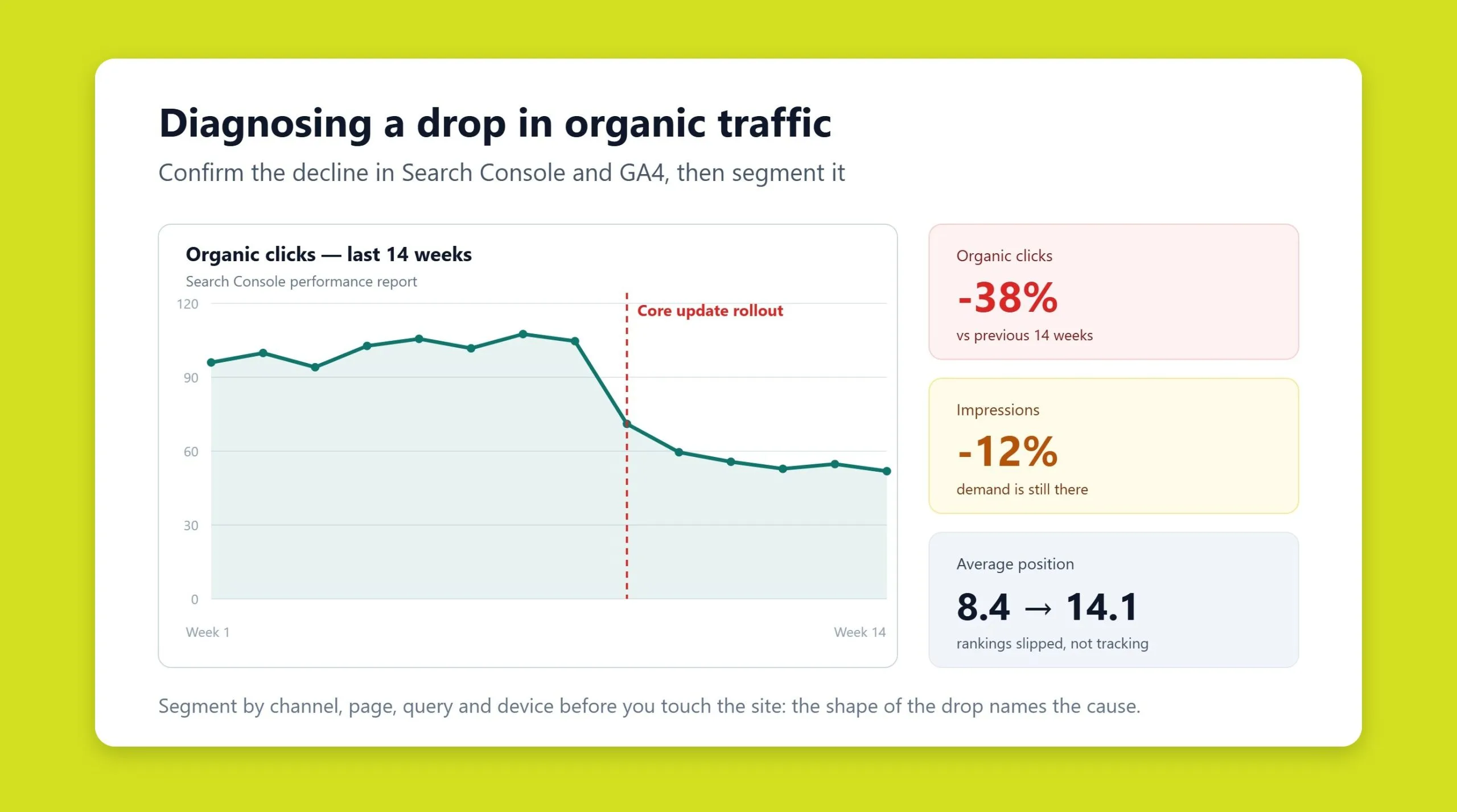
To recover lost website traffic, confirm the drop is real in Google Analytics 4 and Google Search Console, then segment the decline by channel, page, query, and device to isolate the cause. Most sudden losses trace back to one of a handful of culprits: a Google algorithm update, technical or indexing problems, deleted or decayed pages, shifting search intent, seasonality, or AI Overviews absorbing clicks. Once you name the cause, the fix is usually specific and achievable within a few weeks.
Key takeaways
- Confirm the drop is real before reacting: rule out tracking bugs, filtered bots, and reporting gaps in GA4 first.
- Segment everything. A sitewide decline, a single-page collapse, and a query-level slide each point to different causes and fixes.
- Cross-reference the drop date with known Google core and spam updates, then check Search Console for manual actions and coverage errors.
- Deleted pages, template bugs, and decayed content quietly bleed traffic even while your head terms still rank well.
- AI Overviews and zero-click SERPs can cut clicks without changing your position, so watch impressions-versus-clicks trends closely.
- Recovery is systematic: diagnose one layer at a time, fix the highest-impact issue first, and request re-crawling to speed reindexing.
A common scenario: you have done everything right. The audits are complete, content is optimized, the site structure is clean, and links are in place. Rankings for your marker keywords are climbing. Yet against every forecast, the organic traffic that was rising suddenly starts drifting down. Positions look healthy, but sessions keep falling. This guide walks through how to diagnose that kind of drop step by step using only Google’s own free tools, and how to recover each type of loss.
Step 1: Confirm the traffic drop is real
Before you rebuild anything, make sure you are not chasing a ghost. A surprising share of reported traffic drops are measurement artifacts, not real losses.
Open Google Analytics 4 and check the Reports > Acquisition > Traffic acquisition view. Isolate the Organic Search channel and compare the affected period against the same window a month and a year earlier. Then verify the basics:
- Tag integrity: a broken or duplicated GA4 tag, a botched migration, or a consent-mode change can erase data overnight. Use the DebugView and Realtime reports to confirm events are still firing.
- Bot and internal filtering: a new filter or a spike of bot traffic that was later excluded can create the illusion of a cliff.
- Reporting identity and date ranges: mismatched attribution settings or time zones can distort comparisons.
Cross-check against Google Search Console (Performance > Search results). Search Console reflects Google’s own click and impression data independent of your analytics tags, so if GA4 shows a drop but Search Console clicks are steady, the problem is almost certainly measurement, not visibility. If both agree that clicks fell, the loss is real and it is time to diagnose. A structured SEO audit is the fastest way to pin down where the leak is coming from.
Step 2: Segment the decline
The single most useful diagnostic move is refusing to look at one aggregate line. Break the drop apart by dimension, because the shape of the decline tells you the cause.
By channel
Did only organic search fall, or did direct, referral, and paid slide too? A drop across every channel usually means a site-wide technical problem or a tracking failure. A drop confined to organic search points to an SEO cause, an algorithm update, indexing, or a SERP change.
By page
In Search Console, use the Pages tab and compare two date ranges. Sort by the biggest click losses. There are three telling patterns:
- A cliff on a few URLs: those specific pages were deindexed, deleted, broke technically, or lost their rankings.
- A gentle sitewide slide: typically an algorithm update or a gradual authority or relevance decline.
- Whole sections falling together: a template or CMS bug affecting one category, brand, or page type.
By query
Switch to the Queries tab and compare periods. The most revealing signal is a query whose impressions held steady but clicks collapsed: you still rank, but something is intercepting the click, an AI Overview, a featured competitor, or a weaker title. Conversely, queries losing both impressions and clicks have genuinely lost position.
By device and country
A loss isolated to mobile suggests a mobile-usability or Core Web Vitals problem. A loss confined to one country can mean a hreflang issue, local competition, or a regional algorithm rollout.
Step 3: Check for a Google algorithm update
Once you have a precise drop date from Search Console, line it up against Google’s update history. Google confirms core updates and spam updates on its Search Status Dashboard, and third-party volatility trackers flag unconfirmed movement.
If your decline starts within a day or two of a confirmed core update, you are most likely dealing with a quality or relevance reassessment rather than a bug. Core updates do not target individual pages to punish them; they re-evaluate how well content satisfies intent relative to everything else available. Recovery here means genuinely improving experience, depth, and trust signals, then waiting for the next update cycle to revalidate. This is where sustained content marketing and demonstrable expertise outperform quick tweaks.
Step 4: Rule out technical and indexing problems
Technical faults are the most common cause of a sharp, sudden drop, and often the fastest to fix.
- Indexing coverage: in Search Console, open the Pages report under Indexing. Watch for spikes in Not indexed reasons such as “Crawled – currently not indexed,” “Duplicate,” “Excluded by noindex tag,” or “Blocked by robots.txt.” A deployment that accidentally shipped a
noindextag or a disallow rule can wipe out visibility within days. - Server response codes: crawl the URLs that used to earn traffic and check for 404s, unexpected 301/302 redirects, and 5xx errors. Pages that returned traffic and now return errors are direct, quantifiable losses.
- Manual actions and security issues: check the Manual actions and Security issues reports. A manual action or a hacked-content flag will suppress traffic until resolved and reviewed.
- Core Web Vitals and mobile usability: a regression in loading performance or a layout that breaks on mobile can erode rankings gradually.
If your team lacks the bandwidth to monitor and fix these continuously, ongoing technical support catches breakages before they hit the index rather than after.
Step 5: Find deleted and decayed pages
This is the classic silent killer from the case that inspired this article. Products sell out and get deleted. Empty categories are removed. Editors prune “old” posts. Nobody consults SEO, and each removal quietly takes its traffic with it, even while your marker keywords keep climbing.
To surface these losses:
- In GA4, build a list of landing pages that earned organic traffic in a healthy period several months before the decline (Reports > Engagement > Landing page, filtered to Organic Search).
- Check each URL’s current server response. Isolate the ones now returning 404 or redirecting somewhere irrelevant.
- Cross-reference with Search Console’s Pages report, filtering for removed or errored URLs.
- Rank the casualties by the traffic they used to earn, so you fix the biggest losses first.
The recovery is straightforward: restore high-value pages, or 301-redirect a genuinely dead URL to the closest relevant equivalent (never a blanket redirect to the homepage). Then submit the restored URLs for re-crawling.
Step 6: Recover lost long-tail queries
Here is a subtle trap. Optimizing hard for your primary head terms can strip relevance for long-tail variations that were never in your new keyword map. Head terms rise, but the aggregate falls because dozens of long-tail phrases quietly dropped off their landing pages.
In Search Console, use the Queries and Pages tabs together, comparing a strong prior period against now. For each important landing page, look at which queries used to send clicks and no longer do. The queries worth chasing are those where search demand is unchanged but your clicks fell sharply, that gap is recoverable relevance, not lost interest.
For each recoverable query, confirm whether the target term still appears in the page’s title, H1, H2s, and body. After aggressive head-term optimization, those long-tail entries are often missing. Reintroduce them naturally, ensure a clear landing page exists for each distinct intent, and resubmit the page for indexing so the change is picked up quickly. In the original case, roughly 3,500 monthly clicks had leaked out this way, more than the head-term gains had replaced.
Step 7: Watch for SERP and intent shifts
Search results are not static. Google can decide a query deserves a different mix of results, video, shopping, local packs, or informational pages instead of commercial ones. When the dominant intent shifts, a page that once fit can fall out of favor without doing anything wrong.
Search the query and study the live SERP. If the page types ranking above you have changed character, your job is to match the new intent: add the format Google now rewards, restructure the page, or split it into pages that each serve one intent cleanly. This is core SEO work, aligning what you publish with what the results page now demands.
Step 8: Separate seasonality from a real decline
Before you panic, confirm the demand itself did not simply fall. Many drops are seasonal and entirely normal. Use Google Trends and Search Console’s impression trend to check whether total demand for your topics declined in step with your clicks. If impressions fell because fewer people are searching, your visibility is intact and the fix is patience plus planning for the next cycle. If impressions held but clicks fell, the loss is yours to recover.
Step 9: Account for AI Overviews eating clicks
An increasingly common cause of “we rank the same but get fewer clicks” is Google’s AI Overviews and other zero-click features answering the query directly on the results page. Your position can be unchanged while your click-through rate quietly erodes.
The signal to watch in Search Console is a widening gap between stable or rising impressions and falling clicks on informational queries. You cannot opt out, so the strategy shifts: target queries with genuine commercial or transactional intent where users still need to click through, build content substantive enough to be cited as a source within AI answers, and strengthen brand demand so people seek you out directly. Optimizing to be referenced by AI answer engines, sometimes called GEO or AI SEO, is now part of protecting and rebuilding organic visibility.
Putting it together
There is rarely a single reason traffic falls, and rarely a single fix. The discipline is diagnostic order: confirm the drop is real, segment it until the pattern is obvious, then work through algorithm updates, technical and indexing faults, deleted and decayed content, lost long-tail relevance, SERP and intent shifts, seasonality, and AI-driven click loss. In the case that inspired this guide, three overlooked issues, deleted pages, lost long-tail queries, and a template bug that overwrote titles, together explained a decline that head-term rankings had masked. Name the cause, fix the biggest leak first, request re-crawling, and traffic recovers.
Frequently asked questions
How long does it take to recover lost website traffic?
It depends on the cause. Technical and indexing fixes, such as removing an accidental noindex tag or restoring deleted pages, can recover traffic within days to a few weeks once Google re-crawls the URLs. Losses tied to a core algorithm update take longer, often until the next update cycle, because Google revalidates quality over time rather than instantly.
Why did my traffic drop even though my rankings are stable?
Stable rankings with falling clicks usually means something is intercepting the click on the results page. The most common causes are AI Overviews and other zero-click features answering the query directly, a competitor winning a featured snippet, or a weaker title and meta description reducing your click-through rate. Check the impressions-versus-clicks gap in Search Console to confirm.
Which free tools do I need to diagnose a traffic drop?
Google Analytics 4 and Google Search Console cover the core diagnosis. GA4 shows which channels and landing pages lost sessions, while Search Console reveals query-level clicks, impressions, indexing coverage, manual actions, and Core Web Vitals. Google Trends helps you rule out seasonality. Together they let you diagnose most drops without any paid tools.
Can a Google algorithm update permanently hurt my site?
No. Core updates reassess quality and relevance rather than issuing permanent penalties. Sites that improve content depth, user experience, and trust signals routinely recover in subsequent updates. Recovery is not guaranteed on any fixed timeline, but the impact is not permanent if you address the underlying quality gap.
Should I redirect deleted pages to the homepage?
No. Redirecting many unrelated URLs to the homepage is treated by Google as a soft 404 and passes little value. Redirect each deleted page to the closest relevant equivalent, a similar product, a parent category, or a related article, so the redirect preserves relevance and any accumulated authority.
Related guides
Want more people
to find your website?
Strategy call and
full site audit

Read also

Article Bing’s AI Performance Report: What Gulf and Egyptian Brands Can See About Copilot Citations

Article Google Moves Brand AI Overviews to the Side: What MENA Brands Should Track Now

Article How to get cited by ChatGPT (and recommended in its answers)
Article Your Name in ChatGPT: AI Reputation for Individuals and Executives
Article How Much Does SEO Cost in Egypt, Saudi Arabia and the UAE in 2026?
Article Which Sites Do AI Engines Cite? What a 288-Answer Study Means for Gulf Brands



Real Results
More Wins
SEO & GEO for Delta Medical Labs
 GEO
1M+ monthly organic visits, 159,200 ranked keywords, 5,570 pages cited by AI engines, and 1,186 #1 rankings in KSA.

Arabic SEO, GEO & guest posting for VPNly
 SEO
65K peak monthly organic visits, 55 guest posts, and 149 pages cited by AI engines.

SEO & GEO for Ogaei Virtual Care
GEO
From 3 to 7,931 monthly organic clicks in 7 months, 2.9M+ impressions, and 40+ keywords in Google’s Top 10.

SEO for Eduverse
SEO
12× search traffic in 10 months, 45% of target keywords in the top 5, and 55% in the top 10.
Trusted by