
Top 3 Reasons Websites Lose Search Engine Rankings
Websites usually lose search engine rankings for one of three reasons: technical problems that block or degrade crawling and indexing, content that has decayed or no longer matches search intent, and backlink issues that erode a site’s authority. Google core updates and stronger competitors can amplify all three. The fix is always the same disciplined loop: diagnose the real cause with Google Search Console and GA4 before you change anything, then rebuild the weak factor and monitor the recovery.
A drop in the search results is rarely random. Behind every decline sits a concrete cause tied to how Google evaluates pages and to the current state of your website. To respond effectively when traffic slips, you first need to understand how ranking works and where your site is most exposed.
Key takeaways
- Three root causes dominate: technical faults, content quality and decay, and backlink problems. Most declines are a combination, not a single trigger.
- Diagnose before you act. Rushing to change pages without analysis often deepens the loss. Use Search Console and GA4 to pinpoint when and where the drop began.
- Sudden drops usually signal manual actions, technical breakage, or a migration gone wrong; gradual drops point to content decay, shifting intent, or rising competition.
- Google core updates re-weight relevance and quality signals, so pages can slip without any error on your part.
- In 2026, watch clicks separately from rankings. AI Overviews can reduce clicks even when your position holds steady, so falling traffic does not always mean falling rankings.
- Recovery is systematic, not instant – fix technical issues, refresh content to match intent, strengthen trust and links, then track the results.
How ranking works and why sites slip
Google evaluates websites on a combination of signals: technical health, content quality, the backlink profile, user experience, and how well a page satisfies the person behind the query. These systems are updated constantly, and the bar rises over time.
A “ranking drop” means reduced visibility for the keywords that matter to you. It can appear as a sharp collapse in traffic or a slow, grinding decline. Sometimes only a handful of pages are affected; sometimes the whole project loses ground at once. Google also judges your site against its environment, not in a vacuum. Competitors improve, user expectations shift, and algorithms grow more demanding. A site that stands still can lose position even when nothing on it is obviously broken.
Reason 1: Technical problems
Technical health is the foundation the whole SEO strategy rests on. Even excellent content cannot rank reliably if the site carries critical technical faults.
Indexing and crawl errors
The most damaging problems are indexing issues. If Googlebot cannot crawl your pages, or part of the site is accidentally blocked, visibility evaporates. Common culprits include a misconfigured robots.txt, stray noindex meta tags left over from staging, broken internal linking, and canonical tags that point search engines to the wrong URL. When the same content is reachable through several URLs, Google struggles to decide which version is the original, and relevance gets diluted across duplicates.
Speed, Core Web Vitals, and mobile
Page speed matters. Slow pages hurt the user experience, and Core Web Vitals feed Google’s page experience signals. Mobile deserves special attention: most traffic now arrives on phones, and under mobile-first indexing Google predominantly uses the mobile version of your pages to rank you. A site that renders poorly on a smartphone is exposed on both counts.
Redesigns and migrations
Rankings frequently fall after a redesign or platform migration. Restructured URLs, deleted pages, and botched redirects can wipe out indexation and the link equity a page had accumulated. This is why every significant change should be shipped under SEO supervision.
How to fix technical problems
Start with a full SEO audit rather than a surface check. Confirm Googlebot can reach every important page by reviewing robots.txt, meta directives, your XML sitemap, and the Pages (Indexing) report in Google Search Console. Use the URL Inspection tool to see exactly how Google renders and indexes a specific page.
Next, improve loading performance – compress images, enable caching, trim unnecessary scripts, and lean on modern delivery techniques. Make sure the mobile experience is genuinely responsive, with usable navigation and content that displays correctly on every device. Resolve duplicate pages and set canonical URLs deliberately so ranking signals concentrate on one authoritative version. If the decline followed a migration, verify redirects, preserved URL structure, and the availability of old pages. Ongoing technical monitoring, ideally backed by dedicated technical support, keeps small faults from becoming ranking events.
Reason 2: Content quality and decay
Content is the second major reason sites lose rankings, and it works in two directions: content that was never strong enough, and content that has quietly decayed.
Thin, over-optimized, or unhelpful content
Google’s helpful content systems and core updates reward material that demonstrates genuine expertise and answers the query fully. Pages that are thin, keyword-stuffed, duplicated, or written for search engines rather than readers tend to lose ground. Over-optimization – the same phrase repeated unnaturally, headings crammed with keywords – now works against you.
Content decay and shifting intent
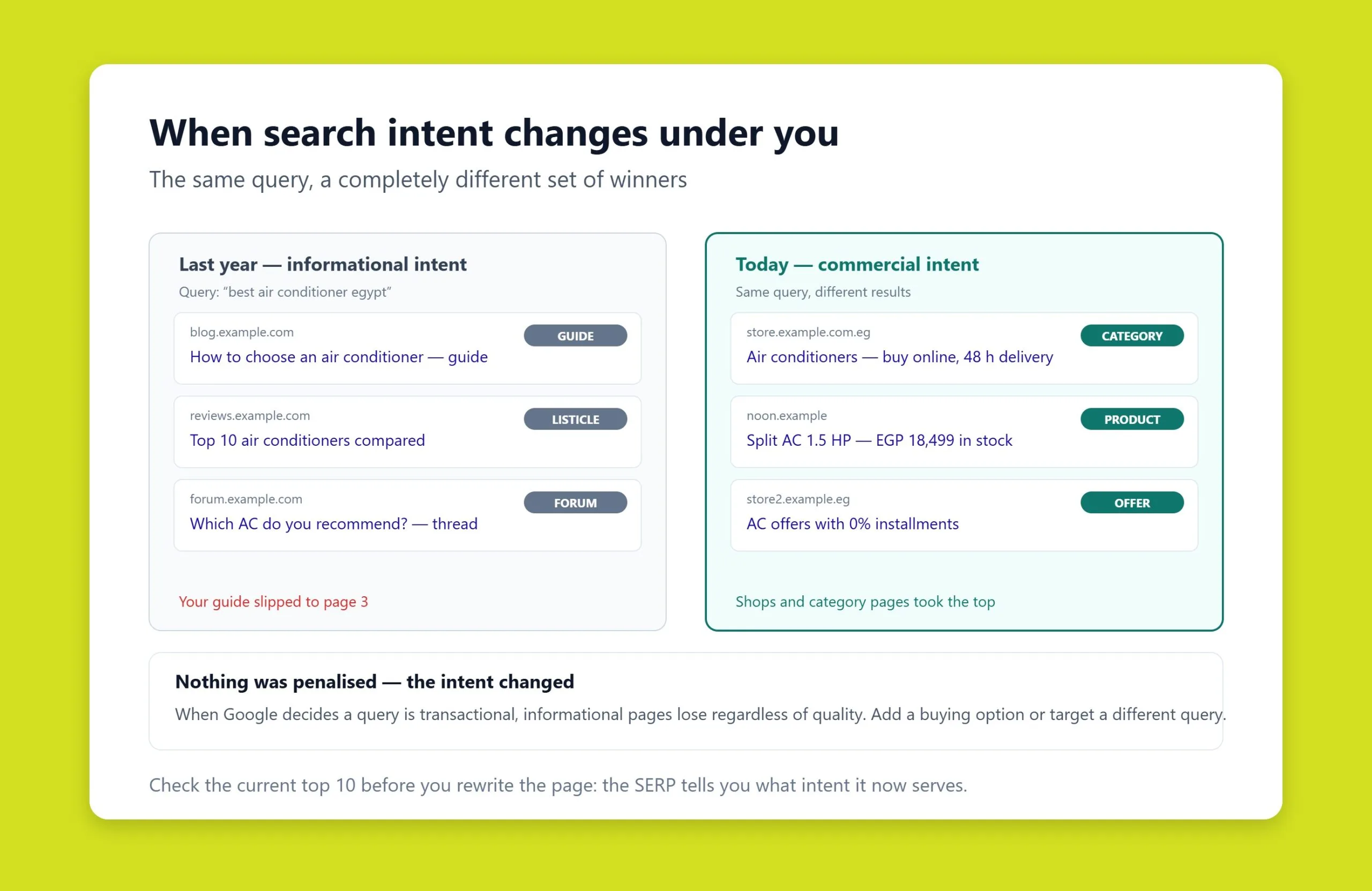
Even a page that once ranked well can fade. Facts go stale, competitors publish deeper resources, and, crucially, search intent evolves. A query that once returned informational articles may now surface commercial pages, or the reverse. When the format Google rewards changes and your page does not follow, it slips. A page optimized for keywords can still fail to answer what users actually want, which weakens engagement and, in turn, rankings.
How to fix content issues
Audit the pages that lost visibility and compare them against what currently ranks. Rework over-optimized copy, consolidate or remove duplicate and low-value pages, and prioritize usefulness, expertise, and a clear match to intent. If a query has become more commercial, strengthen the commercial elements – pricing, benefits, reviews, and obvious calls to action. If it has become more informational, add depth and structure.
Treat content as a living asset. Refresh outdated data, expand sections that competitors cover better, and revisit format so it aligns with what Google now shows. A disciplined content marketing program keeps pages current instead of letting them decay. SEO is no longer a one-time project; it needs continuous correction.
Reason 3: Backlink and authority issues
The third root cause lives off your site: your backlink profile. Links remain one of Google’s core trust signals, and problems here can pull rankings down even when your pages are technically sound and well written.
Lost, toxic, or unnatural links
A sharp drop in the number or quality of inbound links – a partner site removing a link, a resource going offline – can cost you position. The opposite problem is just as damaging: a spammy or manipulative link profile can trigger a loss of trust, and in serious cases a manual action for unnatural links, which is reported directly in the Manual Actions section of Google Search Console.
Manual actions and spam updates
When Google detects manipulation – link schemes, cloaking, or aggressive over-optimization – it can apply a manual action that limits visibility for part or all of the site. Automated spam updates do similar work at scale. The tell-tale sign is a steep drop with no technical explanation, sometimes limited to specific groups of queries or the removal of pages from results.
Recovering means diagnosing the cause, cleaning up the offending links, and rebuilding on quality. Disavow or remove clearly toxic links, earn natural mentions from relevant sources, and shift your strategy toward quality over volume. If you have a manual action, fix the underlying issue and submit a reconsideration request in Search Console. Restoration takes time, because Google needs a period to re-evaluate the site.
Core updates and competitors
Two forces amplify all three root causes. Google core updates periodically re-weight how relevance, quality, and experience are assessed; after an update, some sites rise and others lose visibility with no error on their part. And competition is relentless – if you lost position while rival sites climbed, study their structure, content depth, backlink profile, and interface. Traffic redistributes toward whoever best satisfies the query, so standing still is effectively moving backward.
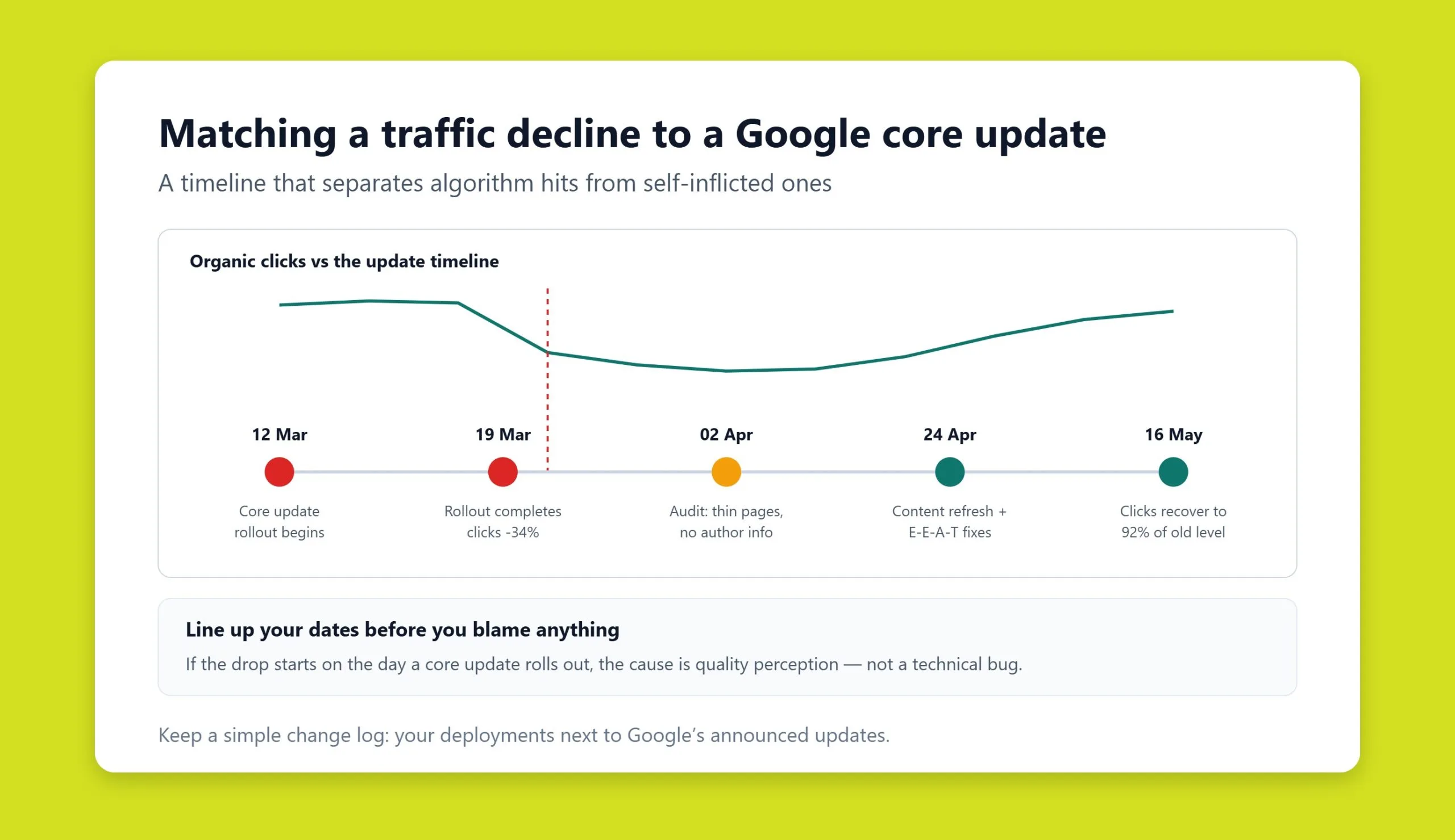
How to diagnose the cause with Search Console and GA4
Diagnosis is the stage that determines everything downstream. The common mistake is to start changing things before understanding the problem, which usually makes the loss worse. Work through a systematic sequence instead.
1. Analyze the traffic and ranking trend
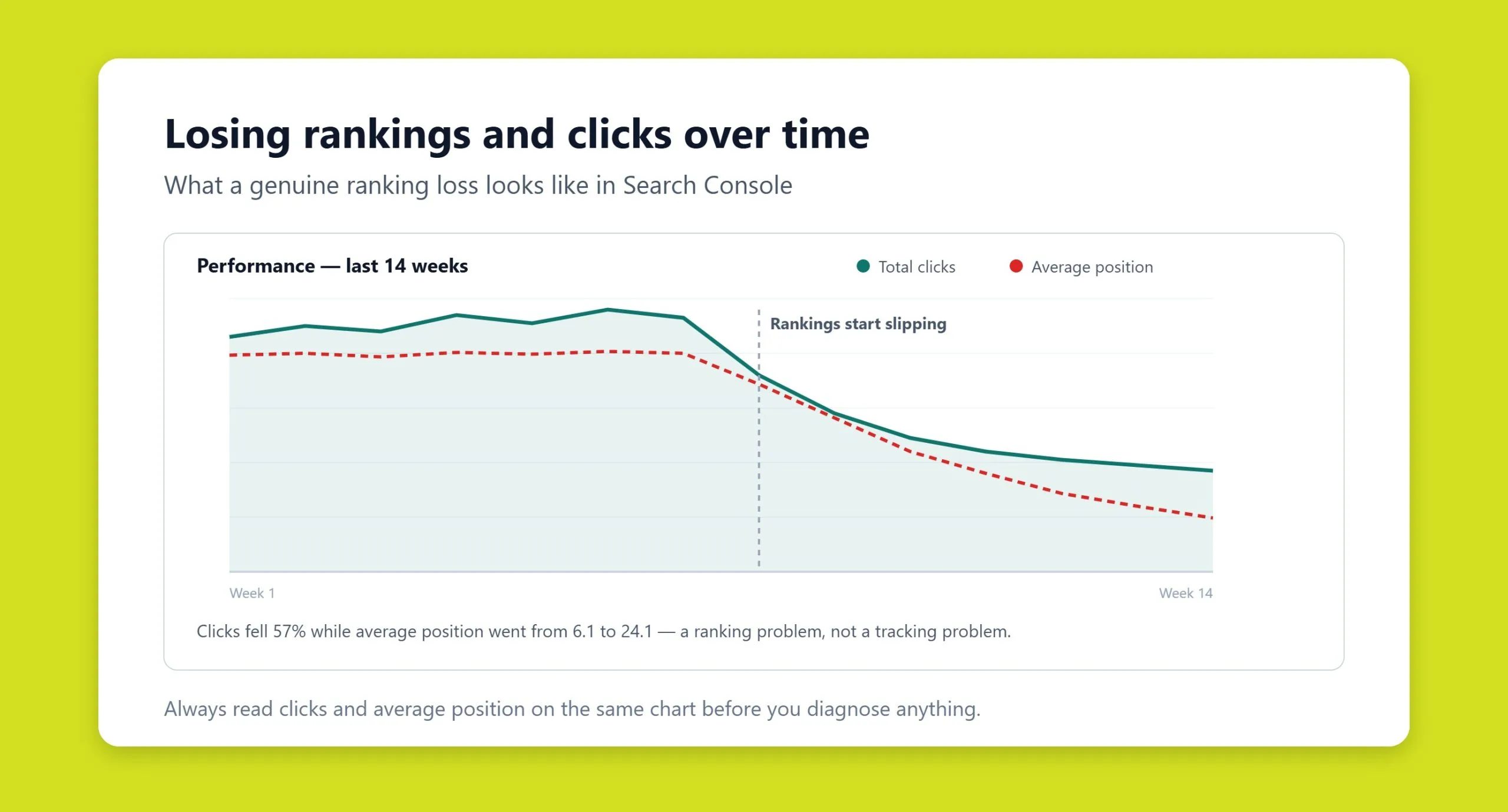
In Google Search Console’s Performance report, pinpoint when the decline began and its shape. A sharp drop typically signals a manual action, technical failure, or a major on-site change. A gradual slide points to content decay, shifting intent, or rising competition. In GA4, confirm whether the fall is isolated to organic search or spans every channel.
2. Segment the loss
Split the drop by page type – categories, product pages, articles, landing pages – using Search Console’s page and query filters. If only commercial pages fell, suspect intent shifts or competitors. If every section dropped together, the problem is likely systemic.
3. Run a technical audit
Check indexing status, crawl errors, server responses, speed, and mobile rendering. Pay special attention to anything shipped shortly before the drop – a redesign, CMS upgrade, or new feature. Minor-looking edits can move rankings.
4. Compare the search results
Compare today’s results page against what it looked like before. If aggregators, video, or large marketplaces now dominate, intent or an algorithm has shifted. Note which pages rank now and how they differ from yours.
5. Analyze competitors and backlinks
If rivals gained as you lost, study their approach. Then review your own link profile: a sudden loss of quality links, or the presence of spammy ones, can both hurt.
6. Check engagement and update history
Rising bounce, shorter sessions, and lower scroll depth in GA4 suggest pages no longer meet expectations. Finally, cross-reference the timing of your drop against known Google update dates. Accurate diagnosis comes from combining these sources – analytics, the live results, technical state, and user behavior – not from any single number.
Step-by-step recovery
Recovery is systematic work aimed at removing the cause and strengthening the site on the factors that matter. There are no shortcuts; results come from sequential improvement and steady monitoring.
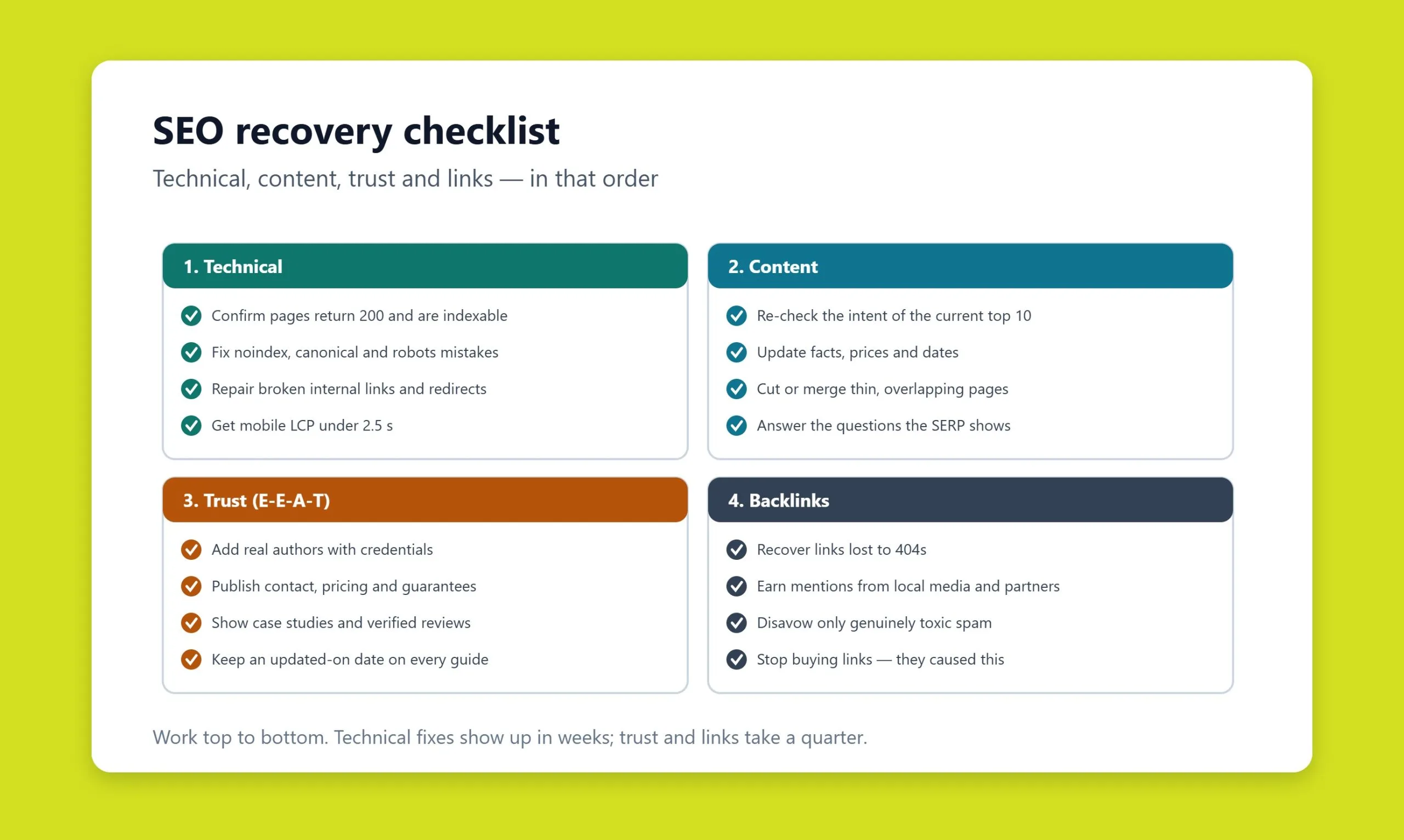
- Fix the technical foundation first. Restore correct indexing, repair broken links, remove duplicates, and validate redirects. Address speed and stability, and confirm every page survived any recent redesign with its link equity intact.
- Rework the content. Align pages with current intent and reader expectations – not a light text swap but a genuine upgrade to structure, depth, and expertise, matched to the format Google now rewards.
- Improve user experience. Clear navigation, fast access to key information, and flawless mobile behavior feed directly into engagement signals.
- Build trust. Add reviews, case studies, and clear company information. These E-E-A-T signals carry weight, especially in commercial and YMYL topics.
- Clean and rebuild links. Remove toxic links and earn natural, relevant ones focused on quality.
- Revisit the overall strategy. If your target keywords no longer match real demand or competition, refresh the keyword map and build new pages for current queries.
- Monitor continuously. Track positions, traffic, and engagement after each change so you can tell what worked and what needs adjustment.
Some recoveries take significant time, particularly after a manual action or serious technical fault. With consistent, comprehensive work, rankings return – and often surpass their previous level. If you would rather hand the whole loop to specialists, a managed SEO service combines diagnosis, recovery, and ongoing monitoring under one roof.
A 2026 note: rankings versus clicks
One modern twist deserves emphasis. With AI Overviews now appearing for many queries, you can hold your ranking and still lose clicks, because the answer is summarized above the results. If Search Console shows stable impressions and positions but falling clicks, the cause may be AI answers rather than a ranking drop. Optimizing to be cited inside AI answers – the discipline of generative engine optimization – is becoming as important as classic ranking work.
Conclusion
Losing rankings is a signal that something in your strategy or your site is weak. In most cases it is not one cause but several acting together. Technical faults, content decay, and backlink problems are the three to check first, amplified by core updates and competitors. Catch them early and you can not only recover but prevent the next decline. Regular analysis, adaptation to change, and a comprehensive approach keep visibility stable and growing, even in a crowded market.
Ranking drops specific to Arabic and bilingual sites
The three causes above account for most ranking losses anywhere. Bilingual sites in this region have a fourth failure mode that looks like an algorithm penalty and is not.
When your two languages compete with each other
If the Arabic and English versions of a page are not correctly declared as alternates of one another, search engines can treat them as two candidates for the same query. Rankings then oscillate between them, and neither version accumulates the signals it needs. Traffic falls without any obvious cause, and audits that only look at content quality find nothing.
- Annotations must be reciprocal. If the Arabic page points to the English one but not the reverse, the declaration is ignored.
- Every version must reference itself as well as its counterparts. A missing self-reference is one of the most common causes of the whole set being discarded.
- Language codes must be valid. Region codes that do not exist, or a country code used where a language code belongs, invalidate the annotation silently.
- The canonical must not point across languages. An Arabic page canonicalized to its English twin tells search engines to drop the Arabic version entirely, which is usually not what anyone intended.
Two more regional causes worth ruling out
- A slug policy change. Switching Arabic URLs between encoded script and transliterated Latin characters turns every existing URL into a redirect. Rankings dip while the change is processed, and the dip is much larger if any redirect in the chain is broken.
- Geographic targeting set too narrowly. Restricting a site to one country when the audience spans several Gulf states suppresses visibility in the markets you excluded, which shows up as a gradual decline rather than a sudden drop.
The diagnostic order matters. Check the language annotations and canonicals before assuming a content or link problem, because these faults produce the same symptoms and are far quicker to fix.
Frequently asked questions
How long does it take to recover lost search rankings?
It depends on the cause. Fixing a technical fault such as an accidental noindex can restore rankings within days to a few weeks once Google recrawls the site. Recovering from content decay or a core update usually takes one to three months of improvement plus a re-evaluation period. Manual actions and serious link problems can take longer, since Google needs time to reassess trust after you submit a reconsideration request.
Why did my rankings drop after a Google core update?
Core updates re-weight how Google assesses relevance, quality, and experience across the whole index. A drop after one does not necessarily mean you did something wrong – it often means competing pages now satisfy the query better on the newly emphasized signals. Focus on genuinely improving content quality, expertise, and user experience rather than searching for a single quick fix.
My traffic fell but Search Console shows my rankings are stable – why?
This is increasingly common in 2026. AI Overviews and other rich results can answer the query on the results page, so users click through less even when your position is unchanged. Compare impressions, average position, and clicks in the Search Console Performance report. If position holds but clicks fall, the issue is likely reduced click-through, and optimizing to be cited in AI answers can help recover visibility.
How do I tell whether the cause is technical, content, or links?
Segment the loss. A sudden, site-wide collapse points to a technical failure or manual action. A gradual decline on specific pages points to content decay or shifting intent. A drop tied to lost or toxic backlinks shows up when you compare your link profile over time. Cross-referencing Search Console, GA4, the live results, and update dates lets you isolate the true cause before making changes.
Can I prevent ranking losses before they happen?
Largely, yes. Run regular technical audits, monitor Core Web Vitals and indexing in Search Console, refresh content on a schedule so it does not decay, keep earning quality links, and watch competitors. Shipping every redesign or migration under SEO supervision prevents the single most avoidable cause of sudden drops.
Related guides
Want more people
to find your website?
Strategy call and
full site audit

Read also

Article Your Name in ChatGPT: AI Reputation for Individuals and Executives
Article How Much Does SEO Cost in Egypt, Saudi Arabia and the UAE in 2026?
Article Which Sites Do AI Engines Cite? What a 288-Answer Study Means for Gulf Brands
Article Google Algorithm Updates: Every Confirmed Update Since January 2025
Article ChatGPT Ads Context Hints: How to Write Them for Gulf and Arabic Campaigns
Article Google Ads Credit for New Advertisers: What a Google Premier Partner Can Apply for You
Article 25 Questions to Ask an SEO or GEO Agency Before You Hire One
Article GEO for E-commerce: How to Get Your Products Recommended by ChatGPT and Google AI



Real Results
More Wins
SEO & GEO for Delta Medical Labs
 GEO
GEO
1M+ monthly organic visits, 159,200 ranked keywords, 5,570 pages cited by AI engines, and 1,186 #1 rankings in KSA.

Arabic SEO, GEO & guest posting for VPNly
 SEO
SEO
65K peak monthly organic visits, 55 guest posts, and 149 pages cited by AI engines.

SEO & GEO for Ogaei Virtual Care
GEO
From 3 to 7,931 monthly organic clicks in 7 months, 2.9M+ impressions, and 40+ keywords in Google’s Top 10.

SEO for Eduverse
SEO
12× search traffic in 10 months, 45% of target keywords in the top 5, and 55% in the top 10.
Trusted by