
We Moved a Telehealth Platform to a New Domain and a New CMS. Here Is the Checklist We Used
Ogaei moved from ogaei.care to ogaei.ca and rebuilt on a different CMS at the same time. Two of the three highest-risk moves in technical SEO, run together. We used a 37-item blueprint across three stages, and every item had a named owner before launch day.
The screenshots below are the working files, not a redraw of them.
Key takeaways
- The site moved from ASP to WordPress, and from ogaei.care to ogaei.ca, in a single cutover.
- We held the URL path identical wherever the page type survived, and mapped every exception explicitly in a URL sheet before launch.
- All 301s went live at once rather than in batches, and a full technical audit ran on launch day.
- The design was rebuilt to match the old site first. Improvements came after the migration was proven stable, not during it.
- Organic sessions reached 49,000 for January to September 2026, up 693.3% year over year in GA4.
- Bounce rate rose to 47.6% over the same period, and the section below explains why we expected that.
Why is changing your domain and your CMS together the hard case?
Each carries its own failure mode. Doing both at once means you cannot tell which one broke you.
A domain change asks Google to transfer every signal it has accumulated about you to a different hostname.
A CMS change rewrites how your URLs are generated, how your templates render, and how your metadata is stored. Do them separately and a ranking drop has exactly one suspect, so you know where to look.
Do them together and you are debugging two systems at once while your traffic falls.
The way we make that survivable is to remove one variable on purpose. We changed the domain and the platform, then refused to let anyone change anything else until it was stable.
The URL path stayed identical wherever the page type survived the rebuild. Where a type was consolidated, the new destination was written down explicitly rather than left to a pattern rule.
The meta titles, descriptions, H1s and canonical tags were carried across rather than rewritten. The design was rebuilt to match the old site closely enough that a returning patient would not notice the platform underneath had changed at all.
That makes for a boring migration. That is the point.
Every improvement we wanted was queued for after launch, and the queuing is the part most teams get wrong.
What does the 37-item blueprint actually contain?
Three stages, with every item owned by either us or the client before launch day.
What follows is the actual checklist we worked from, not a tidied summary of it.
Pre-migration.
- Noindex the staging site
- Upload and review all content on the new build
- Create the new GA property for the new domain
- Add and test tracking codes, including Analytics and pixels
- Keep the URL structure identical
- Run a speed health check
- Run a full SEO audit
- Fix every audit issue on staging, before launch
- Set up a custom 404 page
- Take a full backup of the live site
- Confirm the corporate pages exist: about, contact, privacy policy, terms, HTML sitemap, cookie notice
- Build the URL mapping list matching old to new
- Move the current meta tags across
- 301 every old URL to its new one, all at once
Migration.
- Submit both the old and the new XML sitemaps
- Update the URLs inside the old sitemap
- Update robots.txt
- Verify Analytics, Search Console and Tag Manager are all firing on the new domain
Post-migration.
- Run a new technical audit on the same day as launch, looking for 404s, broken links, internal redirects and any redirect that is not a 301
- Test speed and Core Web Vitals
- Test every old-to-new redirect
- Fix what the audit surfaces
- Run weekly ranking audits
- Share the meta tags, implement them, then review the implementation
- Update robots.txt again
- Review internal links and run the mobile-friendly test
- Validate the code fundamentals
- Confirm SSL is valid and every HTTP URL redirects to HTTPS
- Test across devices and browsers
- Confirm the important pages are indexable, with no stray noindex and correct canonicals
- Remove irrelevant pages from the index
- Monitor authority changes
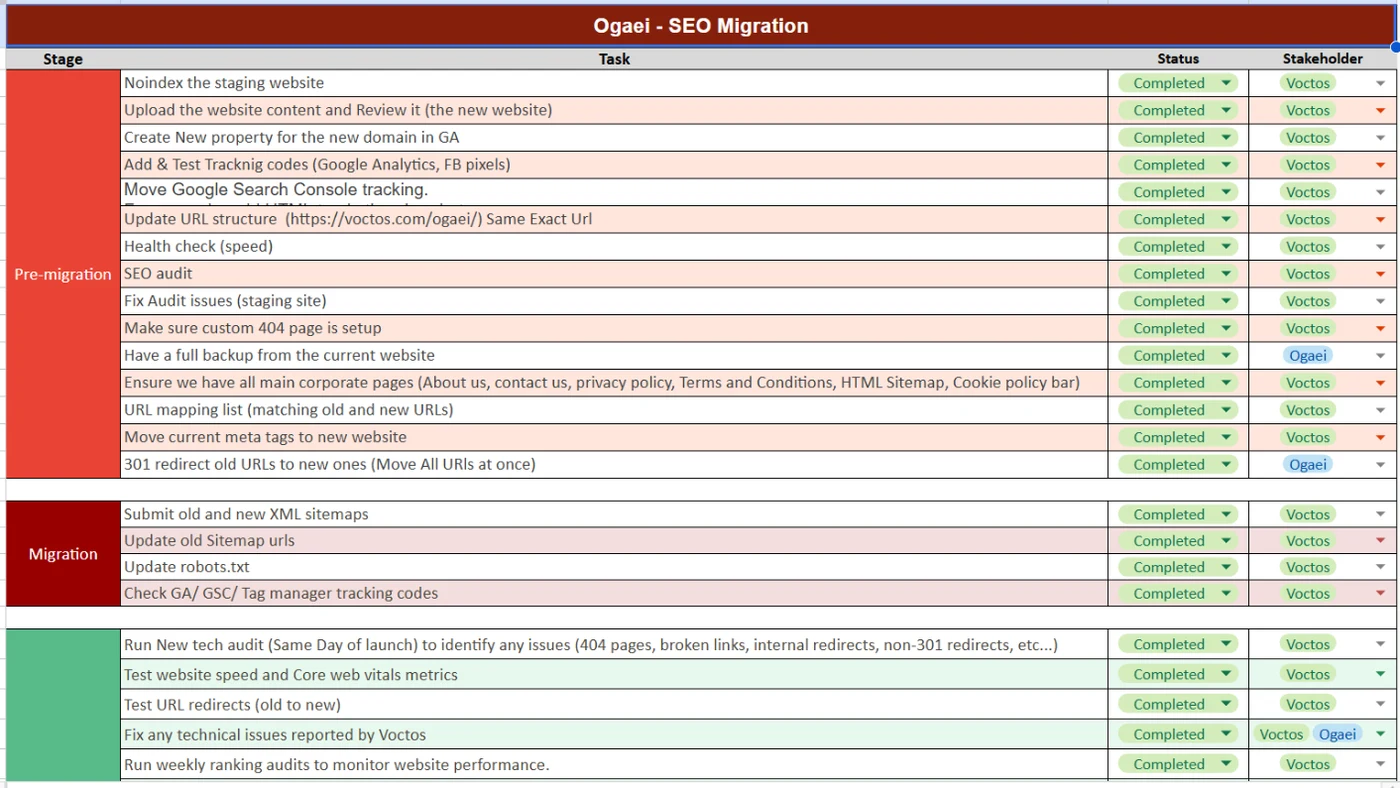
Every row carries a status and a named stakeholder. That column is the whole method. A migration task with no name against it is a task nobody is doing.
Two items in that list carry most of the risk, and if you only audit two things in your own plan, audit these.
The URL mapping list is the migration. Everything else on the list is hygiene around it. If your map is wrong, no amount of post-launch fixing recovers the equity cleanly, because Google has already followed the wrong instruction and acted on it.
The same-day audit is what separates a controlled migration from a hopeful one. Launch day is when redirect chains, non-301 status codes and orphaned templates surface. Finding them a week later costs you a week of Googlebot learning the wrong version of your site.
What does a real URL map look like?
It is a sheet, and it is boring, and that is why it works.
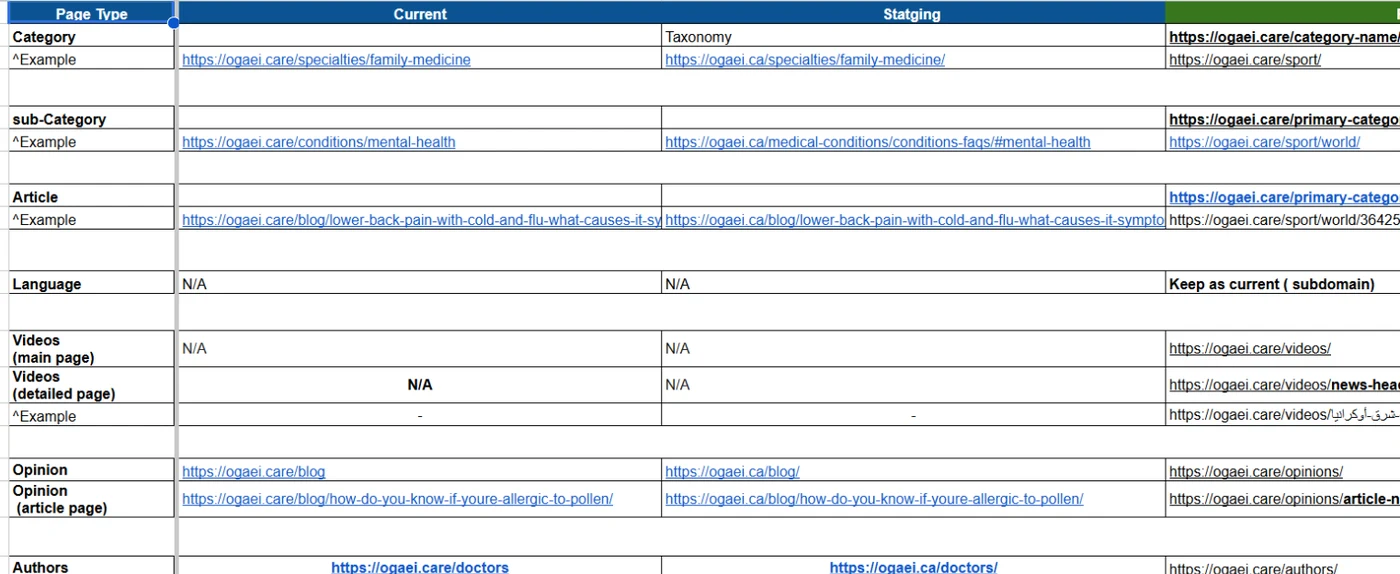
One row per page type. The current URL, the staging URL, and the destination. Categories, sub-categories, articles, videos, opinion pages, author profiles, tag pages and PDFs each get their own row with a worked example underneath, so nobody has to infer the rule from a pattern.
Most page types kept their exact path. A few did not, and those are the rows that matter, because a pattern-based redirect rule would have silently sent them to a 404. Writing the exceptions down is the difference between a map and an assumption.
If you take one artefact from this article into your own migration, take this one. Build it before anyone touches the new build, not after.
What we changed only after the migration was stable
Once the platform was proven stable, the second phase started. This is where design and conversion work belongs.
The registration flow was simplified by cutting the number of steps and the number of required fields.
Calls to action were rewritten for clarity and moved to clearer placements. Both changes were run as tests rather than shipped on somebody’s opinion, which is how you find out whether a change helped or only looked better.
The performance work moved the site from a failing score into the green on both mobile and desktop.
The screenshot below shows the kind of number we started from.
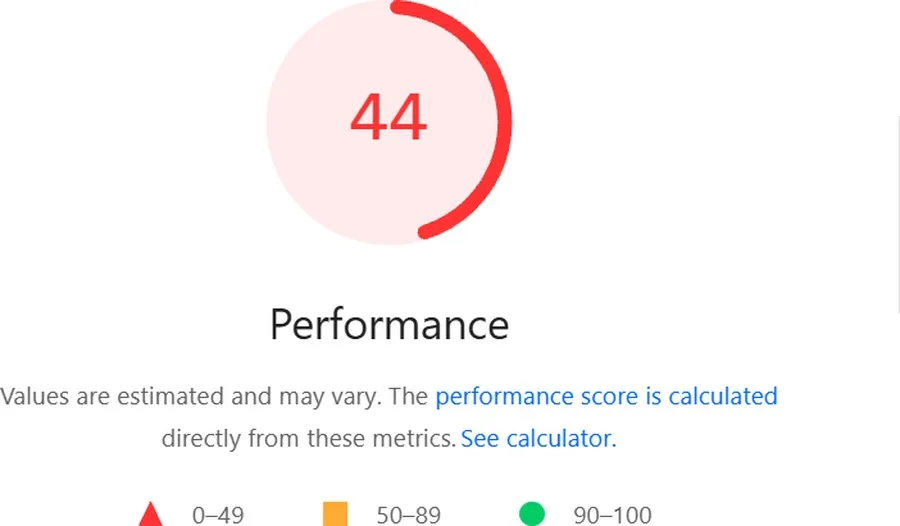
Speed is the easiest technical win to sell and the easiest to overstate, so here is the honest framing.
A Lighthouse score is a lab measurement taken on a simulated device. That makes it a useful diagnostic and a poor substitute for field data from your real users. We treat it as the thing that tells us what to fix, never as the outcome we are selling you.
What does a medical trust layer need to carry?
On a telehealth site the credibility signals are not decoration around the content. They are most of the product.
Every medical article carries the name of the doctor who wrote or reviewed it, linked to a profile.
A visible last-updated date sits on the page, because medical information dates and your patient can tell. Authoritative external references sit at the foot of the article.
Related internal links point your reader to the next question they are likely to have, so somebody reading about symptoms can move to treatment or cost without going back to search.
That last one does far more work than it looks like it should.
On a health site your reader almost always has a second question waiting. The site that answers it is the site that keeps the session.
We also added mid-article calls to action and tracked how many readers clicked through to book after reading, rather than assuming that an article that ranks is an article that converts.
What do the results actually measure?
Scoping matters more than size here. Every figure below carries the tool it came from and the window it covers.
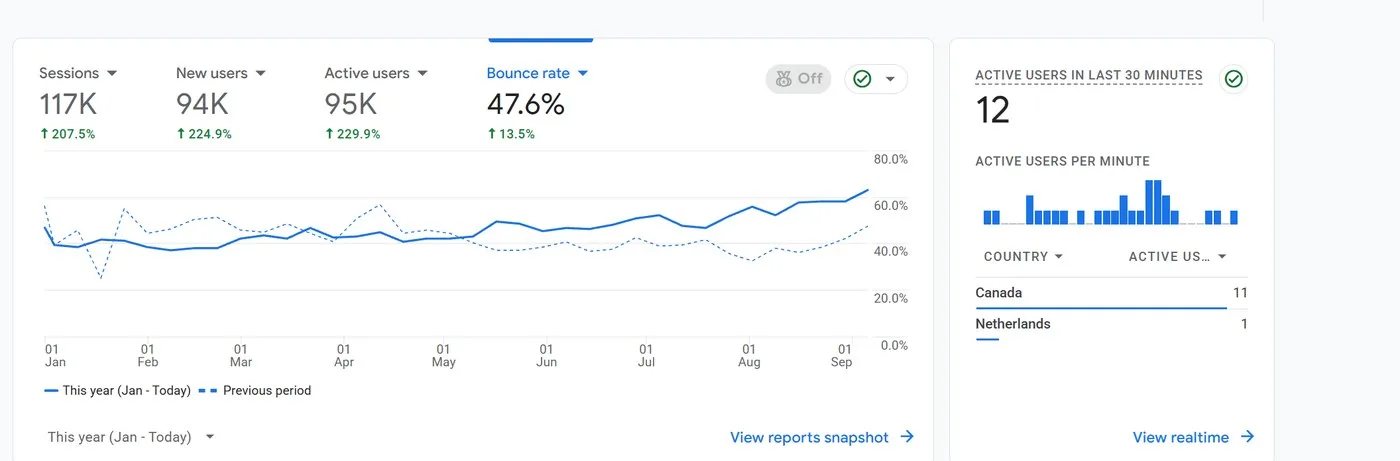
For January to September 2026, GA4 records 117,000 sessions, up 207.5%, and 95,000 active users, up 229.9%. Those are property-wide totals across every channel, not organic alone.
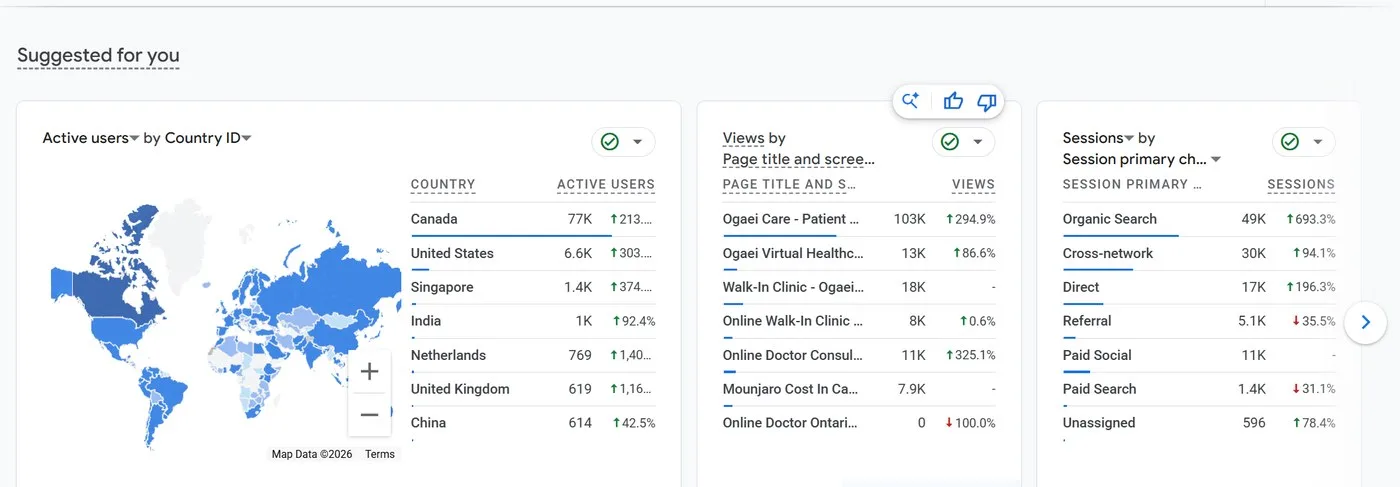
Broken out by channel, organic search reached 49,000 sessions for the same period, up 693.3% year over year.
Cross-network contributed 30,000 and direct 17,000, and the most-viewed page reached 103,000 views.
These are GA4 session figures. The search-side story for the same client, measured in Search Console clicks rather than sessions, is in our earlier write-up on how Ogaei’s organic traffic grew.
They are not the same as the Search Console click figures published in our Ogaei case study, which cover a different window and count a different thing. Mixing the two is how agencies inflate their own results by accident, so we keep them separate and label both.
The number that went the wrong way
Bounce rate over the same period is 47.6%, and it rose 13.5% year over year.
We are publishing it because leaving it out would make everything above it less trustworthy.
Here is our reading of it, offered as a reading rather than a measured attribution.
When organic sessions grow nearly eight fold, your traffic mix changes underneath you. Most of that growth came from informational queries, people researching medication costs and comparing their options.
An informational visitor bounces more than someone who landed on your booking page with intent, so a property-wide bounce rate that mixes both will rise even when nothing has actually got worse.
The way to test that properly is to segment bounce rate by landing page type and compare like with like, which is a different analysis from the one this figure represents.
The general point is worth more to you than this specific case. A single property-wide engagement metric is close to meaningless during a period of rapid traffic growth, and any agency quoting one at you without a segment behind it is either not looking closely or hoping that you will not.
What this migration does not prove
Three limits worth stating.
It does not prove the migration alone caused the growth. Content, technical fixes and conversion work all ran alongside it, and no single intervention can be isolated on a live commercial site without a control group you do not have.
It does not prove zero loss either.
A clean migration protects equity. The honest claim we can make is that we saw no ranking collapse and the trajectory kept climbing, not that we can prove a counterfactual that never happened.
And it is one migration, on a mid-sized site, in one market. A five million page replatform is a different engineering problem with different failure modes, and we would not extrapolate this checklist to that without saying so.
Objections we hear
“Can we not just change the domain now and rebuild the site later?”
You can, and separating them is usually safer when the choice is yours.
We combined them here because the platform change was already committed. If you do have a choice, put a full quarter between them and let each one stabilise before you start the next.
“How long before rankings recover after a migration?”
There is no honest single answer, and anyone who gives you a fixed number is guessing.
What is measurable is whether the mechanics are correct: redirects resolving in one hop, no non-301 status codes, index coverage stable, and no drop in crawl rate. Get those right and recovery becomes a question of Google’s schedule, not your implementation.
“Do we really need the same-day audit?”
Yes, and it is the single cheapest item on the whole list. It is also the one that catches the expensive mistakes, because redirect chains and stray noindex tags never announce themselves.
“Our current site is on an old platform. Is it worth moving?”
That depends on what your current platform is costing you, not on what SEO gains you are imagining.
If your templates cannot render clean metadata, if your page speed is capped by the stack, or if publishing is slow enough that your content pipeline stalls, then the migration pays for itself. If the platform works and you simply want a new look, redesign without moving.
The more useful question
The question is not whether a migration is risky. All of them are.
The real question is whether your migration has a written owner against every step before launch day.
The checklist above is not clever, and it is not meant to be. It is ordinary work done in order, with the URL map treated as the thing every other step depends on.
Most migrations that lose traffic do not fail because the team lacked skill. They fail because somebody assumed a step belonged to someone else.
If you are planning a domain change, a replatform, or both, start by writing the two columns that matter: every task, and the name next to it. Talk to us about your migration if you want a second pair of eyes on the map before you commit.
Related guides
Want more people
to find your website?
Strategy call and
full site audit

Read also

Article Sovereign AI in the Gulf: What Arabic Models Mean for How Your Business Gets Found

Article Clinic SEO Case Study: How We Took a Kuwait Clinic to #1 on Google and Into AI Answers in 2 Months
Article Hospital SEO Case Study: How Al Mouwasat Grew Non-Brand Traffic 2.9X to 314K Monthly Visits
Article Screaming Frog for JavaScript Sites: How to Crawl What Search Engines Actually See
Article Retrieval or Memory? How to Tell Why an AI Got You Wrong
Article How to Choose a GEO Agency in Egypt and the Gulf: A Buyer’s Checklist

Article ChatGPT Referral Traffic Fell 46%: What Gulf Brands Should Check
Article 301 Redirects: What They Are and How to Set Them Up Correctly






Real Results
More Wins
SEO & GEO for Delta Medical Labs
 GEO
GEO
1M+ monthly organic visits, 159,200 ranked keywords, 5,570 pages cited by AI engines, and 1,186 #1 rankings in KSA.

Arabic SEO, GEO & guest posting for VPNly
 SEO
SEO
65K peak monthly organic visits, 55 guest posts, and 149 pages cited by AI engines.

SEO & GEO for Ogaei Virtual Care
GEO
From 3 to 7,931 monthly organic clicks in 7 months, 2.9M+ impressions, and 40+ keywords in Google’s Top 10.

SEO for Eduverse
SEO
12× search traffic in 10 months, 45% of target keywords in the top 5, and 55% in the top 10.
Trusted by