

The Title Meta Tag: What It Is and How to Write It
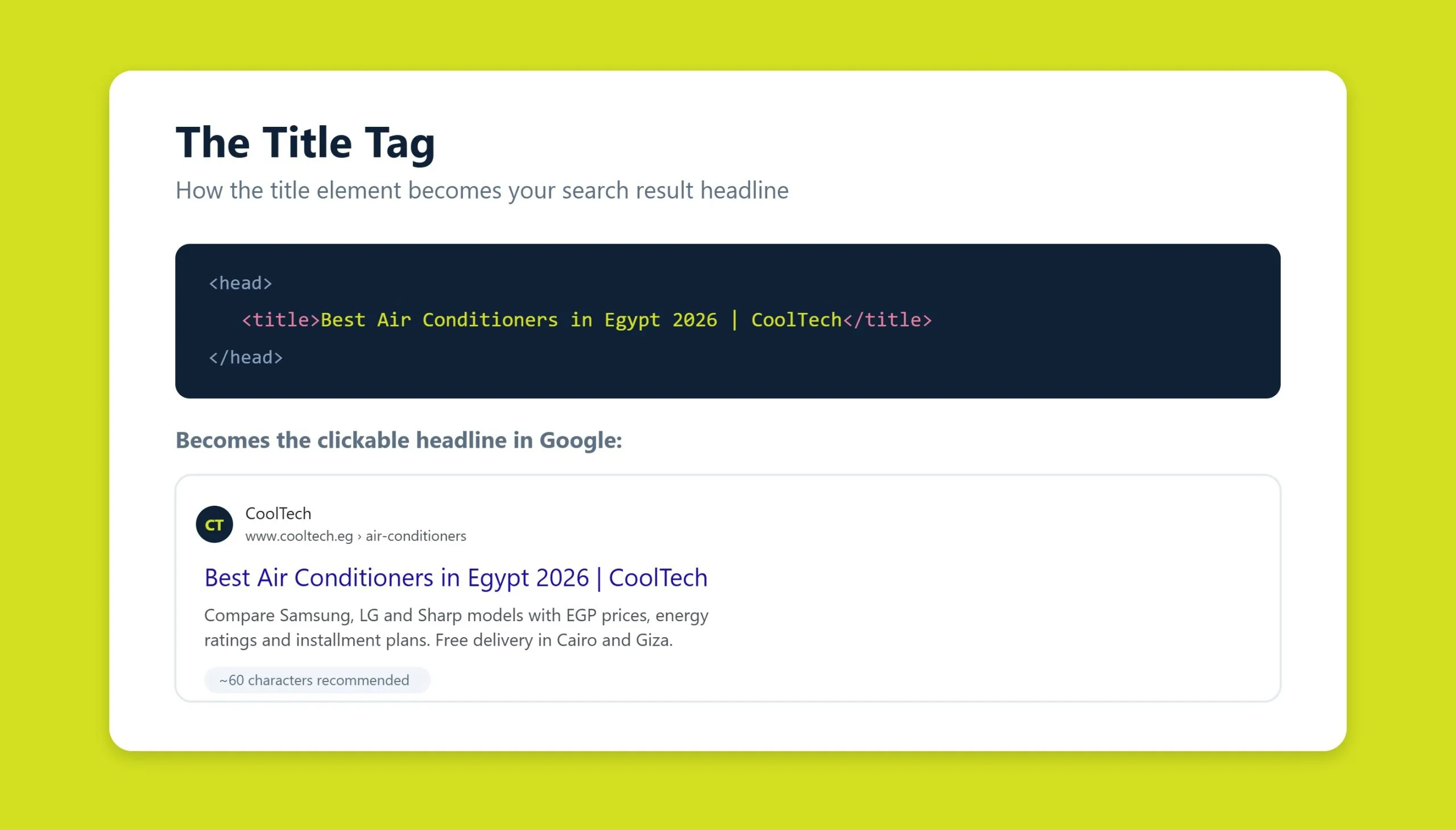
The title meta tag (or “title tag”) is the HTML element that defines the clickable headline Google shows for your page in search results. It lives in the <head> of your document as <title>Your Page Title</title>, and it is one of the most influential on-page signals you control. A well-written title tells search engines what the page is about, helps it rank for the right queries, and persuades people to click. Aim for roughly 50-60 characters, lead with your primary keyword, keep every title unique, and add your brand at the end.
Key takeaways
- The title tag is HTML metadata that becomes the blue, clickable headline in search results and the label on browser tabs and social shares.
- It is a direct ranking factor and the single biggest driver of organic click-through rate (CTR), so it works for both search engines and people.
- Keep titles around 50-60 characters (about 600 pixels) so Google does not truncate them in the SERP.
- Put your primary keyword near the front, keep each title unique across the site, and append your brand name at the end.
- Do not confuse the title tag with the H1 heading. The H1 sits on the page; the title tag represents the page in search and social.
- Google rewrites titles it considers unhelpful, so give it a strong, accurate title it has no reason to change.
What the title tag is
The title tag is a piece of HTML metadata placed inside the <head> section of a web page. It is not visible in the body of the page itself. Instead, it surfaces in three important places: the headline of your listing in Google and other search engines, the label on the browser tab, and the title used when the page is shared on social platforms or in messaging apps.
Because the title tag applies to the whole document, not just the article text, it works together with every other element on the page: the navigation, the footer, the sidebar, and any supporting blocks. That whole-page scope is exactly why it deserves careful attention.
Title tag vs. H1 heading
A common mistake is treating the title tag and the H1 heading as the same thing. They are not. The H1 is the on-page headline a visitor reads once the page has loaded. The title tag is what appears in the search results and in social previews, often before anyone has visited your site at all.
Keep the two closely related but not identical. If they are word-for-word duplicates, you waste an opportunity to target additional keyword variations, and your H1 can end up stiff and over-optimized instead of readable. Write the title tag for the search snippet and the H1 for the person already on the page.
Why the title tag matters for rankings and CTR
The title tag pulls double duty. First, it helps search engines understand and rank your page for relevant keywords. Google reads the title as a strong hint about the topic and intent of the document, which is why keyword placement inside it still carries real weight. If you want a structured way to find those issues across a whole site, a professional SEO audit will flag missing, duplicate, and truncated titles at scale.
Second, the title is your storefront in the results. Even a page that ranks well earns nothing if no one clicks it. A specific, compelling title lifts click-through rate, and higher CTR sends positive engagement signals back to search engines. The reverse is also true: if you over-promise in the title and the page disappoints, people bounce quickly, and that behavior tells search engines your result was not a good match.
Writing titles is one of the least labor-intensive parts of on-page optimization, yet the payoff is outsized. Ranking depends not only on the title but also on whether visitors stay and engage after they arrive, so an honest, accurate title that sets the right expectation protects both your rankings and your conversions. It is a foundational piece of any broader SEO strategy.
Optimal length: about 50-60 characters
Google truncates titles that are too long, usually cutting them off around 600 pixels of width, which for most fonts works out to roughly 50-60 characters including spaces. Anything beyond that risks being shortened with an ellipsis, so your most important words never get seen.
Search engines can read and index a longer title, but there is little point in front-loading value beyond the visible cutoff. The practical rule is simple: fit the essential message, including your main keyword, into the first 50-60 characters, and treat anything after that as a bonus that may or may not display. The closer a word sits to the start of the title, the more weight it carries and the more likely it is to be shown.
Keyword placement
Lead with the keyword the page is built to rank for. Because that phrase should live inside the first 60 characters, place it as close to the beginning as the language will allow while still reading naturally. Secondary keywords, synonyms, and modifiers belong later in the title, where their diminishing prominence matches their supporting role.
Do not overstuff. Aim for one exact-match use of your primary keyword, optionally reinforced by a synonym or a natural variation, rather than repeating the same phrase two or three times. Search engines largely ignore prepositions, conjunctions, and articles for ranking, so keep those connecting words to the minimum needed for the title to read clearly.
Be careful with commercial modifiers too. Do not pile up overlapping terms like “buy” and “order” or “cheap” and “low price.” Pick complementary pairs, such as “buy” plus “price,” so each word adds a distinct angle instead of echoing the last one.
Brand and uniqueness
Adding your brand or company name is the easiest way to make a title unique. Search engines reward unique titles, and on competitive queries, uniqueness is hard to achieve when everyone is targeting the same keywords. Your brand name is original by definition, so it differentiates any title instantly.
In most cases, place the brand at the end, separated by a pipe: Primary Keyword - Supporting Detail | Brand. The exception is when the brand itself is a core part of the query, as with well-known names like Apple or Nike, where leading with the brand makes sense.
Uniqueness is not optional. The golden rule of on-page SEO is one unique title per page. Duplicate titles across your own site confuse search engines about which page to rank and dilute your relevance. Where near-duplication is unavoidable because of shared keywords, differentiate with a category, a location, or the brand name at the end.
A few style rules keep titles clean. Use punctuation sparingly. Dashes, commas, and colons are fine when they aid clarity, but avoid periods, question marks, and exclamation points, and use the pipe as a divider instead. Skip ALL CAPS, which reads as shouting rather than emphasis, and avoid empty superlatives like “best,” “cheapest,” or “number one,” which add length without adding trust.
Title templates for common page types
Universal advice only goes so far. Titles should match the purpose and content of each page type, so the formula that works for a product page is wrong for a home page. Use these patterns as starting points, then adapt them to your keywords and market.
Home page
Optimize the home page for the one or two keywords that best capture what the business does, and keep it short. There is no need to cram in every service.
Example: Laptop & Tablet Online Store | Best Price
Category page
Start with the category name, then add a commercial or locational modifier and the store name. To avoid repeating the category word, use a synonym or a different grammatical form.
Example: Buy Lenovo Laptops in Chicago - Prices | Best Price
Product page
Follow the pattern of product name, a commercial modifier, and the brand. Adding a genuine price signal can improve CTR when it is accurate.
Example: Lenovo IdeaPad 5 Laptop - Buy at a Great Price | Best Price
Blog or informational page
For editorial content, drop the rigid ecommerce formula and write a title built from the most important keywords, phrased for a reader. Use the primary phrase as an exact match and vary the supporting terms.
Example: Iron-Deficiency Anemia: Diagnosis, Treatment, and Prevention
Getting these patterns right at scale is where content marketing and SEO reinforce each other. Consistent, well-structured titles across a content library compound into stronger topical authority.
Common mistakes to avoid
- Duplicate titles. Reusing the same title on multiple pages forces search engines to guess which one is relevant.
- Titles that are too long. Anything past roughly 60 characters risks truncation, hiding your key message.
- Keyword stuffing. Repeating the target phrase or chaining redundant commercial terms reads as spam and can suppress CTR.
- Missing keywords. A clever but vague title that omits the phrase people actually search for leaves rankings on the table.
- Over-promising. Titles that exaggerate what the page delivers drive quick bounces and erode trust.
- Superlatives and ALL CAPS. Words like “best” and “huge,” or shouting in capitals, add noise, not persuasion.
- Ignoring search intent. A commercial title on an informational query, or vice versa, mismatches what the searcher wants.
How Google rewrites titles
Even with a title tag in place, Google does not always display it verbatim. When the algorithm judges a title to be unhelpful, for example because it is stuffed with keywords, left as boilerplate, far too long, or too generic, it may generate its own headline using your H1, other on-page text, anchor text, or structured data.
You cannot force Google to keep your title, but you can make rewrites far less likely. Write a concise, accurate, and unique title that clearly describes the page and matches its main heading. When your title genuinely reflects the content and the query, Google has little reason to swap it out. Optimizing for how AI-driven and answer-based results interpret your pages matters more every year, which is where GEO (AI SEO) and answer engine optimization come in, and a strong, descriptive title is a shared foundation for all of them.
Frequently asked questions
What is the ideal length for a title tag?
Aim for roughly 50-60 characters, or about 600 pixels wide. Search engines can read longer titles, but Google typically truncates anything beyond that width in the results, so your most important words, including the primary keyword, should sit in the first 60 characters.
Is the title tag the same as the H1 heading?
No. The title tag lives in the HTML head and appears in search results, browser tabs, and social previews. The H1 is the visible headline on the page itself. They should be related and reinforce the same topic, but they should not be identical, so you can target slightly different keyword variations and keep the H1 readable.
Does the title tag affect Google rankings?
Yes. The title tag is a recognized on-page ranking signal that helps Google understand your page’s topic, and it is also the biggest lever for click-through rate. Better CTR sends positive engagement signals, so a strong title influences rankings both directly and indirectly.
Should I include my brand name in the title tag?
Usually yes, placed at the end after a pipe. Your brand makes every title unique, which search engines reward, and it builds recognition in the results. The exception is when the brand is a core part of the search query, in which case it can lead the title.
Why does Google show a different title than the one I wrote?
Google rewrites titles it considers unhelpful, such as ones that are too long, stuffed with keywords, duplicated, or too generic. It then builds a replacement from your H1, page content, or anchor text. Writing a concise, accurate, unique title that matches your main heading is the best way to keep your own version.
Related guides
Want more people
to find your website?
Strategy call and
full site audit

Read also

Article Your Name in ChatGPT: AI Reputation for Individuals and Executives
Article How Much Does SEO Cost in Egypt, Saudi Arabia and the UAE in 2026?
Article Which Sites Do AI Engines Cite? What a 288-Answer Study Means for Gulf Brands
Article Google Algorithm Updates: Every Confirmed Update Since January 2025
Article ChatGPT Ads Context Hints: How to Write Them for Gulf and Arabic Campaigns
Article Google Ads Credit for New Advertisers: What a Google Premier Partner Can Apply for You
Article 25 Questions to Ask an SEO or GEO Agency Before You Hire One
Article GEO for E-commerce: How to Get Your Products Recommended by ChatGPT and Google AI


Real Results
More Wins
SEO & GEO for Delta Medical Labs
 GEO
GEO
1M+ monthly organic visits, 159,200 ranked keywords, 5,570 pages cited by AI engines, and 1,186 #1 rankings in KSA.

Arabic SEO, GEO & guest posting for VPNly
 SEO
SEO
65K peak monthly organic visits, 55 guest posts, and 149 pages cited by AI engines.

SEO & GEO for Ogaei Virtual Care
GEO
From 3 to 7,931 monthly organic clicks in 7 months, 2.9M+ impressions, and 40+ keywords in Google’s Top 10.

SEO for Eduverse
SEO
12× search traffic in 10 months, 45% of target keywords in the top 5, and 55% in the top 10.
Trusted by