
Broken Links: How to Find and Fix Them Yourself
A broken link is any hyperlink that leads to a page that no longer exists, usually returning a 404 “Not Found” error. Broken links frustrate visitors and quietly erode your search rankings, so the fastest way to protect your site is to audit for them regularly and fix each one by adding a 301 redirect, restoring the page, updating the URL, or removing the link. You do not need a developer to do this: with free tools like Google Search Console and a crawler such as Screaming Frog, most site owners and marketers can find and fix broken links themselves.
Key takeaways
- A broken link points to a URL that returns a 404 (or other error) instead of a working page.
- Broken links hurt user experience, waste crawl budget, and disrupt how link equity flows through your site.
- Find them with Google Search Console, a crawler like Screaming Frog, Ahrefs, or a free online link checker.
- Fix them by choosing the right action: 301 redirect, restore the page, update the URL, or remove the link entirely.
- Prioritize internal broken links and high-traffic pages first, then work through the rest.
- Broken links accumulate over time, so schedule ongoing monitoring rather than treating it as a one-off task.
What are broken links and 404 errors?
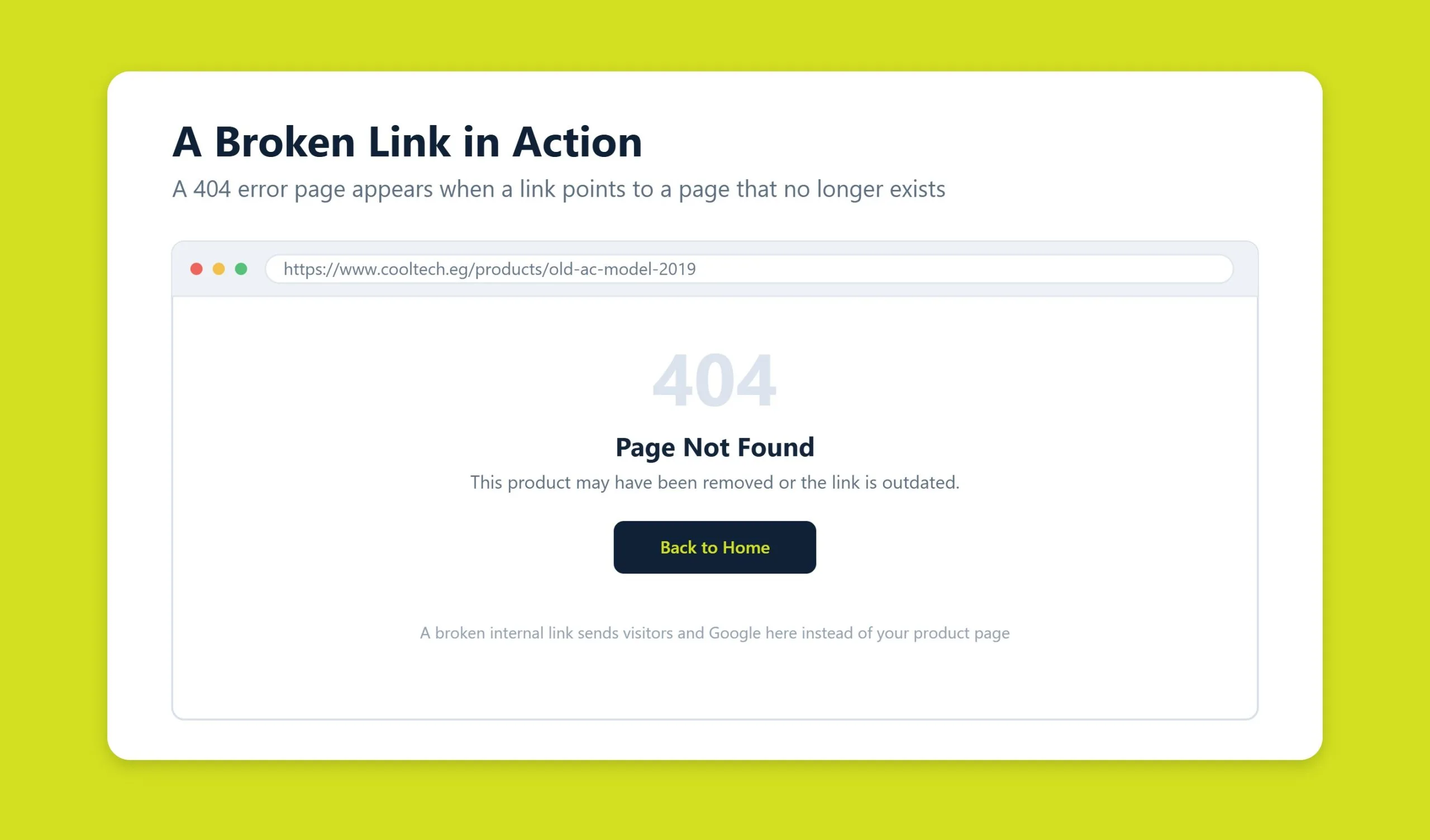
When you click a link and the browser loads a “404 Not Found” page instead of real content, you have hit a broken link. The server is telling you that the address exists in theory but there is nothing there to serve. Broken links come in two forms: internal links that point to other pages on your own website, and external links that point to pages on other sites.
External broken links are the easier problem. If a page you link to has disappeared, you simply swap the dead URL for a working equivalent, or remove the link, and the issue is resolved. Internal broken links are more damaging, because they signal that something in your own site structure has broken, and they directly affect how both users and search engines move through your pages.
Why broken links appear
There are three common reasons a working page turns into a 404:
- Typos and formatting errors in the URL. These happen during manual entry and automated link generation alike. A frequent culprit is a missing or extra trailing slash. Whenever you set a link for an automatic redirect or template, double-check the exact address.
- Site changes. Domain migrations, plugin updates, redesigns, and re-platforming can all break existing URLs. Always back up before major work, and set up redirects from old URLs to new ones whenever you change your structure. Skipping this step guarantees a wave of broken links.
- Deleted pages. Every site evolves, and some update weekly. If you remove a page without adding a redirect, anyone who follows an old link lands on a 404. For a large e-commerce catalog with constant product turnover, this can escalate into a serious problem.
Why broken links hurt SEO, UX, and crawl budget
A 404 page frustrates visitors. That is exactly why good marketers and SEO specialists design 404 pages that invite users to jump to the homepage or another section: the goal is to keep the person on the site instead of bouncing away. A 404 costs you the visit and wastes the crawl, and Google has repeatedly said it does not use bounce or pogo-sticking behaviour as a ranking signal.
But even a well-designed 404 page does not solve the underlying issue. Broken links break the promise the link made, which frustrates visitors and lowers the perceived quality of your resource.
Broken links also cost you traffic and dilute the value of your pages. They interrupt the flow of link equity, or “link juice,” that would otherwise pass from one page to another. On top of that, search crawlers spend time and resources hitting dead ends. On a large site, wasting crawl budget on 404s means genuinely useful pages may get crawled and indexed more slowly. Major search engines say a handful of broken links will not sink your whole site, and that is broadly true, but they still disrupt internal link distribution and annoy real people. That is reason enough to find and fix them promptly.
How to find broken links
You can find broken links manually, but dedicated tools are faster and far more reliable. Here are the ones global site owners reach for most.
Google Search Console
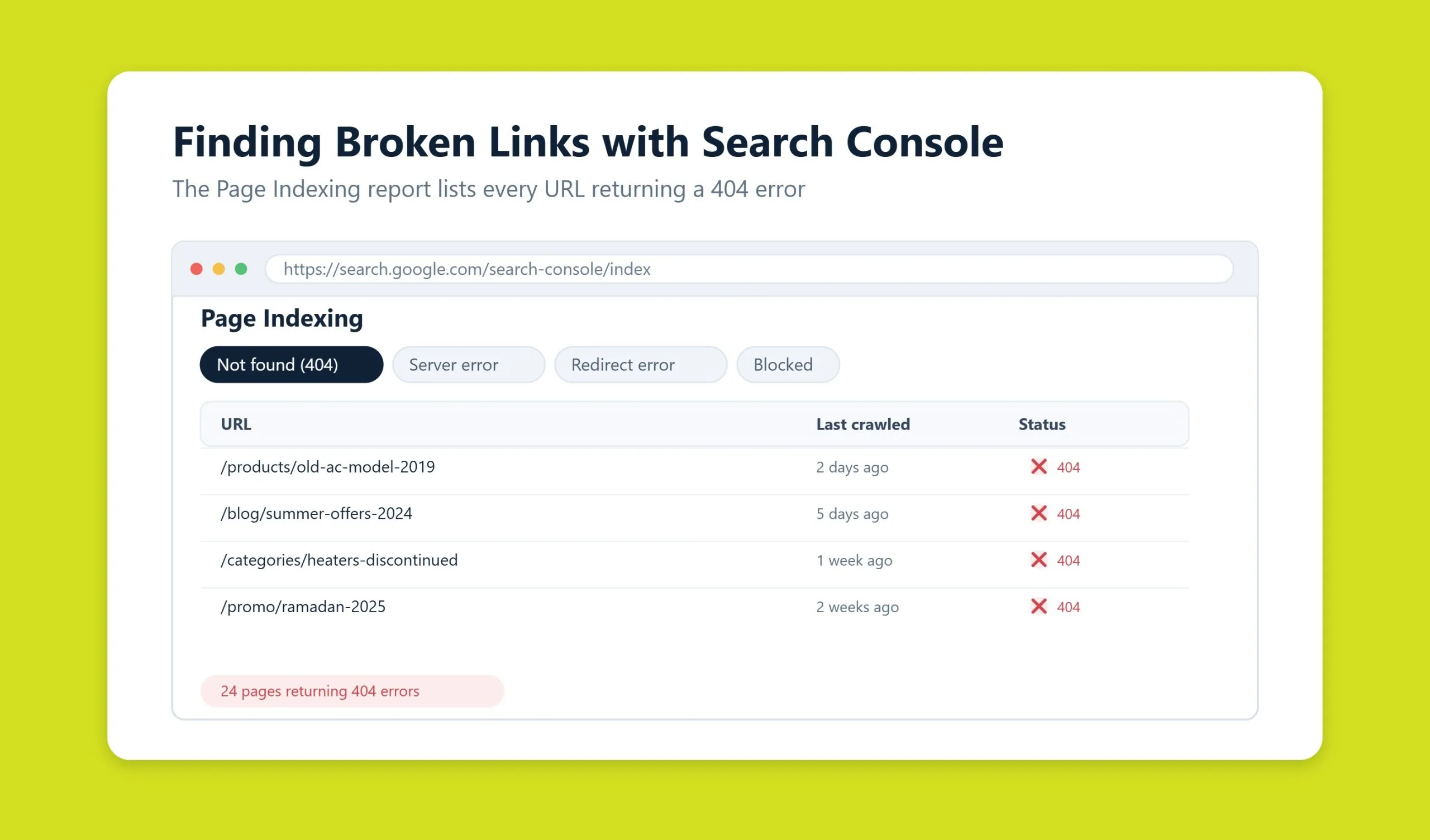
Google Search Console is free, connected directly to how Google sees your site, and the natural first stop. Open the Pages report (under Indexing) and review the “Why pages aren’t indexed” section. Look for the reason labelled “Not found (404)” to see the list of URLs Google tried to crawl but could not reach. You can click into that reason to export the full list, then validate your fixes once they are live. For deeper site health work, this pairs well with a professional SEO audit.
Screaming Frog SEO Spider
Screaming Frog is a desktop crawler that behaves like a search bot, visiting every link on your site and reporting the status code it receives. Run a crawl, then filter the Response Codes tab for “Client Error (4xx)” to see every broken internal and outbound link, along with the exact pages that contain them. As of August 2026 the free version covers up to 500 URLs, which is plenty for most small and mid-size sites.
Ahrefs
Ahrefs is a comprehensive SEO platform whose Site Audit flags broken internal and external links and maps them to the anchor text and source pages. It is especially useful for spotting broken backlinks pointing at your site, which are opportunities to recover lost authority with a redirect.
Online checkers and browser extensions
- Free online link checkers such as Dead Link Checker or Broken Link Check let you scan a URL from the browser without installing anything, which is handy for a quick spot check.
- Check My Links is a Chrome extension built to test all the links on a single page and highlight the broken ones in real time.
- Broken Link Checker exists as both a plugin and an extension and can surface every broken link on a page, including broken images.
To understand which broken pages matter most, cross-reference your findings with Google Analytics (GA4) traffic data. Fix the high-traffic pages first; lower-traffic URLs can wait, though not indefinitely.
How to fix broken links
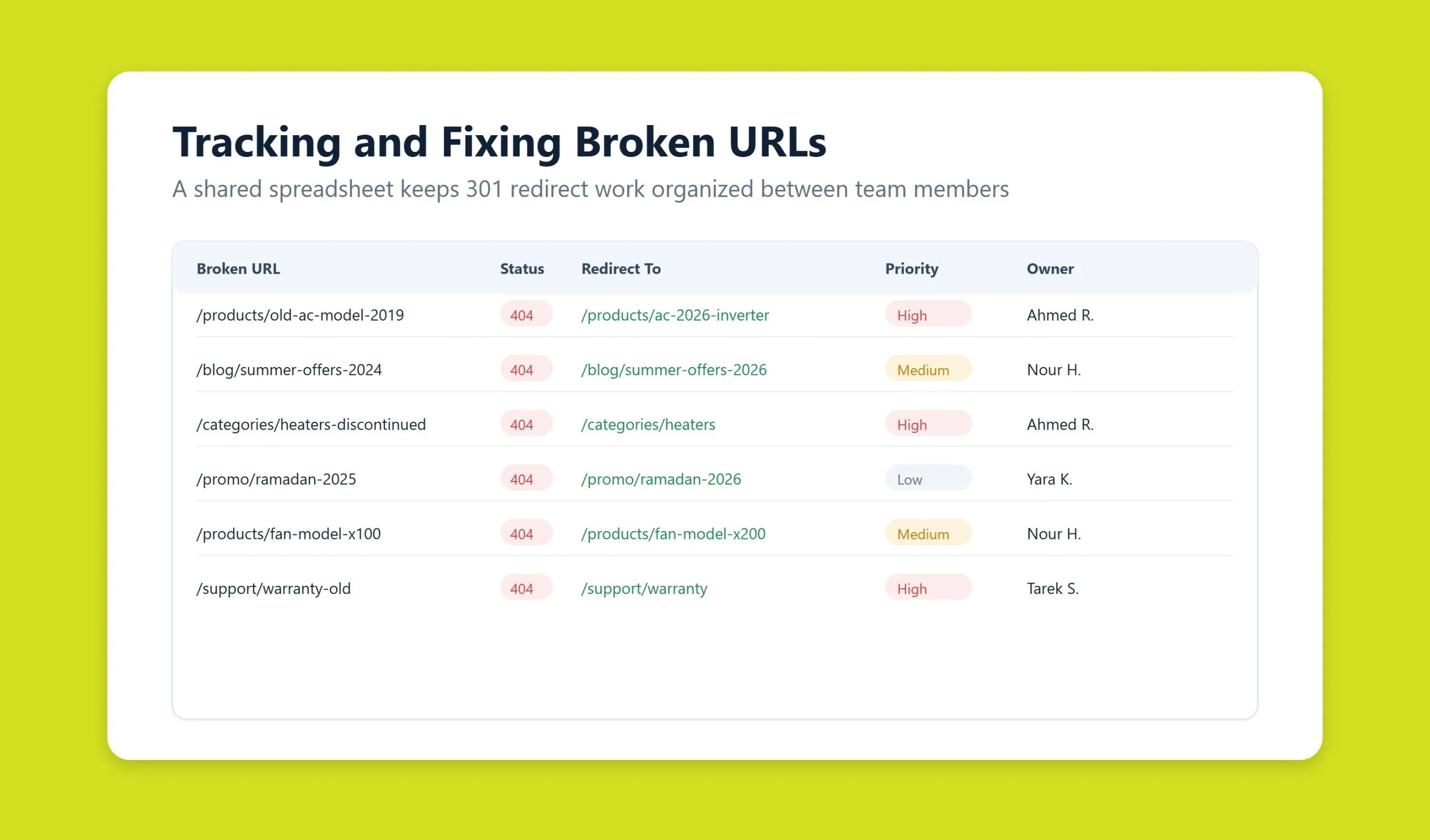
Finding broken URLs is only half the job. Once you have your list, each link needs to be corrected or removed so it stops dragging on user behavior and rankings. To stay organized, keep a simple spreadsheet with every broken URL and its intended replacement.
Update or replace the URL
Replacing a broken link is straightforward. Open the page that contains it, confirm the correct destination address, and edit the link through your CMS or admin panel. If only a handful of links are affected, you will clear them quickly. If the destination is genuinely gone and has no equivalent, remove the link instead of leaving a dead one in place.
Set up 301 redirects
When a URL has moved or a page has been retired but has a logical successor, a 301 redirect is the right fix. A 301 permanently forwards both users and search engines from the old address to a new one. Google states that 30x redirects pass full PageRank, so no link equity is lost. Redirects are essential when you have changed your site structure, renamed sections, or altered how pages are nested. On WordPress, the free Redirection plugin makes this easy, and our team handles it as part of ongoing WordPress development and maintenance. Use redirects deliberately, though: piling up excessive or chained redirects can cause pages to drop out of the index.
Restore the missing page
Sometimes the best answer is to bring the page back. Restoring is not practical if a hundred or more pages disappeared at once, but it is always worth checking whether any deleted pages were strong traffic drivers. If they were, restore them, and recreate the content if it no longer exists. A page that used to rank and convert is often worth rebuilding rather than redirecting.
Remove the link
If an internal link has no valid replacement and the page is not coming back, simply remove the link. It is far better to clean up dead links than to let them multiply, which is exactly what happens when owners and developers leave broken URLs unaddressed.
Internal vs external broken links
Treat internal broken links as the priority: they are fully within your control and they shape both crawl paths and the user journey through your site. External broken links, where you point out to another site that has since changed, are lower risk and usually resolved with a quick swap or removal. Either way, fixing at scale is where automation earns its keep. Correcting a dozen links by hand is fine; a migrated e-commerce site with fifty or more broken URLs is a job for a crawler and bulk edits, not manual labor. If the volume is overwhelming, our technical support team can take it on.
Ongoing monitoring
Broken links have an unpleasant habit of accumulating, so a single cleanup is never enough. Build a recurring routine: keep Google Search Console open for fresh 404s, schedule a monthly or quarterly crawl with Screaming Frog or Ahrefs, and re-check links after every migration, redesign, or bulk content change. Pair that with a genuinely useful custom 404 page that guides lost visitors back into your site. Consistent monitoring keeps link equity flowing, protects your crawl budget, and preserves the experience your audience expects. It is a core part of any well-run SEO program, and it matters increasingly for GEO (AI SEO), where AI answer engines cite sources they can reliably reach.
The bottom line: there is always more than one way out. Broken URLs can be removed, redirected, or replaced with current links, and in select cases the right move is to restore a deleted page that once pulled real traffic. Weigh each situation and choose the fix that best serves your users and your rankings.
The broken link pattern unique to Arabic sites
If your site publishes in Arabic, one cause of broken links appears far more often than any other on the list above, and standard crawlers frequently report it as healthy.
Arabic characters cannot appear literally in a URL, so they are percent-encoded. The browser hides this and shows you readable Arabic. That gap between what you see and what is actually requested is where links break.
Four failures to look for
- Double encoding. A percent sign gets encoded again, and a URL that looks perfect in the address bar returns a 404. This usually appears after a plugin update or a migration.
- Truncation. Encoded Arabic URLs are three to six times longer than they look. They hit length limits in redirect rules, sitemap entries and some server configurations, and get cut off mid-character.
- Links broken in transit. When someone copies an encoded URL into a message, email client or document, it is often split across lines or partially decoded. The link arrives dead, and you never hear about it.
- Inconsistent spelling in the slug. Arabic has orthographic variants, so the same article can be linked under two spellings. One resolves, the other does not.
Why your crawler may miss these
Many link checkers normalise URLs before requesting them. The tool encodes the link correctly, gets a 200 response, and reports no problem, while a real visitor clicking the same link from a chat app receives a 404. Verify a sample by hand, from a phone, using a link shared through a messaging app rather than clicked on the site itself.
The most reliable prevention is a slug policy decided once and applied everywhere. Whether you use Arabic script or transliterated Latin characters matters less than applying the same rule to every URL on the site, including ones created by plugins and by authors working directly in the editor.
Frequently asked questions
What exactly is a broken link?
A broken link is a hyperlink that points to a page that can no longer be reached, so instead of loading content the server returns an error, most often a 404 “Not Found.” Broken links can be internal (pointing to your own pages) or external (pointing to another website).
Do broken links hurt my Google rankings?
Indirectly, yes. Google says a few broken links will not penalize your entire site, but they raise bounce rates, waste crawl budget on dead ends, and disrupt how link equity flows between pages. Those secondary effects can hold back rankings, which is why prompt fixes are worth the effort.
How do I find broken links for free?
Start with Google Search Console, which lists 404 URLs Google has encountered on your site. Add the free tier of Screaming Frog SEO Spider (up to 500 URLs), a browser extension like Check My Links, or an online link checker for quick single-page scans.
Should I redirect or delete a broken link?
Use a 301 redirect when the page has moved or has a close equivalent, since it forwards users and preserves most link equity. Delete or remove the link when the page is gone for good and has no logical replacement. Restore the original page instead if it was a valuable, high-traffic URL.
How often should I check for broken links?
Run a full crawl at least monthly or quarterly, monitor Google Search Console continuously, and always re-audit immediately after a migration, redesign, plugin update, or bulk content change, since those are the events most likely to create new broken links.
Related guides
Want more people
to find your website?
Strategy call and
full site audit

Read also

Article Your Name in ChatGPT: AI Reputation for Individuals and Executives
Article How Much Does SEO Cost in Egypt, Saudi Arabia and the UAE in 2026?
Article Which Sites Do AI Engines Cite? What a 288-Answer Study Means for Gulf Brands
Article Google Algorithm Updates: Every Confirmed Update Since January 2025
Article ChatGPT Ads Context Hints: How to Write Them for Gulf and Arabic Campaigns
Article Google Ads Credit for New Advertisers: What a Google Premier Partner Can Apply for You
Article 25 Questions to Ask an SEO or GEO Agency Before You Hire One
Article GEO for E-commerce: How to Get Your Products Recommended by ChatGPT and Google AI




Real Results
More Wins
SEO & GEO for Delta Medical Labs
 GEO
GEO
1M+ monthly organic visits, 159,200 ranked keywords, 5,570 pages cited by AI engines, and 1,186 #1 rankings in KSA.

Arabic SEO, GEO & guest posting for VPNly
 SEO
SEO
65K peak monthly organic visits, 55 guest posts, and 149 pages cited by AI engines.

SEO & GEO for Ogaei Virtual Care
GEO
From 3 to 7,931 monthly organic clicks in 7 months, 2.9M+ impressions, and 40+ keywords in Google’s Top 10.

SEO for Eduverse
SEO
12× search traffic in 10 months, 45% of target keywords in the top 5, and 55% in the top 10.
Trusted by