
What Is a CMS: A Complete Guide to Content Management Systems
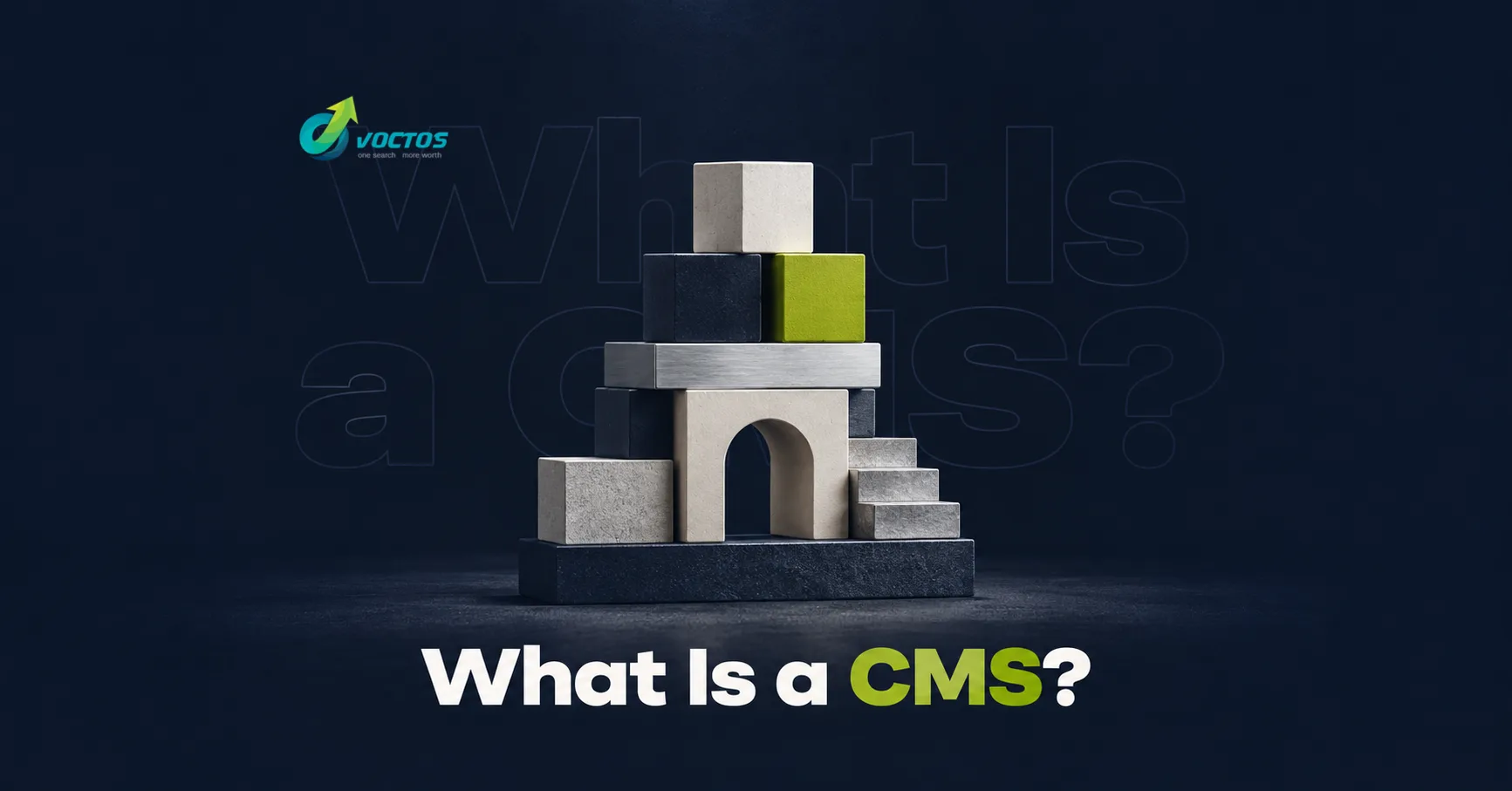
A CMS (content management system) is software that lets you build, publish, and manage a website without writing every page by hand in code. Instead of hiring a developer each time you want to add a blog post, update a price, or swap a photo, you log into a visual dashboard and make the change yourself. The CMS stores your content, applies a design template, and generates the pages your visitors see. Popular platforms such as WordPress, Shopify, Webflow, and Drupal all fall under this umbrella, and together they power the majority of the modern web.
Coding a site from scratch is slow and expensive, which is exactly why content management systems exist. They give solo bloggers, growing stores, and large enterprises a shared foundation: a place to manage content, a library of ready-made designs, and an ecosystem of plugins that add features on demand. This guide explains what a CMS is, how it works, the main types available, how to choose one for your project, and the SEO factors that separate a platform that ranks from one that holds you back.
Key takeaways
- A CMS separates your content from your code, so non-technical users can update a site through a visual dashboard.
- The main categories are open-source (e.g. WordPress, Joomla, Drupal), SaaS/hosted (e.g. Shopify, Wix, Squarespace), headless, custom-built, and framework-based systems.
- WordPress powers over 40% of all websites, making it the most flexible, developer-friendly, and SEO-capable choice for most projects.
- Match the platform to the goal: a blog or brochure site, an online store, or a high-traffic business application each have different priorities.
- SEO readiness, clean URLs, editable titles and meta descriptions, fast loading, and structured data, should be a deciding factor, not an afterthought.
- The right CMS lowers your total cost of ownership by reducing developer dependency while keeping room to scale.
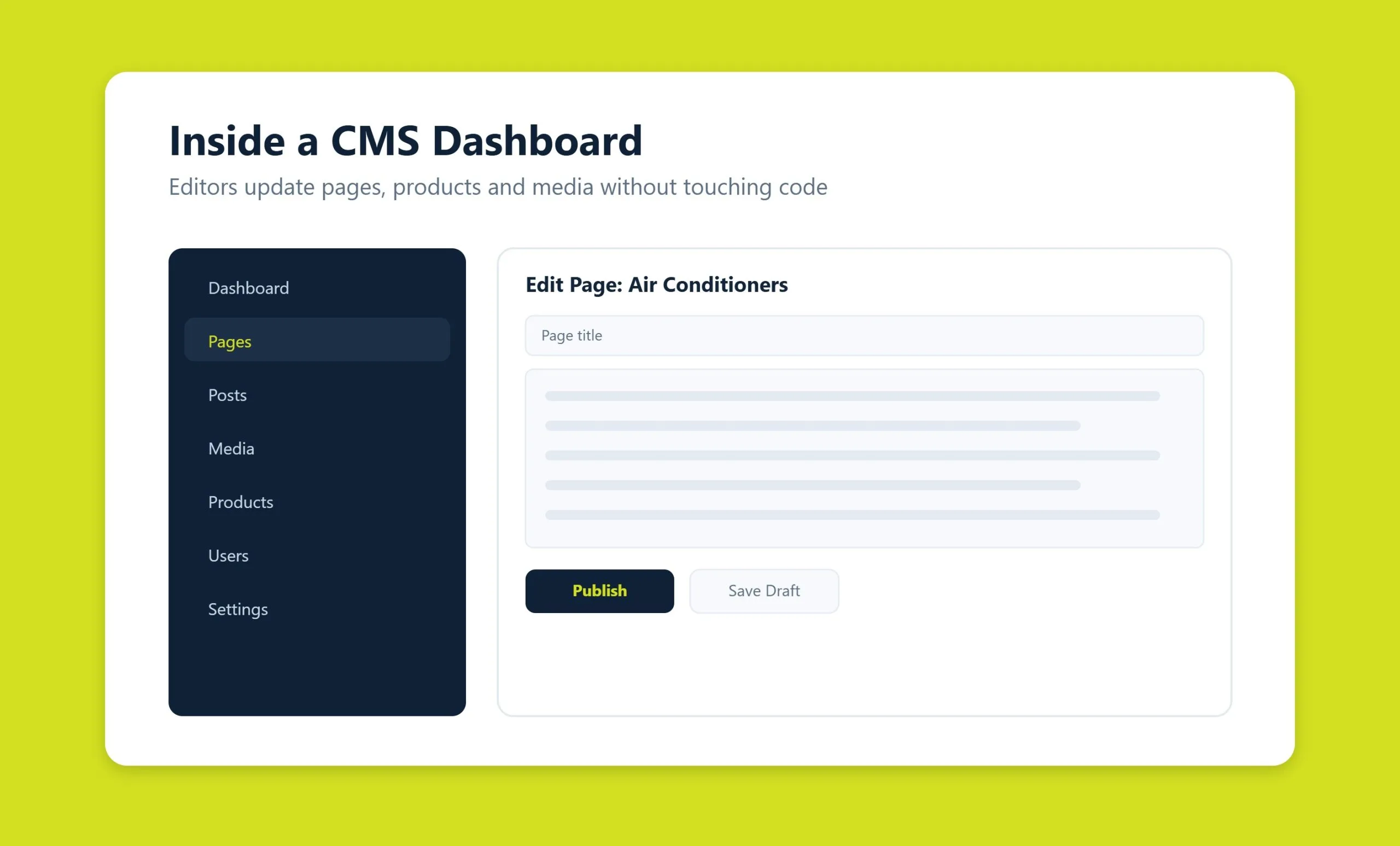
What is a CMS?
At its core, a content management system does two jobs. It stores your content, text, images, products, pages, in a database, and it presents that content to visitors using a design template or theme. Because the two layers are separate, you can rewrite a headline or upload a new banner without ever touching HTML, CSS, or the underlying database.
That separation is what makes a CMS so valuable. A marketer can publish an article, a shop owner can add a product, and an editor can schedule a campaign: all from the same admin panel, often at the same time. The system handles the technical work of turning those inputs into live, responsive web pages behind the scenes.
Most platforms also ship with a large catalog of themes and templates. Free themes let you launch a simple site in an afternoon, with the trade-off that thousands of other sites may share the same look. For a commercial project, a premium or custom theme gives you a distinctive design, usually for a modest one-time cost. Either way, you are not starting from a blank page.
How a CMS works
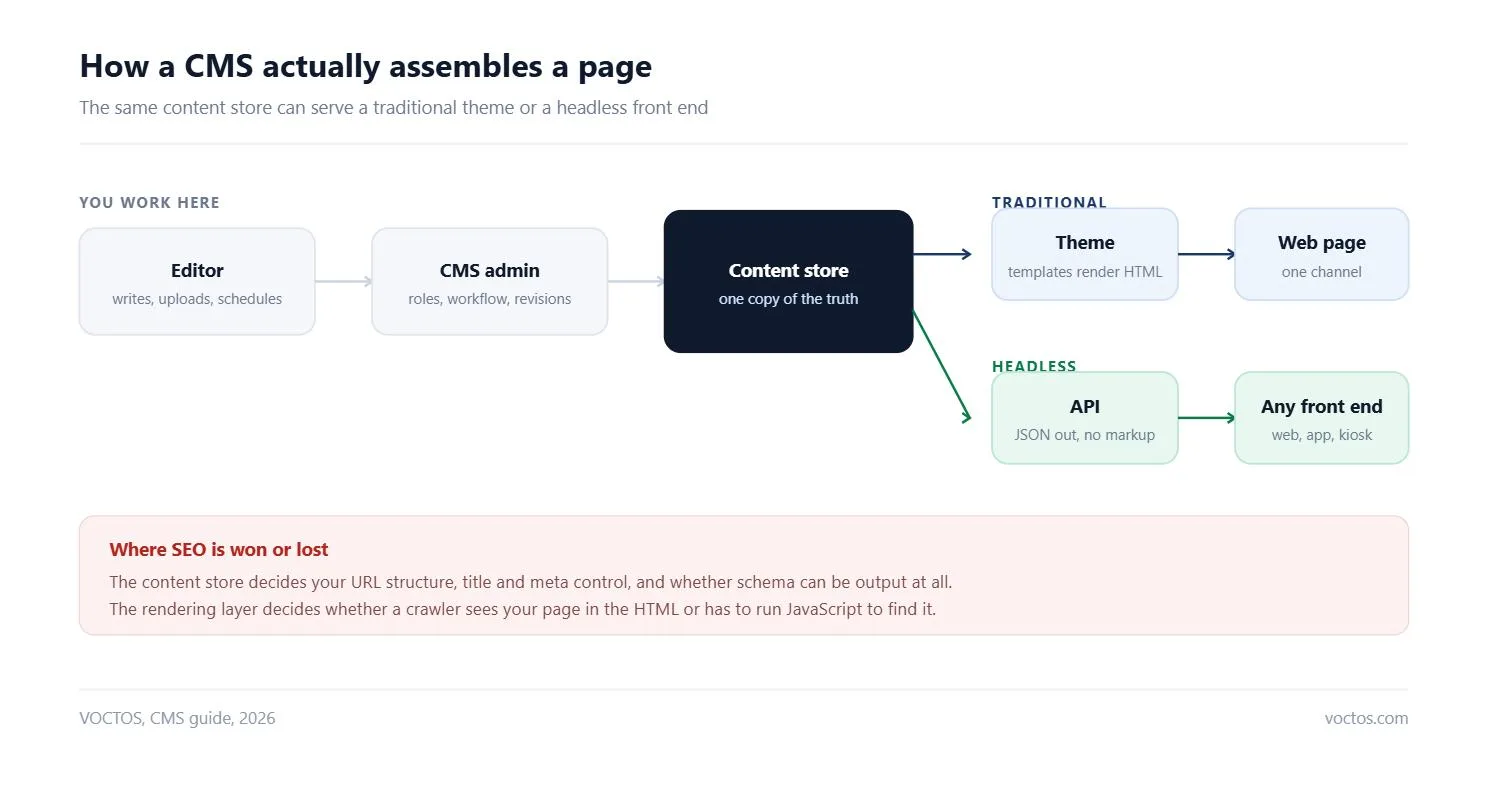
When a visitor opens one of your pages, the CMS pulls the relevant content from its database, drops it into the active template, and serves the finished HTML to the browser. On the back end, you work in an interface built around a few familiar building blocks:
- Content and media management. Visual editors, WYSIWYG or block-based builders like the WordPress Block Editor, let non-specialists format text, lay out pages, and build galleries. A built-in media library organizes images and can automatically compress and convert them to modern formats such as WebP and AVIF for faster loading.
- User roles and permissions. Role-based access control lets you give each team member exactly the access they need: an administrator manages settings, editors handle publishing, and an SEO specialist can be limited to meta tags alone.
- Built-in SEO tools. A capable CMS generates an XML sitemap, manages your robots.txt file, controls URLs and redirects, and lets you set a unique title and meta description for every page: the essentials for getting indexed by Google.
- E-commerce and integrations. For commercial sites, the platform manages product catalogs, carts, orders, and discounts, and connects through APIs to CRMs, inventory systems, shipping carriers, and payment gateways.
- Caching and performance. Code compression, page caching, and database query optimization keep load times low and keep the site stable during traffic spikes.
Types of content management systems
| CMS type | Who controls the code | Hosting | Best for | Main trade-off |
|---|---|---|---|---|
| Open-source | You, fully | Your own or a managed host | Blogs, brochure sites, most SMB projects | You own updates, security and plugin conflicts |
| SaaS and hosted | The vendor | Included | Teams that want to publish, not maintain | Limited server access, and you leave on their terms |
| Headless | You, on the front end | API plus your own front end | Multi-channel content: web, app, kiosk, voice | SEO basics must be rebuilt, nothing is free by default |
| Custom-built | You, completely | Your own | Unusual workflows a product cannot model | Every future change is a development ticket |
| Framework-based | Your developers | Your own | Products where content is one feature among many | Editors depend on developers for routine changes |
Not every CMS works the same way. Broadly, they fall into five categories, each with a different balance of freedom, cost, and maintenance.
Open-source CMS
Open-source platforms give you the full source code and, with it, complete control. WordPress, Joomla, and Drupal are the best-known examples. The advantages are compelling:
- No license fees. The software itself is free, so your budget goes toward design and marketing rather than the platform.
- Independence. You own the site outright. If a developer isn’t working out, you can hire another from a huge global talent pool.
- Flexibility. Access to the code means you can build any business logic and integrate with CRMs, ERPs, and payment gateways without artificial limits.
- A vast ecosystem. A worldwide community produces thousands of plugins and themes, letting you launch core functionality in days rather than months.
The trade-off is responsibility: you (or your agency) handle hosting, updates, and security. Because these platforms are so widely used, they are also common targets for automated attacks, which makes ongoing technical support and timely updates important.
SaaS and hosted CMS
Software-as-a-service platforms, Shopify, Wix, Squarespace, and Webflowbundle the CMS, hosting, security, and updates into a single subscription. You never touch a server; the vendor keeps everything running. Everything is included and configured out of the box, official support is a click away, and the closed environment reduces certain security risks.
The limitation is control. You work within the vendor’s feature set, deep customization can be difficult, and you pay a recurring fee for as long as the site is live. Migrating away later can also be harder. Hosted platforms suit teams that value predictability and speed over open-ended flexibility.
Headless CMS
A headless CMS, such as Contentful, Strapi, or Sanitymanages content but has no built-in front end. Instead, it delivers content through an API to any destination: a website, a mobile app, a smart display, or all three at once. Developers pair it with a modern framework (React, Next.js, Vue) to build the presentation layer.
This approach shines for brands that publish across many channels or want maximum performance and design freedom. It demands more development work than a traditional CMS, so it is best suited to teams with engineering resources.
Custom-built CMS
A custom, or bespoke, CMS is written specifically for one project. It is relatively rare, but it earns its place where performance and security are paramount, or where off-the-shelf plugins start to hold a project back. The benefits:
- Maximum performance. No unused universal features means a lean, fast site, which directly helps SEO and conversions.
- Uniqueness. The system is built around your exact business logic, with any custom workflow, animation, or internal integration you need.
- Stronger security by obscurity. A one-off architecture isn’t a known target for the mass bots that scan for popular CMS vulnerabilities.
- Clean, controlled code. With no third-party plugins, there is no risk of an update breaking the site through a module conflict.
The downsides are cost, longer development time, and dependency on the developers who built it. Documentation and clean code become critical.
Framework-based systems
Building a content-driven site on a framework such as Laravel, Symfony, or Django sits between a heavy off-the-shelf CMS and a from-scratch build. It is a strong choice for technically advanced, highly scalable projects:
- A clean architecture with no hundreds of unused functions or bloated themes, which means fast load times and healthy Core Web Vitals.
- Effortless scalabilityframeworks are built to handle heavy load, and you can add microservices, customer portals, or non-standard databases as you grow.
- Built-in security against common threats such as SQL injection, XSS, and CSRF.
- Maintainabilitycode follows strict standards (MVC), so a new developer can pick up the project without rewriting it.
Popular CMS examples
A handful of platforms dominate the market. Knowing their strengths helps you shortlist quickly.
- WordPress (with WooCommerce). The undisputed leader, powering more than 40% of all websites. It began as a blogging platform and evolved into a universal tool; adding the WooCommerce plugin turns it into a full online store. Pros: free, millions of plugins and themes, a huge community, and best-in-class SEO. Cons: too many third-party modules can make a site heavy, and its popularity makes it a frequent target for attacks, both manageable with good WordPress development and maintenance.
- Joomla. A versatile system sitting between simple WordPress and complex Drupal, often used for corporate sites, portals, and mid-size stores. It is free with strong core functionality and thousands of extensions, but the admin panel is dense and has a steeper learning curve.
- Shopify. A hosted, e-commerce-first platform that handles hosting, security, and payments for you. It is fast to launch and reliable, with the trade-off of monthly fees and a more closed environment.
- Drupal. A powerful open-source CMS favored for complex, high-security enterprise and government sites. Extremely flexible, but it demands more technical expertise.
- Wix and Squarespace. Drag-and-drop builders aimed at small businesses and individuals who want an attractive site quickly, with design freedom traded for platform limits.
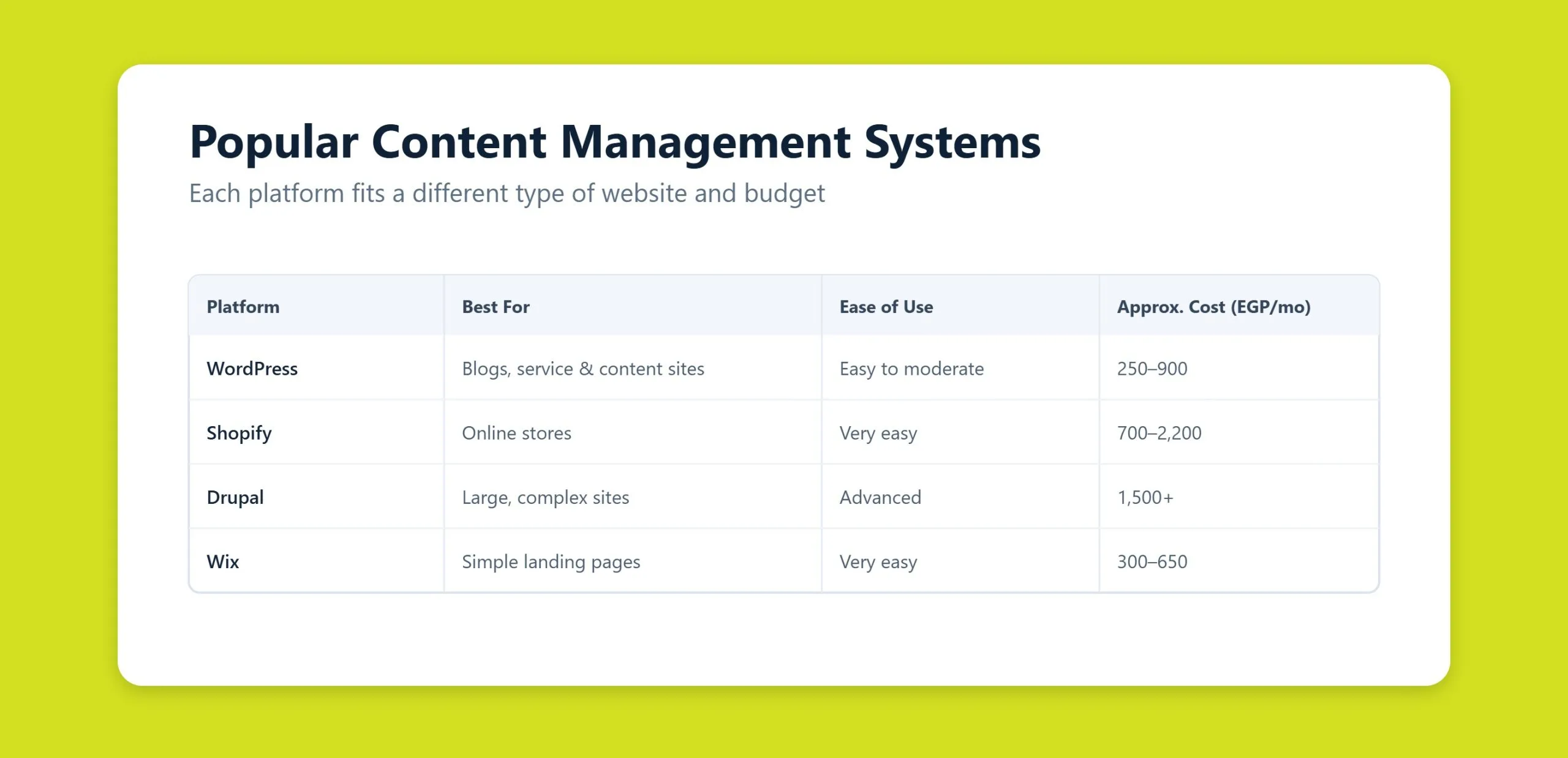
How to choose a CMS for your website
The best platform depends entirely on what you are building. Start with the goal, then work back to the technology.
For a blog or brochure website
If you need a personal blog, a portfolio, or a simple business card site, WordPress is the natural starting point. It installs on almost any host in minutes, offers a huge choice of free and premium themes, and gives you room to grow, when a blog matures into a business, you can bolt on WooCommerce and start selling. Its SEO capabilities are among the best available, which helps content gain visibility faster.
For an online store
E-commerce shifts the priorities to reliability, speed, data synchronization, and the security of customer information. Two common paths work well:
- Small to mid-size stores: WordPress plus WooCommerce is a budget-friendly launchpad for a catalog of roughly 1,000–3,000 products, giving you a flexible storefront with minimal upfront cost.
- Professional retail: a dedicated commerce platform such as Shopify, or a purpose-built e-commerce CMS, offers robust order management, built-in analytics, discounts, and multi-store support out of the box.
For any store, plan for integrations with your CRM, inventory system, shipping carriers, and payment gateways from the outset.
For a business or high-traffic site
Corporate sites and applications that expect heavy traffic or complex logic benefit from either a well-architected WordPress build, a framework such as Laravel or Django, or a headless setup. Here the deciding factors are scalability, performance, and long-term maintainability. If you want a site engineered for search from day one, a purpose-built approach to SEO-friendly websites pays for itself in organic traffic.
SEO considerations when choosing a CMS
| Decision point | What to check | Why it decides the outcome |
|---|---|---|
| URL control | Can you set the slug, and change it later without breaking links? | Systems that force IDs into URLs cost you clicks forever |
| Title and meta | Are they editable per page without a plugin? | If they are not, every page competes with a template |
| Rendering | Does the page exist in the HTML, or only after JavaScript runs? | Client-only rendering slows both Google and AI crawlers |
| Speed | What does the platform do to your Core Web Vitals out of the box? | A slow default theme is a permanent tax on every page |
| Structured data | Can you output schema without hacking templates? | Schema is how machines read your entity and offers |
| Crawler access | Can you edit robots.txt and control bot rules? | OAI-AdsBot and OAI-SearchBot need a path in |
| Export | Can you take content out in a clean, structured format? | This is the only thing that makes a future migration survivable |
| Multilingual | Does it handle RTL, hreflang and per-language URLs natively? | Bolt-on translation is where most Arabic projects lose rankings |
Your choice of platform has a direct, lasting effect on how well you can rank. A CMS that fights you on the fundamentals will cap your organic growth no matter how good your content is. Before you commit, check that it handles these essentials:
- Clean, editable URLs. The system should produce readable, keyword-friendly URLs and let you set redirects. Some platforms generate large numbers of duplicate or junk URLs by default and require cleanup work.
- Full control of title tags and meta descriptions. You need to edit these per page, non-negotiable for on-page SEO.
- XML sitemaps and robots.txt. Automatic sitemap generation and control over crawl directives help search engines index your pages efficiently.
- Speed and Core Web Vitals. Built-in caching, image optimization, and lean code keep load times fast: a confirmed ranking factor. Plugin bloat is the most common cause of slow sites.
- Structured data. Support for schema markup helps you win rich results and improves visibility in both traditional and AI-driven search.
- Mobile responsiveness as a default, since Google indexes the mobile version of your site first.
WordPress scores highly on all of these, especially with a dedicated SEO plugin, which is one reason it remains a favorite among marketers. If you’re unsure whether your current setup measures up, a professional SEO audit will reveal where the platform is helping or hurting, and our SEO services can turn those findings into rankings.
How to identify which CMS a website uses
Knowing which platform a competitor runs is a useful part of market analysis and planning your own build. There are several quick ways to check:
- Online checkers and extensions. Tools like BuiltWith and WhatCMS, or browser extensions such as Wappalyzer, scan a site in seconds and often reveal the CMS, analytics codes, plugins, and hosting.
- View the source code. Press Ctrl+U, then search for a
<meta name="generator">tag, many systems, including WordPress and Joomla, name themselves there. - File paths. Links containing
/wp-content/point to WordPress; other platforms have their own tell-tale directories. - Admin URLs. Appending a standard login path,
/wp-admin/for WordPress,/administrator/for Joomla, often reveals the platform if a branded login screen appears. - robots.txt. Visiting
site.com/robots.txtcan expose system folders that are unique to a given CMS.
If none of these methods work, you are likely looking at a custom-built site, a framework-based build, or plain HTML, some brands deliberately strip CMS fingerprints for security.
Choosing a CMS for an Arabic or bilingual site
Every platform above claims multilingual support. Few handle Arabic well without extra work, and the gaps only surface after you have committed. These are the questions worth asking before you choose.
Six checks before you commit
- Does the admin interface itself flip to right to left? If your editors work in Arabic and the dashboard stays left to right, every content update becomes slower and more error-prone.
- Does the theme mirror, or only align right? Aligning text to the right is not the same as mirroring the layout. Test breadcrumbs, dropdowns, sliders and progress steps specifically.
- How does it generate slugs from Arabic titles? Some platforms produce an empty slug, some produce a long encoded string, some transliterate. Decide which behavior you want before you have a thousand URLs.
- Does the site search handle Arabic spelling variants? If one spelling returns nothing while another returns results, internal search is effectively broken for a large share of visitors.
- Are language versions linked reciprocally and automatically? Maintaining those annotations by hand does not survive a growing site.
- Does the language switch preserve the page? Sending every switch to the homepage is common, and it loses both the user and the crawl path.
One structural decision matters more than the platform itself. Decide early whether Arabic and English live in one installation with linked content, or in two separate sites. One installation keeps your authority consolidated and is easier to maintain. Two sites are quicker to launch and much harder to keep aligned. Most regional teams that split them end up merging later, at considerable cost.
Frequently asked questions
What is a CMS in simple terms?
A CMS, or content management system, is software that lets you create and manage a website without coding each page by hand. You log into a dashboard, type your content into a visual editor, and the system publishes it as a live web page using a design template. WordPress is the most widely used example.
Is WordPress a CMS?
Yes. WordPress is the world’s most popular content management system, powering more than 40% of all websites. It started as a blogging tool and grew into a flexible platform for everything from portfolios to online stores, thanks to its enormous library of themes and plugins and its strong SEO capabilities.
Which CMS is best for SEO?
WordPress is generally considered one of the best CMS options for SEO because it offers clean URLs, full control over title tags and meta descriptions, automatic sitemaps, and dedicated SEO plugins. That said, any well-built platform with fast load times, mobile responsiveness, and structured data support can perform well. The build quality matters as much as the platform itself.
Is a CMS free?
It depends on the type. Open-source systems like WordPress, Joomla, and Drupal are free to download, though you still pay for hosting, a domain, and optional premium themes or plugins. Hosted SaaS platforms such as Shopify, Wix, and Squarespace charge a recurring subscription that covers hosting and support.
Can I switch to a different CMS later?
Yes, though migration takes planning. Content, URLs, and SEO settings all need to be transferred carefully to avoid losing rankings and traffic. Moving from a hosted platform can be more complex than moving between open-source systems. It’s best to choose a CMS that fits your long-term goals from the start, but a well-managed migration is entirely achievable with the right support.
Related guides
Want more people
to find your website?
Strategy call and
full site audit

Read also

Article Your Name in ChatGPT: AI Reputation for Individuals and Executives
Article How Much Does SEO Cost in Egypt, Saudi Arabia and the UAE in 2026?
Article Which Sites Do AI Engines Cite? What a 288-Answer Study Means for Gulf Brands
Article Google Algorithm Updates: Every Confirmed Update Since January 2025
Article ChatGPT Ads Context Hints: How to Write Them for Gulf and Arabic Campaigns
Article Google Ads Credit for New Advertisers: What a Google Premier Partner Can Apply for You
Article 25 Questions to Ask an SEO or GEO Agency Before You Hire One
Article GEO for E-commerce: How to Get Your Products Recommended by ChatGPT and Google AI





Real Results
More Wins
SEO & GEO for Delta Medical Labs
 GEO
GEO
1M+ monthly organic visits, 159,200 ranked keywords, 5,570 pages cited by AI engines, and 1,186 #1 rankings in KSA.

Arabic SEO, GEO & guest posting for VPNly
 SEO
SEO
65K peak monthly organic visits, 55 guest posts, and 149 pages cited by AI engines.

SEO & GEO for Ogaei Virtual Care
GEO
From 3 to 7,931 monthly organic clicks in 7 months, 2.9M+ impressions, and 40+ keywords in Google’s Top 10.

SEO for Eduverse
SEO
12× search traffic in 10 months, 45% of target keywords in the top 5, and 55% in the top 10.
Trusted by