

A WordPress plugin, built by VOCTOS
Your best pages are ageing out, and nothing says so
Reviva scores every published page on ten decay signals, pulls the live Google top 10 for the ones you pick, and hands back a refresh brief with a source URL behind every claim. The scan is free and reads nothing but your own database.
The scoring model, published
Ten signals. One of them is decay
Every published page is scored on ten signals before a single API credit is spent. These are the real weights, and the bar heights are the numbers.
- 01 Months since the last real edit
- 02 Search Console clicks actually fell
- 03 A stale year sitting in the title
- 04 Never edited since publication
- 05 Thin against your own word floor
- 06 Newest year in the body is old
- 07 Percentage claims that may have aged
- 08 Fewer than three internal links
- 09 Schema says it is older than it is
- 10 A long post with no H2 structure
Raw total 131 points, capped at 100. The score is a queue position, not a diagnosis.
How it works
Three passes. Only the middle one spends anything
The first pass reads your own database. The second goes and looks at the live search results. The third turns what it found into something a writer can act on.
Decay scan
Scores every published page on ten signals, reading nothing but your own database. Age since the last real edit carries up to 40 points, a stale year in the title up to 15, and a measured Search Console click drop up to 25 on its own.
Live research
For the pages you choose, Reviva pulls the live Google top 10, then fetches and parses every ranking page in it for heading outline, word count, schema types and last modified date. It runs a news pass on the topic and checks your outbound links for rot.
Report
A single AI call turns the evidence into a verdict, a list of what changed in the world with a source URL against each item, the sections your rivals cover that your page skips, and an action plan ranked by effort and impact.
Reviva sends 0 bytes to VOCTOS. Every request goes from your server straight to the AI and SERP providers you configured, on your own keys, billed to your own account.
Inside the plugin
Six screens, and what each one is for
These are real screenshots from a live install on this site. Nothing is mocked up, and the numbers are the ones Reviva produced on our own published pages.
 Open full size
 The dashboard, before you spend anything
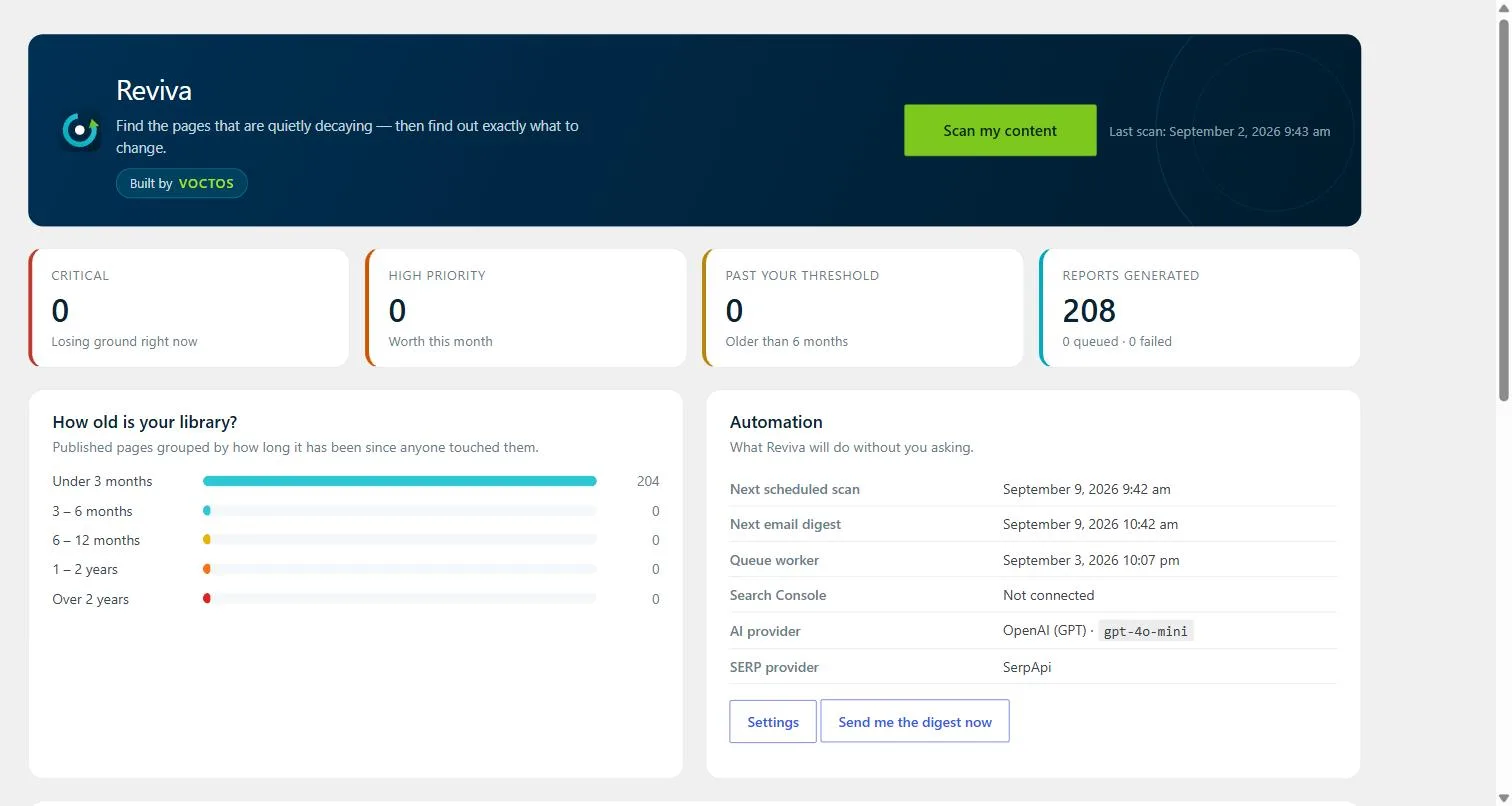
Four counters open the screen: critical, high priority, past your own age threshold, and reports generated. Under them sits a histogram of how old the library actually is, grouped by how long it has been since anyone touched each page. The automation panel states plainly what will happen without you asking, including the next scan, the next digest, and which AI and SERP providers are wired in.
Look at the Search Console row. It reads Not connected, because the plugin never pretends a data source exists.
 Open full size
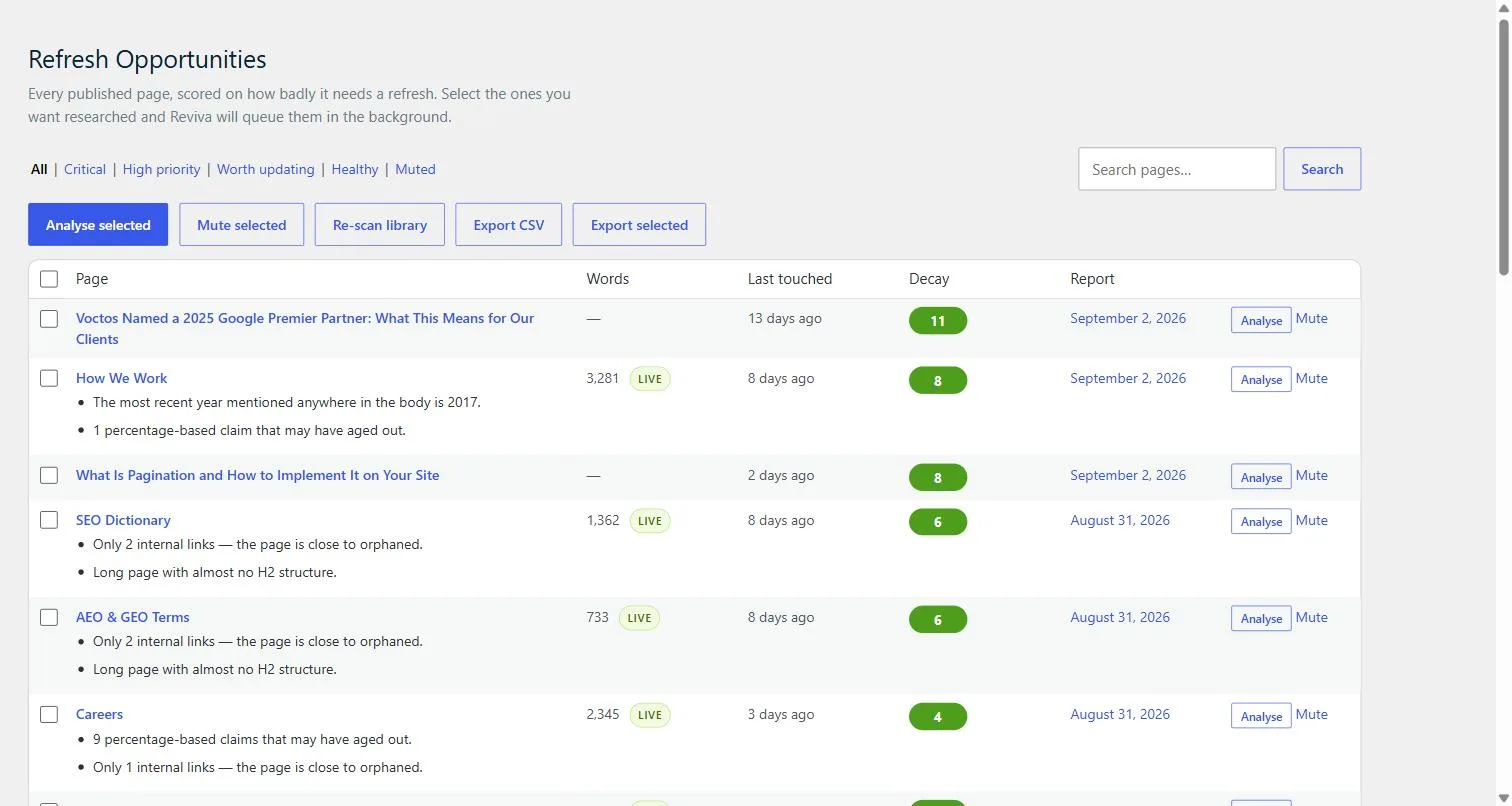
 Every published page, scored and ranked
One row per page, carrying the decay score as a badge, the measured word count, and how long ago the page was last touched. Under each row Reviva prints its reasons in plain English rather than a code. A page might be flagged because the most recent year mentioned anywhere in the body is 2017, or because it holds only two internal links and sits close to orphaned.
The reasons are the product. A score with nothing behind it is just a number to argue about.
 Open full size
 A verdict, then the numbers behind it
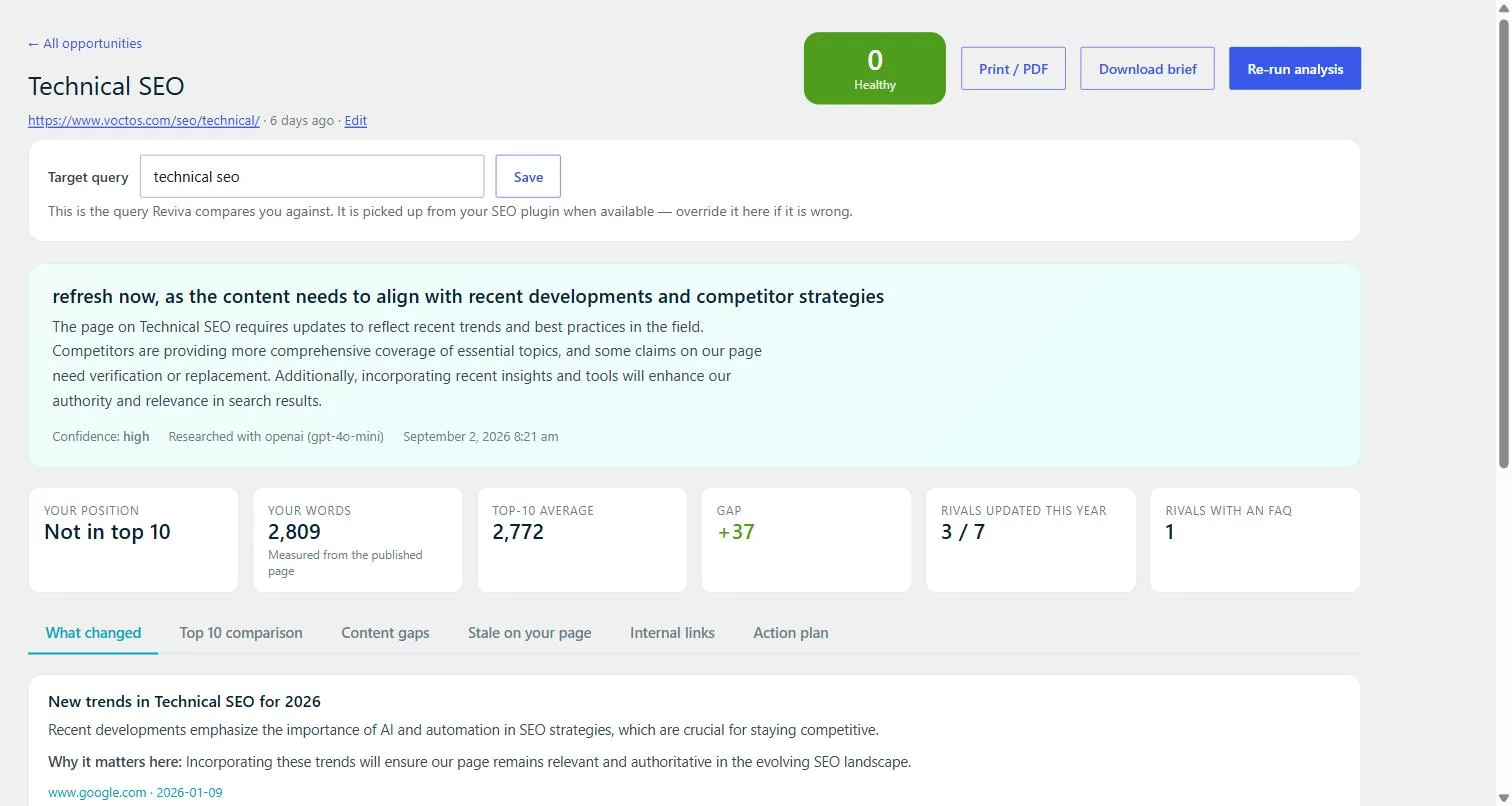
The report opens with one sentence you can act on, followed by the confidence rating, the model that produced it, and the timestamp. Six cards carry the measurements: your position, your word count taken from the published HTML, the top-10 average, the gap between them, how many rivals updated this year, and how many run an FAQ.
Our page came in 37 words above the top-10 average, so length was never the problem. Ruling something out is worth as much as finding it.
 Open full size
 The gaps, with the competitor named
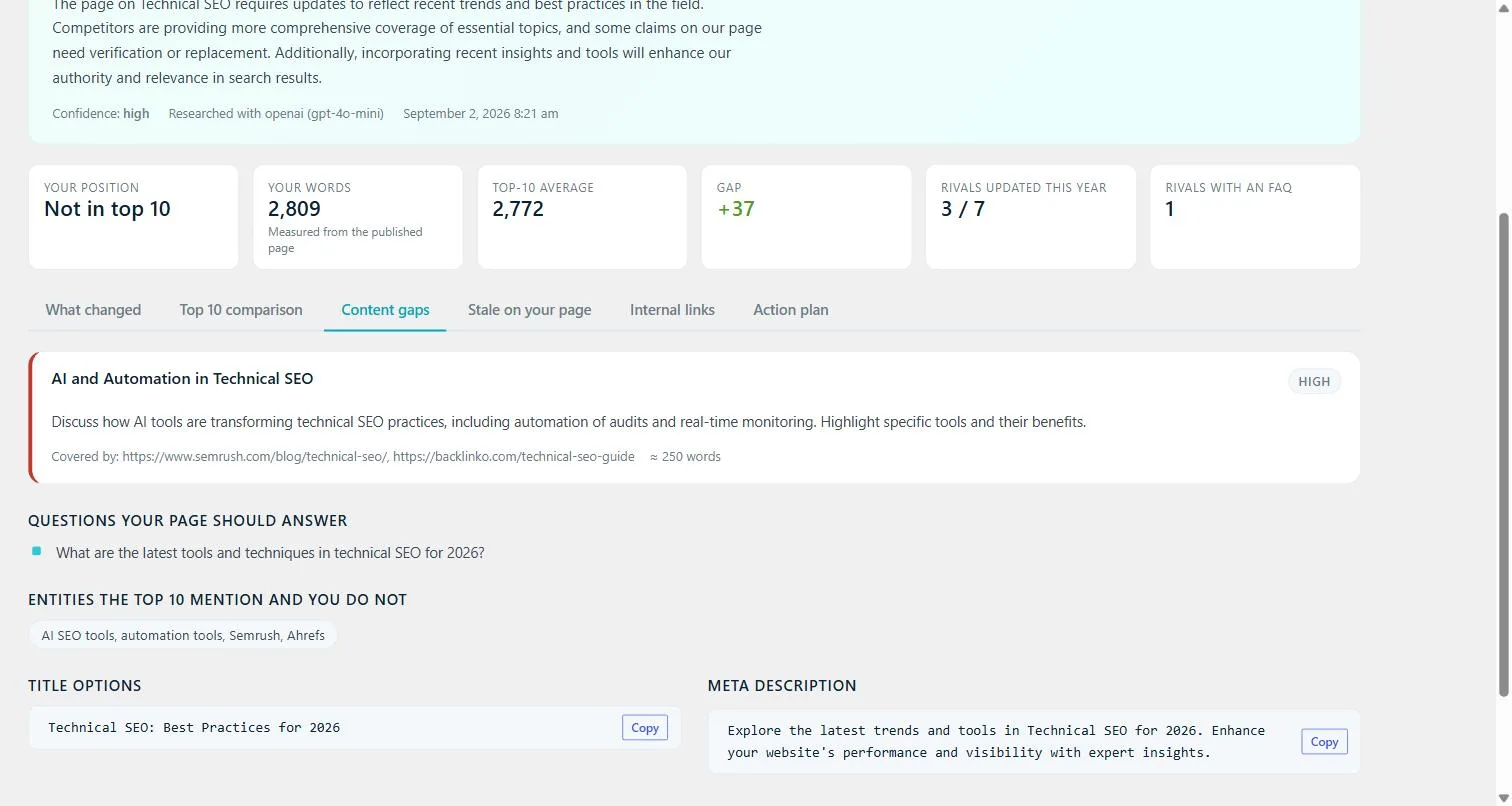
Each missing section carries a priority, a description of what to cover, an approximate word count, and the URLs of the ranking pages that already cover it. Below sit the questions your page should answer and the entities the top 10 mention that you do not. Title and meta description options arrive with a copy button.
Every gap names its source, so you can open the competitor page and check the claim yourself.
 Open full size
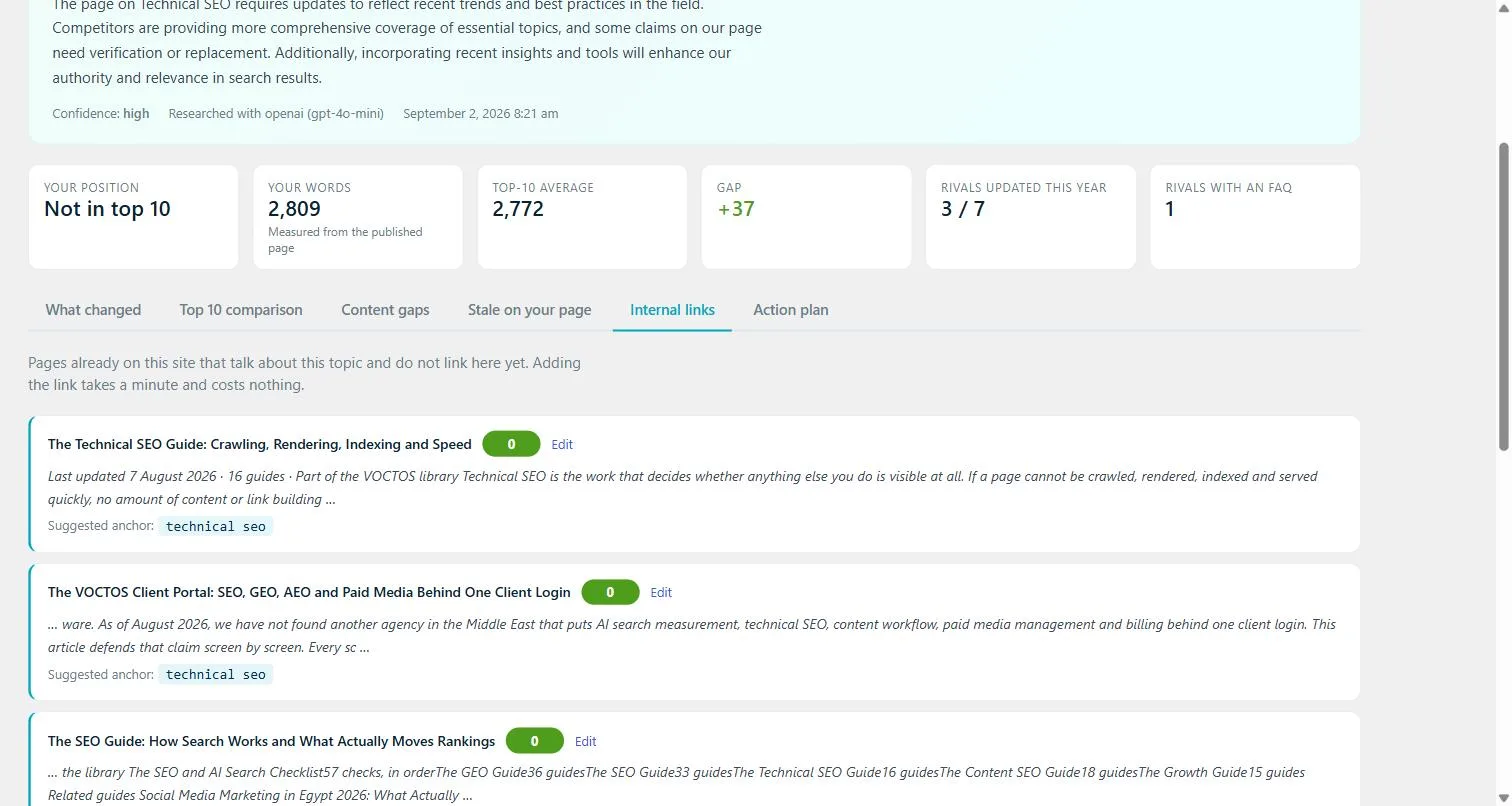
 Links you already have and never made
Reviva searches your own site for pages that discuss the same topic and do not link to the page under review. Each suggestion shows the target page, an excerpt of the sentence that matched, and a suggested anchor. Adding the link takes a minute and costs nothing.
This is the cheapest fix on the list, and the one most refresh workflows forget.
 Open full size
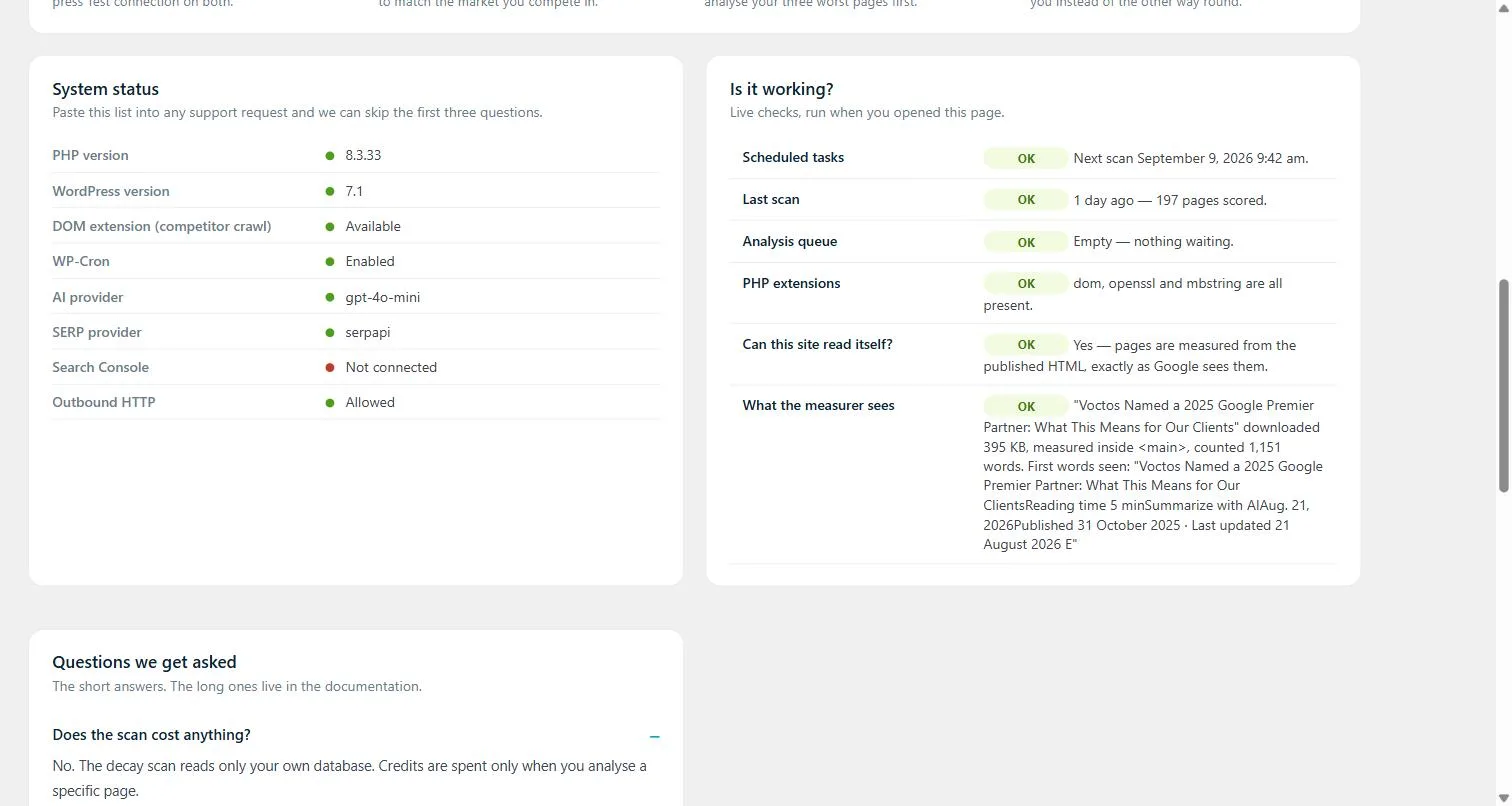
 Proof that the measurement is real
The status panel lists every dependency and its state, from the PHP version through to whether outbound HTTP is allowed. The live checks beside it run when you open the page. The last row is the one that matters: it downloads one of your own pages and prints the byte count, the container it parsed, the word count, and the first words it saw.
If the measurer is reading a cookie banner instead of your article, this row is where you find out.
Reviva runs inside WordPress on your own keys, and VOCTOS uses it as part of the content programmes we run for clients.
One report, unedited
A number your writer can argue with
Refresh now, as the content needs to align with recent developments and competitor strategies. Some claims on the page need verification or replacement.
Trusted by

































Questions we get asked about Reviva
No. The scan reads only your own WordPress database and scores every published page on ten signals. Nothing is sent anywhere and no API credit is spent, so it is safe to run every week. Credits are used only when you ask Reviva to research a specific page against the live search results.
Nothing reaches VOCTOS. Reviva sends 0 bytes to us: no activation call, no telemetry and no proxy. When you run the research pass, every request goes from your own server straight to the AI and SERP providers you configured, on your own keys and billed to your own account.
Seven in total, three AI and four SERP. You add your own key for whichever you already use, and you can switch provider later without losing your report history. If a provider fails, Reviva names it and explains why rather than quietly returning an empty report.
Ten weighted signals, capped at 100. Months since the last real edit carries up to 40 points, a measured Search Console click drop up to 25, and a stale year sitting in the title up to 15. The remaining seven cover thin content, aged percentage claims, missing internal links, schema dates and heading structure. Nine of the ten stand in for decay and only the click drop measures it, which is why connecting Search Console changes the ranking.
No, and that is deliberate. Reviva produces a verdict, a list of what changed in the world with a source URL against each item, the sections your rivals cover that your page skips, and an action plan ranked by effort and impact. A writer decides what to do with it. Publishing machine-written text over a page that already ranks is how sites lose the position they had.
Weekly for the free scan, because it costs nothing and catches a stale year or a broken internal link soon after it appears. The research pass is worth running on a handful of pages a month, starting with whatever sits at the top of the queue. Most content libraries do not change fast enough to justify more than that.
It works without it, but the scoring is sharper with it. Without Search Console every signal is a proxy for decay. Once connected, Reviva can see that clicks actually fell, which is the only line in the model that measures the problem instead of standing in for it. The status page states plainly whether the connection exists.
Yes. Reviva is built by VOCTOS and we use it inside the content programmes we run for clients, including libraries with thousands of articles that nobody could audit by hand. If you would rather have the refresh work done than manage it yourself, that is a service rather than a plugin licence, and it still starts with the same free scan.